





LILYGO T-Display-S3 LCD vs AMOLED: Which Board Fits Your Project?
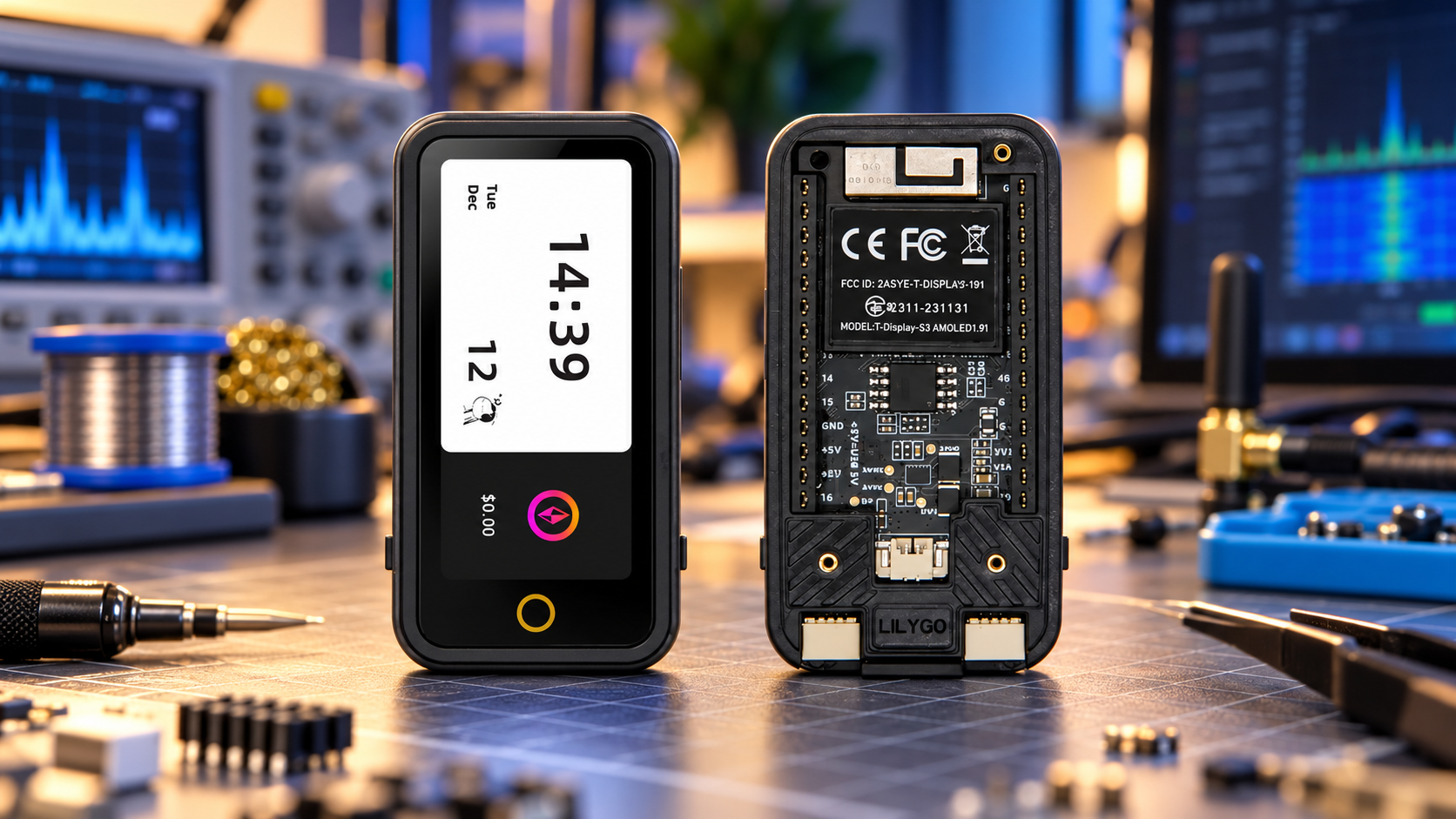
Choose the LILYGO T-Display-S3 LCD when you want a compact status display or a project already built around its ST7789 screen. Choose T-Display-S3 AMOLED when the extra resolution, a detailed custom interface or an optional touch version justifies the cost. Both have an ESP32-S3R8, 16MB flash and 8MB PSRAM. The main upgrade is the display and its supporting hardware, so the right choice depends on your software, sensors and enclosure as much as the screen.
This comparison covers the standard 1.9-inch LCD and 1.91-inch AMOLED boards. AMOLED Plus, AMOLED Lite and other screen sizes are separate products with different hardware. Check the complete model name before choosing a tutorial, case or firmware file.
T-Display-S3 LCD vs AMOLED: the specifications that matter
| Feature | T-Display-S3 LCD | T-Display-S3 AMOLED |
|---|---|---|
| Processor | ESP32-S3R8, dual-core LX7 | ESP32-S3R8, dual-core LX7 |
| Memory | 16MB flash; 8MB PSRAM | 16MB flash; 8MB PSRAM |
| Screen | 1.9-inch color TFT LCD | 1.91-inch color AMOLED |
| Resolution | 170 × 320 pixels | 240 × 536 pixels |
| Display controller and interface | ST7789V; 8-bit parallel / I8080 | RM67162; QSPI in the documented board configuration |
| Wireless | 2.4 GHz Wi-Fi; Bluetooth LE | 2.4 GHz Wi-Fi; Bluetooth LE |
| Touch selection | Check the exact LCD model; touch is a separate variant | Touch and non-touch variants; select explicitly |
| Power and programming | USB-C; battery connection and charging support | USB-C; battery connection and charging support |
LILYGO's LCD specifications and AMOLED specifications document these configurations. Resolution may also be written in landscape orientation: 320 × 170 for LCD and 536 × 240 for AMOLED.
Choose LCD for a familiar display project
The LCD board is a sensible choice for temperature readouts, timers, connection status and compact equipment controls. If an existing project already targets the T-Display-S3 with an ST7789 display, choosing that board avoids an unnecessary display-driver migration.
Its 170 × 320 resolution is sufficient for a few clear readings and a simple menu. A larger font with fewer fields can be more useful than fitting an entire desktop-style dashboard onto a small panel. Compare the complete package price, including the case and headers, rather than assuming every LCD listing contains the same accessories.
The SDRstore T-Display-S3 LCD listing is offered with a shell. Check the selected option and its physical fit if you plan to add sensors, wires or a battery.
Choose AMOLED when the interface needs more detail
The AMOLED version provides 240 × 536 pixels in a similar screen diagonal. That gives you more room for charts, icons, longer menus and detailed typography. It is an appealing choice for a custom handheld interface or a compact dashboard where the screen is a central part of the project.
The two panels have different proportions, so an LCD layout will need more than a resolution setting change to make good use of the AMOLED screen. Revisit text size, spacing and touch targets. More pixels do not make tiny controls easier to use.
The T-Display-S3 AMOLED listing includes version choices. Select touch explicitly if your interface needs it, and check whether the headers arrive soldered. The word AMOLED alone does not identify those options.
More pixels do not mean a faster processor
Both boards have the same headline processor and memory specifications. The AMOLED display has approximately 2.36 times as many pixels, calculated from the listed resolutions. That creates more drawing work for a full-screen update, although actual performance also depends on the display bus, driver and rendering method.
For example, one uncompressed full-screen RGB565 buffer requires 108,800 bytes for LCD and 257,280 bytes for AMOLED. These are calculated buffer sizes, not measured application memory use. Partial buffers, extra buffers and image assets change the total, so test your intended interface rather than choosing from a promised frame rate.
The display upgrade also leaves the radio family unchanged. Espressif specifies 2.4 GHz Wi-Fi and Bluetooth LE for ESP32-S3. Neither board gains 5 GHz Wi-Fi simply by using an AMOLED panel.
Firmware and GPIO compatibility need a closer look
These boards are not interchangeable display targets. ST7789 parallel-bus initialization differs from RM67162 AMOLED initialization. Application logic may be reusable, but the display driver, resolution, rotation, power controls and input handling must match the board.
Start with the official LCD repository for the LCD board. For AMOLED, the LilyGo-AMOLED-Series repository supports touch and non-touch versions. The older dedicated AMOLED repository explicitly supports the non-touch version only.
Follow the dependency versions required by your chosen example. The AMOLED Series documentation distinguishes LVGL 8 examples from its LVGL 9 example; installing a different major version can require changes. Likewise, general ESP32-S3 support in a framework does not establish that the correct display and touch drivers are included.
For sensors and expansion modules, compare the exact board pinout and schematic before wiring. Display, touch and power functions reserve GPIOs, and their assignments differ. LILYGO also documents an AMOLED revision change in the function of GPIO38. A similar outline or header arrangement is not enough to establish electrical compatibility.
Battery operation: plan around the complete project
Both boards support battery-powered projects, but charging support does not mean a battery is included. Confirm the battery specification, connector and polarity for the supplied revision. Add a suitable USB data cable, and check that the battery and wiring fit your enclosure.
There is no verified runtime winner in this comparison. Brightness, screen content, Wi-Fi activity, sensor load and sleep behavior affect consumption. Measure your actual application on the intended battery before committing to an enclosure or runtime target.
Power initialization also matters. The LCD repository documents GPIO15 as the peripheral power control, which must be enabled for battery or 5V-header operation. Use the matching board example when diagnosing a screen that works over USB but stays dark on battery.
Which board fits your project?
- Existing ST7789 project: Choose the LCD board when its exact hardware is already supported by your code.
- Simple sensor or status display: LCD is a practical starting point when its resolution and complete package meet your budget.
- Detailed custom interface: Choose AMOLED for its higher resolution, and allow time to adapt the layout and driver.
- Touch-operated controls: Choose a confirmed touch variant with a supported example, rather than relying on the family name.
- Battery handheld: Choose after checking enclosure fit, power controls and measured consumption in your application.
Browse the LILYGO boards and accessories to compare current options. For a classroom or multi-board project, request a formal quote with the required display, touch option, headers and enclosure specified.
Frequently asked questions
Is T-Display-S3 AMOLED a direct replacement for the LCD board?
No. The processor family and headline memory match, but the display controller, interface and pin assignments differ. Check firmware, peripheral wiring and enclosure fit before replacing one with the other.
Does every AMOLED version include a touchscreen?
No. Touch and non-touch versions exist. Select the required variant and use software that supports its touch controller.
Can I flash LCD firmware onto the AMOLED version?
Use a build explicitly intended for the AMOLED board. A program can upload successfully while its display configuration is wrong. Reusable application code still needs the correct board drivers and initialization.
Which board has better battery life?
That depends on the complete application. There is no shared runtime test here establishing a winner. Compare the same battery, brightness, wireless workload and sleep strategy.
Do these boards have an onboard microSD slot?
The standard LCD and standard 1.91-inch AMOLED boards compared here do not. The LCD repository describes an SD Shield add-on, while AMOLED Series lists external SD wiring. Do not copy storage specifications from AMOLED Plus or another model.
Which is easier for a beginner?
The board with a working example that matches your exact project is usually the easier choice. LCD suits an existing T-Display-S3 ST7789 tutorial; AMOLED suits a project built around the official AMOLED examples. Verify the variant and dependency versions first.
Shop products for this guide
Explore relevant products from our store.
Alternatives considered
Other relevant options for this guide.
-
LILYGO T-WATCH-S3 Plus ESP32-S3 Smartwatch Development Board LoRa Wi-Fi Bluetooth AMOLED
La T-WATCH-S3 Plus pertenece a otra familia y está diseñada como placa de reloj; no es la T-Display-S3 AMOLED comparada en el artículo.
No posts found
Write a review
We support all major card and digital payment options. More local methods are available and shown during checkout.
You enter into a binding sales contract once you have received an 'order confirmation and sales receipt' email from us, in line with our Sales & Delivery conditions. Therefore, sdrstore.eu has the right to cancel your order in the event of technical problems, delivery failure, Fair use policy and other similar situations.



Your payments are protected by advanced encryption and 3-D Secure authentication for safe online shopping.