








Best Meshtastic Devices in 2026: Handhelds, Trackers, and Base Stations Compared
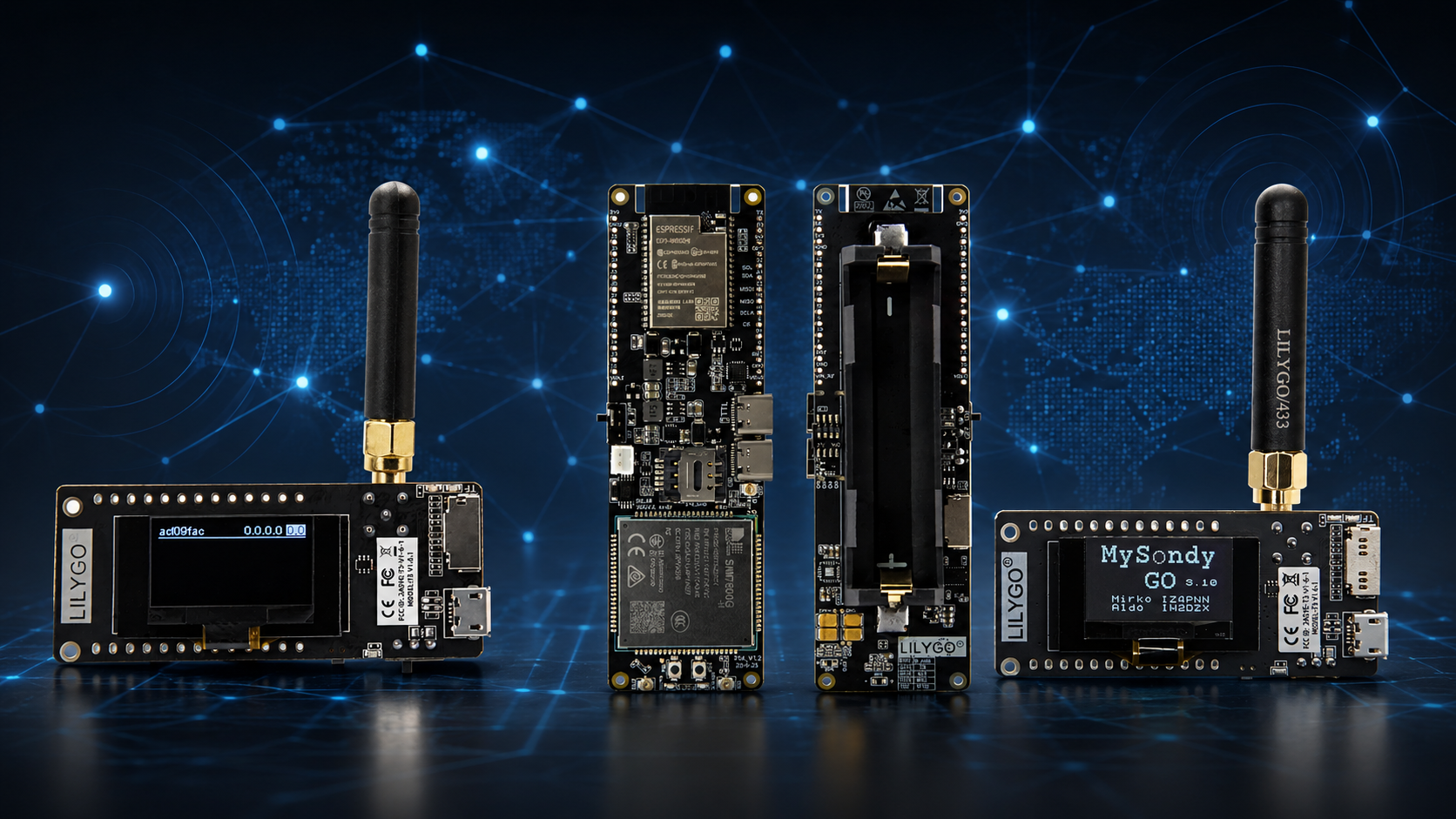
Meshtastic has become one of the most interesting ways to build an off-grid communication network in 2026. Instead of relying on cellular service, internet access, or a central server, Meshtastic devices use LoRa radio to exchange messages and position data across a decentralized mesh.
The hardest part is no longer finding compatible hardware. The challenge is choosing the right device from a rapidly growing list of handheld communicators, GPS trackers, budget development boards, solar repeaters, and fixed base stations.
A LILYGO T-Deck makes sense if you want a keyboard and screen. A SenseCAP T1000-E is better if you want a slim tracker. A T-Beam Supreme is a strong choice for GPS experiments. A RAK WisBlock setup is better for a low-power solar node. A Station G2 may be suitable for a licensed high-power installation.
This guide compares the best Meshtastic devices in 2026 and explains which one to buy for hiking, emergency communication, outdoor tracking, community mesh networks, DIY projects, and permanent base-station deployments.
Quick Answer: What Is the Best Meshtastic Device in 2026?
There is no single best Meshtastic device for every buyer. The best choice depends on whether you need a standalone handheld, a compact GPS tracker, a low-cost development board, or a fixed node that stays online continuously.
| Device | Best For | Buyer Recommendation |
|---|---|---|
| LILYGO T-Deck Plus | Standalone handheld messaging with screen, keyboard, and GPS | Best handheld-style Meshtastic communicator |
| LILYGO T-Echo | Low-power handheld with E-Ink screen, GPS, and battery | Best battery-efficient screen-based handheld |
| Heltec MeshPocket | Compact pocket device with E-Ink screen and GPS | Strong alternative for portable everyday carry |
| SenseCAP T1000-E | Slim GPS tracking and ready-to-go portable use | Best card-sized tracker |
| Wio Tracker L1 Pro | Ready-to-go GPS tracker with case and battery | Best flexible Seeed tracker alternative |
| RAK WisMesh Tag | Weather-resistant portable location tracking | Best rugged compact tracker |
| LILYGO T-Beam Supreme | GPS-enabled DIY node with ESP32-S3, SX1262, screen, Wi-Fi, and Bluetooth | Best GPS development board |
| Heltec LoRa32 V4 | Low-cost DIY Meshtastic node and learning platform | Best budget development board |
| RAK WisBlock Starter Kit | Low-power modular node, sensors, solar installations, and custom builds | Best base-station building platform |
| SenseCAP Solar Node | Long-term outdoor deployment with minimal maintenance | Best ready-to-go solar node |
| RAK WisMesh Repeater | Permanent solar-powered relay coverage | Best purpose-built outdoor repeater |
| Station G2 | High-power fixed deployment for licensed radio operation | Best advanced licensed base station |
For most beginners, the easiest choices are:
- Choose LILYGO T-Deck Plus if you want a handheld communicator with a keyboard.
- Choose SenseCAP T1000-E if you want a slim, simple GPS tracker.
- Choose LILYGO T-Beam Supreme if you want a flexible DIY node with GPS.
- Choose Heltec LoRa32 V4 if you want a low-cost board for learning.
- Choose RAK WisBlock if you want to build a low-power base station or solar node.
What Is Meshtastic?
Meshtastic is an open-source off-grid communication system built around LoRa radio. Each node can send, receive, and relay packets for other devices, allowing messages to travel across multiple hops without cellular towers or internet service.
Many Meshtastic nodes connect to a smartphone through Bluetooth. The phone provides the user interface, while the LoRa radio handles the long-range communication link. Some more advanced devices include their own screens and keyboards, allowing limited standalone operation without a phone.
Meshtastic can be useful for:
- Hiking and outdoor group communication
- Emergency-preparedness networks
- Community mesh networks
- Remote property monitoring
- Camping and overlanding
- GPS position sharing
- Asset tracking
- Solar-powered remote nodes
- IoT and environmental sensor projects
- Learning about LoRa radio and mesh networking
Choose the Correct Frequency Before Buying
Before comparing devices, choose the correct frequency for your country. This is one of the most important Meshtastic buying decisions.
LoRa frequency variants are not interchangeable in normal use. A 915 MHz device intended for the United States should not be treated as the correct option for a European EU_868 network. Matching the hardware frequency, antenna, and software region avoids poor performance and regulatory problems.
| Region | Common Meshtastic Setting | Typical Hardware Choice |
|---|---|---|
| European Union | EU_868 | 868 MHz device and matching antenna |
| European Union alternative band | EU_433 | 433 MHz device and matching antenna |
| United States and Canada | US | 915 MHz device and matching antenna |
| Australia and New Zealand | ANZ | 915 MHz device and matching antenna |
| India | IN | 865 MHz-compatible hardware |
| Japan | JP | 920 MHz-region-compatible hardware |
Always check your local regulations and use the official Meshtastic region guide before ordering. The software requires a regional setting before transmitting, and local power limits and duty-cycle rules still apply.
Officially Supported vs Community-Supported Devices
Meshtastic supports a very large number of boards, but not all devices receive the same support level.
Officially supported devices are maintained through Meshtastic partner and backer programs. These products are included in important project tools such as the web flasher, documentation, and client applications.
Community-supported devices may still receive firmware builds, but support is generally handled by the community rather than the core project team. Some older boards may gradually disappear from the web flasher as the hardware ecosystem evolves.
Buyer advice
- Choose officially supported hardware for the easiest first setup.
- Choose community-supported boards only if you understand the trade-offs.
- Check firmware support before buying old stock or a discontinued board.
- Prefer newer radio chips for a new installation.
SX1262 vs SX1276 vs LR1110: Which LoRa Radio Chip Is Better?
The LoRa radio chip matters. Modern Meshtastic guidance generally recommends newer SX126x or LR11xx-series radios over older SX127x devices for new purchases.
| Radio Family | Best For | Buyer Advice |
|---|---|---|
| SX1262 | Modern handhelds, DIY nodes, solar nodes, and base stations | Strong default choice for most new Meshtastic builds |
| LR1110 / LR11xx | Compact trackers and newer multi-purpose designs | Good choice for purpose-built tracking devices |
| SX1276 / SX1278 | Older development boards and existing installations | Still useful, but not the first choice for a new premium build |
Older boards can still work, but a new buyer should normally prefer SX1262 or LR11xx hardware when available.
ESP32 vs nRF52840: Which Meshtastic Platform Should You Choose?
The microcontroller affects battery life, Wi-Fi support, user interface features, and the best use case for the node.
| Platform | Main Strength | Best Use |
|---|---|---|
| ESP32 / ESP32-S3 | Wi-Fi, more RAM, lower-cost boards, displays, keyboards, and flexible development | Handheld communicators, DIY devices, home-powered nodes, MQTT gateways, and user-interface-heavy projects |
| nRF52840 | Lower power consumption and strong battery efficiency | Trackers, compact handhelds, solar nodes, and always-on remote deployments |
| RP2040 / RP2350 | Cost-effective DIY experimentation | Custom projects for users comfortable building their own interface and connectivity solution |
Choose nRF52840 when battery life is the priority. Choose ESP32-S3 when you want Wi-Fi, a richer interface, or a lower-cost development board.
Best Standalone Meshtastic Handheld: LILYGO T-Deck Plus
The LILYGO T-Deck family is one of the most interesting options for users who want Meshtastic to feel more like a handheld communicator and less like a small radio accessory connected to a phone.
T-Deck devices use an ESP32-S3 platform, SX1262 LoRa radio, full-color screen, mini keyboard, Wi-Fi, Bluetooth, speaker, microphone, and trackball-style controls. The T-Deck Plus and T-Deck Pro variants add GPS, making them more attractive for location-aware outdoor use.
SDRstore.eu currently offers the standard LILYGO T-Deck ESP32-S3 LoRa handheld development board. Check the selected variant carefully if built-in GPS is important to your project.
Choose the T-Deck family if you want:
- A keyboard for text entry
- A color screen
- A handheld communicator-style form factor
- Wi-Fi and Bluetooth
- Standalone-style use without constantly checking your phone
- A platform for custom Meshtastic interfaces and apps
Understand the trade-off
A screen, keyboard, Wi-Fi, and ESP32-S3 processor use more power than a minimal nRF52840 tracker. Choose a T-Deck when interaction matters more than maximum battery runtime.
Best Low-Power Screen Handheld: LILYGO T-Echo
LILYGO T-Echo is a strong choice for users who want an all-in-one handheld without the higher power requirements of a large color-screen device.
It combines an E-Ink screen, GPS, battery, SX1262 radio, Bluetooth, and low-power nRF52840 platform in an injection-molded case.
Choose T-Echo if you want:
- Better battery efficiency than an ESP32 handheld
- A built-in display
- Integrated GPS
- A portable enclosed device
- A simple hiking or everyday-carry node
- Bluetooth phone connectivity without Wi-Fi
T-Echo is a better choice than T-Deck when battery life matters more than typing long messages directly on the device.
Strong Pocket Alternative: Heltec MeshPocket
Heltec MeshPocket is another interesting handheld option for 2026. It uses an nRF52840 platform, SX1262 LoRa radio, E-Ink display, Bluetooth, and GPS in a compact portable format.
Choose MeshPocket if you want:
- A compact enclosed handheld
- Low-power nRF52840 hardware
- An E-Ink screen
- Built-in GPS
- A pocket-friendly alternative to T-Echo
Best Card-Sized Meshtastic Tracker: SenseCAP T1000-E
The SenseCAP T1000-E is one of the easiest Meshtastic devices to recommend for tracking. It is a ready-to-go, card-sized device with GPS, Bluetooth, an LR1110 radio, and an IP65-rated enclosure.
Instead of building a board, choosing a case, wiring a battery, and flashing a custom setup, buyers get a slim tracker designed for portable use.
Choose SenseCAP T1000-E if you want:
- A slim card-style tracker
- Integrated GPS
- A ready-to-go enclosed device
- Outdoor position sharing
- A hiking, travel, event, or asset-tracking node
- A device that pairs with a phone through Bluetooth
Understand the trade-off
T1000-E is designed as a tracker, not a keyboard communicator. It is ideal when location sharing and portability matter more than a screen or extensive physical controls.
Best Seeed Tracker Alternative: Wio Tracker L1 Pro
Wio Tracker L1 is another nRF52840-based option with SX1262 LoRa, Bluetooth, and GPS. The Pro version is designed as a ready-to-go handheld with a case and battery.
Choose Wio Tracker L1 Pro if you want:
- A tracker-style node with GPS
- Lower-power nRF52840 hardware
- A ready-to-go enclosed variant
- A platform that can also support custom-project thinking
Best Rugged Compact Tracker: RAK WisMesh Tag
RAK WisMesh Tag is a purpose-built portable location tracker. It offers GPS-style tracking workflows, IP66 weather resistance, and a built-in 1000 mAh battery.
Choose WisMesh Tag if you want:
- A rugged compact tracker
- A weather-resistant enclosure
- A battery-powered portable device
- A ready-to-use alternative to building your own RAK WisBlock node
Best GPS Development Board: LILYGO T-Beam Supreme
The LILYGO T-Beam Supreme is one of the best boards for buyers who want GPS, a display, Wi-Fi, Bluetooth, and a modern SX1262 LoRa radio in a flexible development platform.
It uses an ESP32-S3 processor, GPS module options, SX1262 radio, and 1.3-inch OLED screen. This makes it useful for portable nodes, experimentation, location-aware builds, and custom enclosures.
Choose T-Beam Supreme if you want:
- A GPS-enabled DIY node
- A modern SX1262 radio
- Wi-Fi and Bluetooth
- An OLED display
- A platform for custom firmware experimentation
- A board that can grow into a portable field node
T-Beam Supreme is a better new-build choice than older SX127x-based boards when you want a modern radio platform.
Is the Older LILYGO T-Beam V1.2 Still Worth Buying?
The LILYGO Meshtastic T-Beam V1.2 remains useful for budget GPS projects, learning, and existing deployments.
It includes an ESP32 platform, LoRa radio, Wi-Fi, Bluetooth, GPS, and optional OLED display. However, it uses an older SX1276/SX1278-generation LoRa radio rather than the newer SX1262 found in T-Beam Supreme.
Choose T-Beam V1.2 if:
- You want a lower-cost GPS node.
- You already use older T-Beam hardware in your mesh.
- You want a proven learning board.
- You understand that a newer SX1262 board is usually the better long-term choice for a premium build.
Best Budget Development Board: Heltec LoRa32 V4
Heltec LoRa32 V4 is one of the best low-cost entry points for Meshtastic experiments. It uses an ESP32-S3 platform with SX1262 radio, Wi-Fi, Bluetooth, and optional GPS support.
It is a good choice for users who want to learn Meshtastic without immediately buying a complete enclosed tracker or handheld communicator.
Choose Heltec LoRa32 V4 if you want:
- A low-cost first Meshtastic board
- A modern SX1262 radio
- Wi-Fi and Bluetooth
- A DIY enclosure project
- A USB-powered home node
- A basic MQTT gateway experiment
Budget boards usually need extra planning for the battery, antenna, case, and GPS. They are best for users who enjoy building rather than buyers who want a finished handheld.
LILYGO LoRa32 Boards: Useful Budget Alternatives
SDRstore.eu also offers LILYGO LoRa32 development boards for IoT and LoRa projects. Older models can still be useful for learning, custom projects, and existing hardware ecosystems.
- LILYGO LoRa32 V1.3 ESP32 LoRa development board
- LILYGO TTGO LoRa32 V2.1 development board
- LILYGO boards, LoRa modules, and accessories
For a brand-new premium Meshtastic build, prefer a newer SX1262-based board where possible. For experimentation, learning, and custom projects, older boards can still be valuable.
Best Low-Power Modular Base Station: RAK WisBlock Starter Kit
RAK WisBlock is one of the strongest platforms for a fixed Meshtastic node, solar relay, sensor project, or customized base station.
The popular RAK4631 core combines an nRF52840 microcontroller with an SX1262 LoRa radio. The modular platform allows users to add GPS, sensors, displays, Ethernet, real-time clocks, and other peripherals depending on the project.
Choose RAK WisBlock if you want:
- A low-power fixed node
- A solar-powered installation
- A modular sensor platform
- A GPS add-on only when needed
- A custom enclosure
- A long-term outdoor deployment
- A flexible base station that can evolve over time
WisBlock is not always the cheapest option, but it is one of the best platforms for users who want efficiency, modularity, and solar-ready design.
Best Ready-to-Go Solar Node: SenseCAP Solar Node
SenseCAP Solar Node is designed for long-term outdoor Meshtastic deployment. It uses a low-power nRF52840 platform, SX1262 radio, Bluetooth, optional GPS, and an integrated solar-focused design.
Choose SenseCAP Solar Node if you want:
- An outdoor fixed node
- Minimal maintenance
- A solar-powered relay
- A ready-to-go alternative to a full DIY build
- A node for farms, remote properties, hills, cabins, or community coverage
Best Outdoor Repeater: RAK WisMesh Repeater
RAK WisMesh Repeater is a purpose-built solar fixed-position node with a waterproof design, high-gain antenna, and extended-range focus.
It is a better fit than a handheld when the goal is to place a reliable relay at a useful elevated location and leave it operating continuously.
Choose WisMesh Repeater if you want:
- A permanent mesh relay
- Solar-powered outdoor operation
- Weather resistance
- Community mesh expansion
- Coverage from an elevated site
Best High-Power Base Station for Licensed Users: Station G2
Station G2 is a high-power LoRa transceiver designed for licensed amateur-radio operation. It uses an ESP32-S3 platform, SX1262 radio, Wi-Fi, Bluetooth, and optional GPS.
This is not the default beginner recommendation. High-power operation may require licensing and careful regional compliance. The Station G2 is best for experienced users who understand their legal obligations and need a fixed advanced deployment.
Choose Station G2 only if:
- You understand local radio regulations.
- You are licensed where required.
- You need a fixed high-power node.
- You are building a serious base-station installation.
- You understand antenna placement, duty cycle, and responsible mesh operation.
Best Meshtastic Device by Use Case
| Use Case | Best Choice | Why |
|---|---|---|
| Standalone text communicator | LILYGO T-Deck Plus | Screen, keyboard, Wi-Fi, Bluetooth, and GPS on Plus variants |
| Low-power handheld | LILYGO T-Echo or Heltec MeshPocket | nRF52840 platform, E-Ink display, GPS, and battery-efficient design |
| Slim GPS tracker | SenseCAP T1000-E | Card-sized enclosed design with GPS and Bluetooth |
| Rugged portable tracker | RAK WisMesh Tag | Weather resistance and purpose-built tracking format |
| GPS DIY node | LILYGO T-Beam Supreme | ESP32-S3, SX1262, GPS, OLED, Wi-Fi, and Bluetooth |
| Budget learning board | Heltec LoRa32 V4 | Low-cost modern SX1262 development platform |
| Solar DIY base station | RAK WisBlock Starter Kit | Low power, modular peripherals, and solar-ready design |
| Ready-to-go solar node | SenseCAP Solar Node | Designed for long-term outdoor operation |
| Outdoor permanent repeater | RAK WisMesh Repeater | Weather-resistant solar relay with high-gain antenna focus |
| Licensed high-power installation | Station G2 | Designed for advanced fixed deployments where legally permitted |
Which Meshtastic Device Is Best for Beginners?
Beginners should avoid overcomplicating the first setup. Start with two compatible nodes using the same frequency region and modem preset.
The best beginner device depends on whether you want to build or simply use the network:
- Choose SenseCAP T1000-E if you want the easiest compact tracker.
- Choose T-Deck Plus if you want a handheld communicator-style experience.
- Choose T-Beam Supreme if you enjoy DIY projects and want GPS.
- Choose Heltec LoRa32 V4 if price matters most and you do not mind adding a case, battery, and antenna.
Which Meshtastic Device Is Best for Hiking?
For hiking, choose a low-power portable node with GPS and a good antenna.
| Hiking Priority | Best Device |
|---|---|
| Lightweight tracking | SenseCAP T1000-E |
| Low-power screen handheld | LILYGO T-Echo |
| Pocket E-Ink alternative | Heltec MeshPocket |
| Keyboard and screen | LILYGO T-Deck Plus |
| DIY GPS node | LILYGO T-Beam Supreme |
Antenna placement still matters. A good portable node attached outside a backpack can outperform a more expensive device buried under equipment.
Which Meshtastic Device Is Best for a Home Base Station?
For a home base station, prioritize reliable power, a quality antenna, useful elevation, and an appropriate node role.
RAK WisBlock is usually the best flexible platform because it is modular and power-efficient. An ESP32-based board can also be useful if you want Wi-Fi or MQTT connectivity.
Good base-station options include:
- RAK WisBlock with external antenna and optional Ethernet module
- RAK WisMesh Ethernet MQTT Gateway with optional PoE
- RAK WisMesh Wi-Fi MQTT Gateway
- Heltec LoRa32 V4 for a low-cost indoor powered node
- SenseCAP Indicator if you want a larger touchscreen-style interface
Which Meshtastic Device Is Best for a Solar Repeater?
For a solar repeater, low power matters more than a color screen or Wi-Fi. Choose an nRF52840-based platform with a modern SX1262 radio.
Good solar options include:
- RAK WisBlock Starter Kit for a custom solar node
- SenseCAP Solar Node for an easier ready-to-go solution
- RAK WisMesh Repeater for a purpose-built outdoor relay
- RAK WisMesh Repeater Mini for a more portable solar deployment
How Much Range Can Meshtastic Achieve?
Meshtastic range does not depend only on the radio board. Antenna quality, antenna height, terrain, buildings, trees, regional frequency, legal transmit limits, and modem settings all matter.
A well-placed node on a hill or building can perform dramatically better than a node inside a car, backpack, or reinforced-concrete room.
Improve range by focusing on:
- The correct frequency-specific antenna
- Elevation and clear line of sight
- Outdoor placement
- Shorter low-loss cable runs
- Matching regional settings
- Modern SX1262 or LR11xx hardware
- Responsible node placement instead of unnecessary transmit power
Do You Need a Router or Repeater Role?
Most portable devices should remain in the normal Client role. Do not set every node as a router or repeater.
Router and repeater-style roles are more appropriate for carefully placed fixed nodes with good elevation, reliable power, and a clear reason to relay traffic. Too many poorly placed routers can make a local mesh less efficient.
Simple role advice
- Use Client for normal handhelds and trackers.
- Use fixed relay roles only for well-positioned permanent nodes.
- Keep the default hop limit unless your network genuinely needs changes.
- Test a node before installing it in a hard-to-reach location.
Should You Use MQTT?
MQTT can bridge Meshtastic traffic over the internet when a node has Wi-Fi or Ethernet connectivity. This can be useful for experiments, remote monitoring, and connecting distant local meshes.
However, MQTT is not required for a normal off-grid mesh. It can also create more traffic and may publish node information depending on configuration.
Use MQTT when:
- You understand the privacy settings.
- You intentionally want an internet-connected bridge.
- You want to test a private MQTT server.
- You are building a controlled gateway project.
Avoid enabling MQTT blindly when:
- You want a purely off-grid mesh.
- You do not understand location-sharing implications.
- You are joining a busy public mesh.
- You have not tested the node locally first.
Where to Browse Meshtastic-Compatible Hardware
SDRstore.eu offers several LILYGO LoRa boards and handheld-style devices that can be used for Meshtastic and related off-grid communication projects:
- LILYGO T-Deck ESP32-S3 LoRa handheld board
- LILYGO Meshtastic T-Beam Supreme
- LILYGO Meshtastic T-Beam V1.2
- LILYGO LoRa32 V1.3 development board
- LILYGO boards, modules, and accessories
- Antennas for LoRa and wireless projects
Always choose the correct frequency variant and a matching antenna for your country.
Final Recommendation
The best Meshtastic device in 2026 depends on the job.
Choose LILYGO T-Deck Plus if you want a communicator-style handheld with a keyboard. Choose LILYGO T-Echo or Heltec MeshPocket if you want a low-power screen-based device. Choose SenseCAP T1000-E if you want a slim GPS tracker. Choose RAK WisMesh Tag if you want a rugged compact tracker. Choose LILYGO T-Beam Supreme if you want a flexible GPS development node.
For fixed installations, choose RAK WisBlock if you want a modular low-power build, SenseCAP Solar Node if you want an easier outdoor deployment, or RAK WisMesh Repeater if you want a purpose-built solar relay. Consider Station G2 only when high-power operation is legal and appropriate for your licensed setup.
Most importantly, do not buy only by specifications. Choose the correct regional frequency, use a matching antenna, place nodes carefully, and start with the simplest device that fits your actual project.
FAQ
What is the best Meshtastic device in 2026?
The best Meshtastic device depends on your goal. LILYGO T-Deck Plus is a strong handheld communicator, SenseCAP T1000-E is a good compact tracker, T-Beam Supreme is a flexible GPS development board, and RAK WisBlock is one of the best platforms for low-power base stations and solar nodes.
What is the best Meshtastic device for beginners?
Beginners should choose SenseCAP T1000-E for a simple tracker, LILYGO T-Deck Plus for a handheld communicator, T-Beam Supreme for a GPS DIY project, or Heltec LoRa32 V4 for a low-cost development board.
What is the best standalone Meshtastic handheld?
LILYGO T-Deck Plus is one of the best standalone-style Meshtastic handhelds because it includes a screen, keyboard, Wi-Fi, Bluetooth, LoRa radio, and GPS on Plus variants.
What is the best low-power Meshtastic handheld?
LILYGO T-Echo and Heltec MeshPocket are strong low-power handheld options because they use nRF52840 hardware, E-Ink displays, Bluetooth, GPS, and SX1262 LoRa radios.
What is the best Meshtastic tracker?
SenseCAP T1000-E is one of the best slim trackers. Wio Tracker L1 Pro and RAK WisMesh Tag are also strong options when you want an enclosed GPS node.
What is the best Meshtastic base station?
RAK WisBlock is one of the best customizable base-station platforms because it is low-power, modular, and suitable for solar installations. Ready-to-go alternatives include SenseCAP Solar Node and RAK WisMesh Repeater.
Should I buy an ESP32 or nRF52840 Meshtastic device?
Choose ESP32 or ESP32-S3 if you want Wi-Fi, lower-cost boards, or interface-heavy devices. Choose nRF52840 if battery life and low-power solar operation matter more.
Is SX1262 better than SX1276 for Meshtastic?
SX1262 is generally the better choice for a new Meshtastic build because current Meshtastic guidance recommends newer SX126x and LR11xx radios for improved performance and compatibility.
Which Meshtastic frequency should I buy in Europe?
Most European users should select an 868 MHz device and configure EU_868, although EU_433 may also be available for certain use cases. Always check local regulations and use a matching antenna.
Which Meshtastic frequency should I buy in the United States?
United States users should normally select a 915 MHz-compatible device and configure the US region in Meshtastic.
Can 868 MHz and 915 MHz Meshtastic devices communicate?
Not in a normal regional setup. Devices need compatible radio hardware, matching regional configuration, and matching modem settings to communicate reliably and legally.
Does Meshtastic need internet or cellular service?
No. Meshtastic can send messages and relay packets over LoRa without internet or cellular service. Internet connectivity is optional for features such as MQTT bridging.
How many Meshtastic devices do I need?
You need at least two compatible nodes to exchange off-grid messages between devices. Additional nodes can improve coverage when placed carefully.
Should every Meshtastic node be set as a router?
No. Most handhelds and trackers should use the normal Client role. Router and repeater roles are better reserved for carefully placed fixed nodes with reliable power and useful elevation.
No posts found
Write a review






We support all major card and digital payment options. More local methods are available and shown during checkout.
You enter into a binding sales contract once you have received an 'order confirmation and sales receipt' email from us, in line with our Sales & Delivery conditions. Therefore, sdrstore.eu has the right to cancel your order in the event of technical problems, delivery failure, Fair use policy and other similar situations.






Your payments are protected by advanced encryption and 3-D Secure authentication for safe online shopping.