





HackRF H4M Pro Battery Guide: 18650 Fit, Charging and Runtime
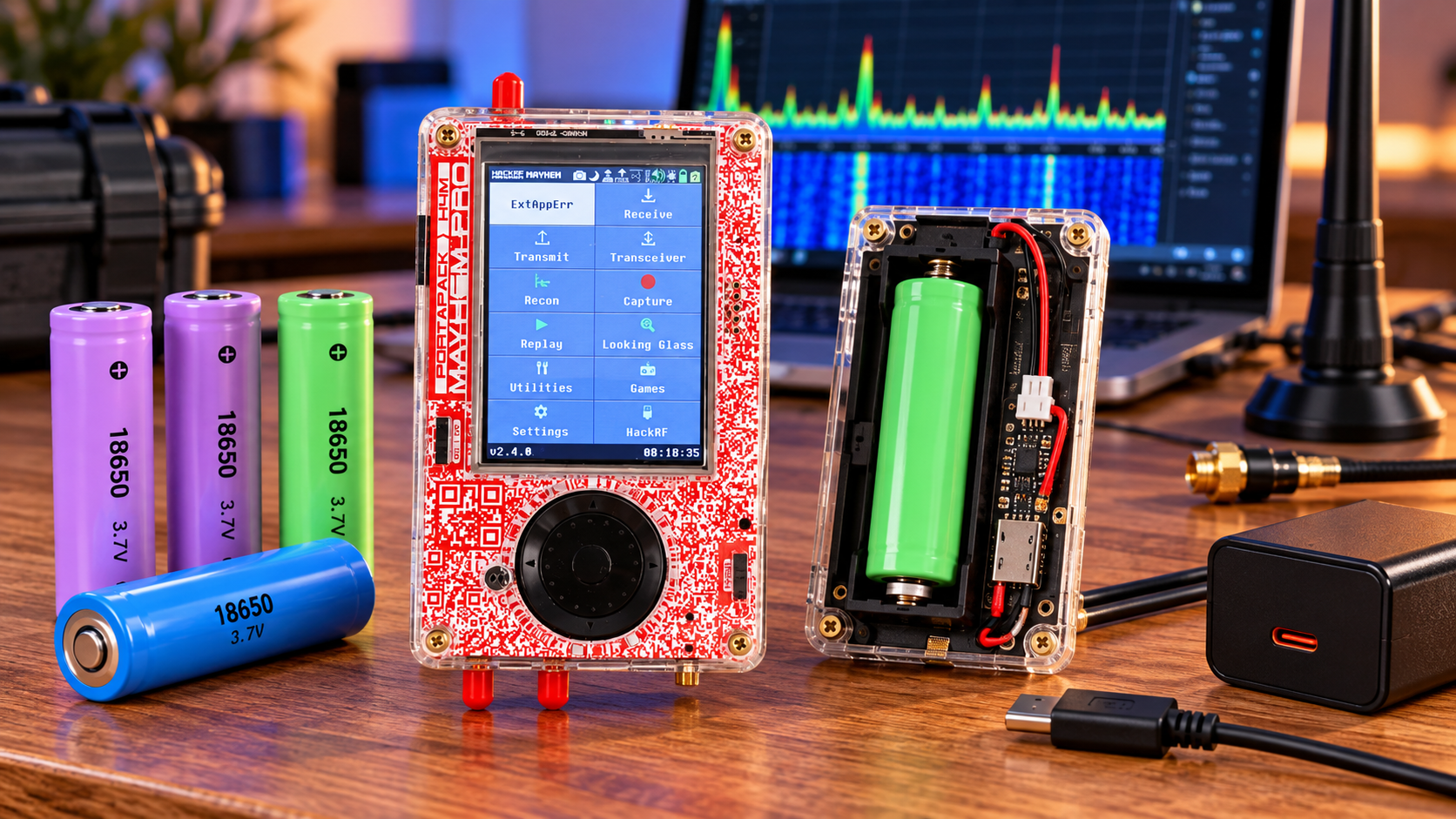
The HackRF Pro R1.2.1 with PortaPack H4M Pro sold in our battery-free bundle needs a compatible rechargeable 18650 lithium-ion cell for portable use. Start with the manufacturer's recommendation: 3.7 V nominal, 4.2 V maximum charge voltage and 2500 mAh nominal capacity. Confirm physical fit before choosing a protected or button-top version.
This guide applies to the H4M Pro Mayhem Signature Edition bundle. A classic H4M with a pouch battery has a different power arrangement. Do not order a wired replacement pouch just because it is advertised for a PortaPack.
What the battery specification establishes
| Item | Buying guidance |
|---|---|
| Cell format | Removable cylindrical 18650 lithium-ion |
| Nominal voltage | Manufacturer recommendation: 3.7 V |
| Maximum charge voltage | 4.2 V; use a matching chemistry |
| Reference capacity | 2500 mAh, equivalent to 9.25 Wh nominal |
| Battery supplied | Excluded from this SDRstore bundle |
| Exact maximum length and discharge rating | Not established by the published recommendation |
The manufacturer's recommendation is a starting specification, not a list of every compatible cell. The same cylindrical format can contain different chemistries and terminal arrangements. Do not substitute a LiFePO4 cell or a higher-voltage lithium chemistry based on size alone.
Will protected and button-top cells fit?
Our listing's battery Q&A describes a standard-length cell of approximately 65 mm and states that the exact maximum supported length has not been specified. Protected cells are often longer, so their fit cannot be guaranteed. The published answer also does not establish that a flat-top terminal is mandatory.
Check the actual cell manufacturer's dimensions, including the terminal and any protection circuit. Ask for confirmation against the current holder revision if the cell is longer than the standard format. Do not force the cell into a tight holder, remove protection components or modify the battery wrap to make it fit.
Physical compatibility and electrical protection are separate checks. Choosing a shorter unprotected cell for fit does not, by itself, verify the device's protection behaviour. Use a genuine cell from a traceable supplier and obtain the pack and device requirements before making a specific cell recommendation.
Install and charge it correctly
- Disconnect USB power and turn the unit off before inserting or removing the cell.
- Inspect the wrap, terminal insulation and holder contacts. Do not use a damaged cell.
- Follow the plus and minus markings in the holder exactly.
- Connect an appropriate USB supply and cable to the device.
- Turn the power switch on for charging and inspect the charging status.
The manufacturer's manual specifically says the switch must be on while charging. It describes a holding status when the switch is off. A lit screen alone does not prove that energy is entering the cell.
Use the cell manufacturer's charging-temperature range. A USB-C connector does not establish USB Power Delivery support, a particular fast-charge rate or a guaranteed charge time. Avoid assigning a charger-current figure from another H4M revision to this device.
Set the capacity value without mistaking it for a test
The manufacturer describes a battery-capacity setting accessed from the battery icon. Where supported by your installed firmware, enter the actual nominal capacity of the fitted cell rather than leaving an unrelated default.
This changes the fuel-gauge calculation. It does not increase stored energy, verify the printed cell capacity or calibrate every operating condition. Treat the displayed remaining time as an estimate, especially after a cell change, firmware change or substantial change in load.
Calculate runtime from energy and measured load
Nominal energy = nominal voltage × capacity in amp-hours. For the recommended reference cell, 3.7 × 2.5 = 9.25 Wh. Runtime = usable energy ÷ average power, measured at a consistent electrical boundary.
The following examples assume that 80% of nominal cell energy reaches the operating electronics: 9.25 × 0.80 = 7.4 Wh. The 80% value and power figures are assumptions for illustrating the calculation, not H4M Pro measurements.
| Assumed average load | Calculated runtime from 7.4 Wh |
|---|---|
| 1 W | 7.4 hours |
| 2 W | 3.7 hours |
| 3 W | About 2.5 hours |
Display brightness, audio use, radio mode, external accessories, temperature and cell age can change average load or usable energy. A higher-capacity cell may extend runtime if it fits and meets the electrical requirements, but the label alone is insufficient evidence.
Verify the battery with a repeatable receive test
Record the cell model, nominal capacity, firmware version, brightness, audio level, receive application and room temperature. Charge normally, disconnect USB and run the same receive task until the device's normal low-battery shutdown. Record elapsed time without repeatedly forcing restarts.
Repeat only as needed to establish consistency. Stop if the cell or device behaves abnormally. USB-input energy during charging includes conversion losses and device operation, so it is not a direct measurement of the cell's rated capacity.
If it does not appear to charge
Check polarity, contact seating, the power switch and a known-good supply and cable. Read the actual charging state. If the unit runs on USB but stops immediately when unplugged, investigate the cell and contacts before blaming firmware. Do not short the holder, bypass protection or try to revive a damaged cell.
Frequently asked questions
Is 2500 mAh the only permitted capacity?
It is the manufacturer's published reference recommendation. Other capacities require compatible chemistry, dimensions and electrical ratings; no universal higher-capacity approval is established here.
Can I charge with the switch off?
The documented H4M Pro procedure requires the switch on. Confirm charging status rather than assuming the behaviour matches an older PortaPack.
What minimum discharge current should I buy?
The published recommendation does not specify one. Obtain confirmation for the exact hardware and intended accessory load instead of inventing a rating.
Does a larger capacity setting make the battery last longer?
No. It changes the estimate shown by supported firmware, not the energy in the cell.
Check the current bundle listing before ordering. Use its product-question option or our quote process to confirm a proposed cell's exact model and dimensions.
No posts found
Write a review






We support all major card and digital payment options. More local methods are available and shown during checkout.
You enter into a binding sales contract once you have received an 'order confirmation and sales receipt' email from us, in line with our Sales & Delivery conditions. Therefore, sdrstore.eu has the right to cancel your order in the event of technical problems, delivery failure, Fair use policy and other similar situations.






Your payments are protected by advanced encryption and 3-D Secure authentication for safe online shopping.