








iCopy XS Review: Hands-On RFID/NFC Tool for Authorized Badge Testing
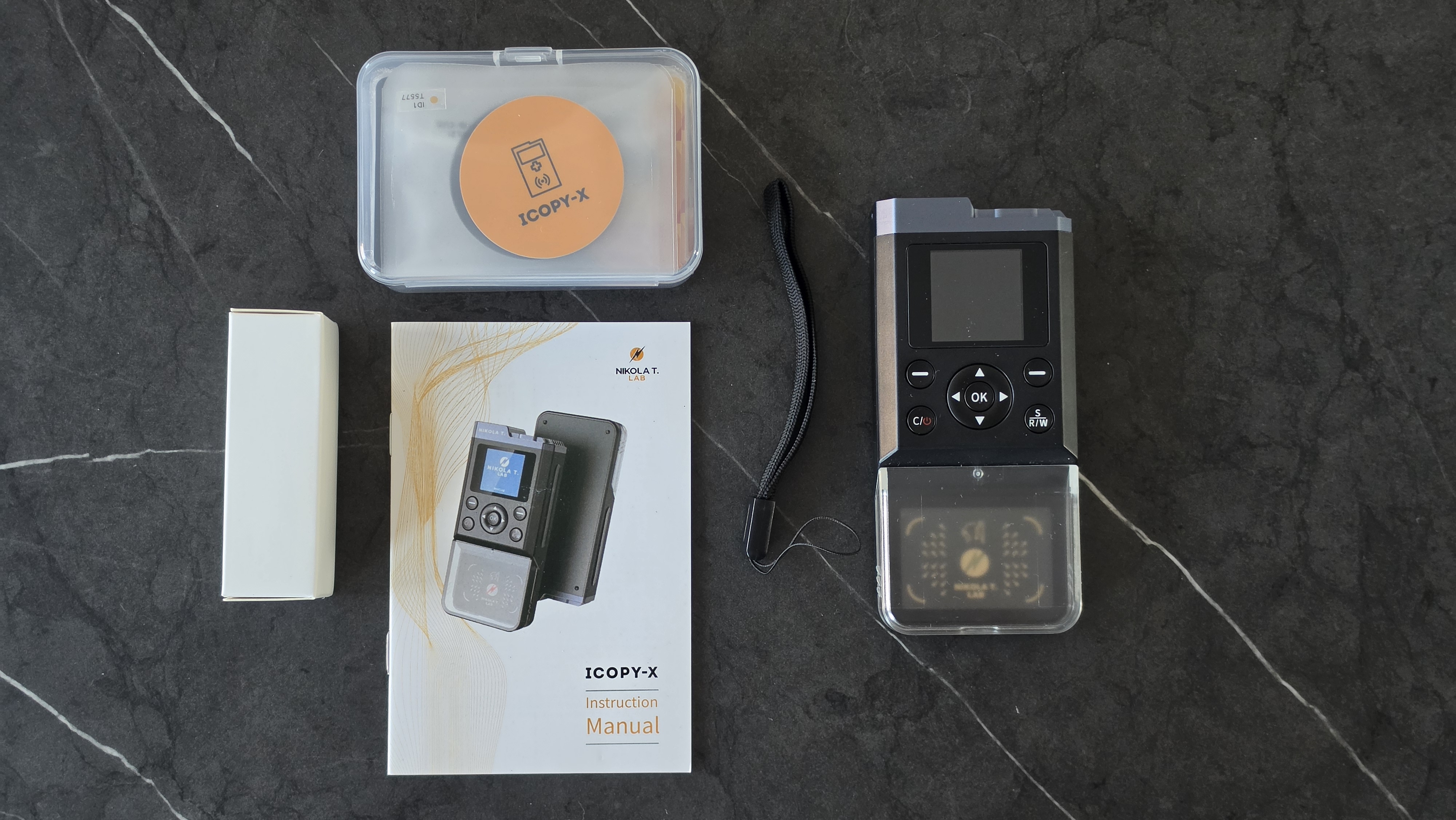
The iCopy XS is a portable RFID and NFC tool designed for professionals who need to test, identify, document, and manage badge technologies in authorized environments. It is built for security researchers, locksmiths, facility teams, access-control technicians, and organizations that need a practical handheld tool for badge audits and controlled testing.
This review focuses on legitimate and authorized use only. RFID and NFC tools should only be used on badges, cards, readers, and access systems that you own, manage, or have written permission to test. The iCopy XS is a powerful device, but it should be treated as a professional security tool, not a toy.
You can view the product here: iCopy XS RFID/NFC Tool.
Quick Verdict: Is the iCopy XS Worth Buying?
The iCopy XS is worth buying if you need a portable RFID/NFC badge testing tool that is easier to use in the field than a laptop-based Proxmark setup. It gives users a screen, physical buttons, built-in battery, offline operation, and Proxmark-based functionality in a compact handheld form.
It is best for authorized badge identification, access-control audits, training, locksmith work, security research, and professional testing. It is not the right tool for unauthorized badge copying, bypassing access systems, or testing cards that do not belong to you.
Buy the iCopy XS if you want:
- A portable RFID and NFC testing tool
- A Proxmark-based device with a handheld interface
- Support for both LF and HF badge technologies
- Fast badge identification in the field
- Offline use without always needing a laptop
- Proxmark mode for advanced users
- A tool for authorized security audits and access-control testing
What Is the iCopy XS?
The iCopy XS is the advanced model in the iCopy-X family. It is built around a Proxmark 3-based RFID system and is designed to make common RFID and NFC badge testing tasks easier through a portable screen-and-button interface.
Instead of requiring a computer for every field task, the iCopy XS can be used as a standalone handheld tool. This makes it useful for technicians who need to quickly identify badge types, verify supported technologies, check access-control deployments, and prepare documentation during authorized work.
For advanced users, Proxmark mode is one of the most important features. It allows the device to be connected to a computer so experienced users can work with the Proxmark ecosystem directly.
iCopy XS Key Specifications
| Feature | iCopy XS |
|---|---|
| RFID system | Proxmark 3-based platform |
| Low-frequency support | 125 kHz / 134 kHz badge technologies |
| High-frequency support | 13.56 MHz NFC / RFID technologies |
| Display | 1.3-inch 240 × 240 RGB LCD |
| Controls | Physical navigation buttons |
| Battery | 2000 mAh Li-ion battery |
| Connectivity | USB-C |
| Storage | 16 GB SD |
| RAM | 256 MB |
| Approximate size | 120 × 55 × 24 mm |
| Approximate weight | 113 g |
Why the iCopy XS Is Useful for Authorized Badge Testing
Many access-control systems use RFID or NFC credentials. In a real building, company, campus, or residential environment, a technician may need to identify what type of badge is being used, check whether old credentials are still in circulation, confirm whether a system uses weak legacy technology, or document badge types during a security review.
The iCopy XS is useful because it removes much of the friction from this process. Instead of setting up a laptop, reader, cables, and command-line tools for every basic check, the user can perform many common inspection tasks directly from the handheld device.
Practical authorized use cases include:
- Identifying badge frequency and technology
- Documenting access-control credentials during audits
- Testing company-owned badges in a controlled environment
- Helping locksmiths and facility teams understand credential types
- Training security teams on RFID/NFC risks
- Checking whether older badge systems should be upgraded
- Using Proxmark mode for deeper authorized research
Supported RFID and NFC Technologies
The iCopy XS supports a wide range of common low-frequency and high-frequency badge technologies. This makes it much more useful than a simple NFC phone app or a basic card reader.
Common low-frequency technologies include:
- EM4XX
- T5577
- HID Prox
- Indala
- AWID
- ioProx
- Viking
- FDX-B
- KERI
- HITAG
- Paradox
- Presco
- GProx
- Securakey
- PAC
- Stanley
- NexWatch
Common high-frequency technologies include:
- MIFARE Classic 1K / 4K
- MIFARE Ultralight
- MIFARE Ultralight C
- MIFARE Ultralight EV1
- NTAG
- ISO14443B
- iCLASS Legacy
- iCLASS Elite
- ISO 15693
- iCODE SLI and SLIX partial support
- Topaz
- FeliCa
- Legic
Support can depend on the exact badge type, security configuration, card generation, blank card compatibility, and whether additional accessories or tools are required. Buyers should always check the exact badge technology before ordering.
Important Limitations Buyers Should Know
The iCopy XS is powerful, but it does not magically work with every access-control card. This is one of the most important points for buyers to understand before purchasing.
The device does not support every modern secure credential type. It also cannot detect or bypass anti-copy algorithms that are increasingly used in European access-control systems. For seamless operation, official iCopy-X blank cards are required, and generic blank cards are not supported.
Important limitations include:
- It does not support MIFARE DESFire.
- It does not support bank cards or EMV payment cards.
- iCLASS SE and SEOS workflows may require additional supported tools or accessories.
- It cannot bypass modern anti-copy systems.
- Generic blank cards are not supported by the device.
- Compatibility depends on the exact credential, system, and security configuration.
This does not make the iCopy XS a bad tool. It simply means buyers should treat it as a professional RFID/NFC testing device with real technical limits, not as a universal access-control solution.
Hands-On Style Experience: What the iCopy XS Feels Designed For
The strongest part of the iCopy XS is its workflow. It is designed for quick field use. The screen and buttons make it easier to handle common badge checks without setting up a full workstation.
For a facility manager, locksmith, or security tester, that matters. In many real situations, the first question is not “can we run a complex lab test?” but “what type of badge is this, what technology does this building use, and should we document it for review?” The iCopy XS is well suited to that first layer of practical testing.
The device is also useful for teams that want to train staff on RFID/NFC security. Seeing badge information on a standalone tool can make access-control weaknesses easier to understand than explaining them only through technical documentation.
iCopy XS vs Proxmark 3
The iCopy XS is built around Proxmark-style functionality, but it is not exactly the same buying experience as a standard Proxmark 3 kit. A Proxmark 3 is more flexible for command-line users and researchers who want full manual control. The iCopy XS is easier for field use because it adds a screen, buttons, battery, and simplified workflows.
| Feature | iCopy XS | Proxmark 3 |
|---|---|---|
| Best for | Portable field use and faster badge checks | Manual research and advanced command-line workflows |
| Standalone use | Yes | Usually requires a computer or host device |
| Interface | Built-in screen and physical buttons | Computer-based client interface |
| Advanced access | Proxmark mode available | Native Proxmark workflow |
| Learning curve | Easier for common tasks | Better for users who want deep manual control |
If you want the most flexible research platform and are comfortable with command-line tools, a Proxmark 3 may still be the better choice. If you want a portable professional tool that is easier to use in the field, the iCopy XS is more convenient.
iCopy XS vs Flipper Zero
Many buyers compare the iCopy XS with Flipper Zero because both are portable devices used by security enthusiasts and professionals. The better choice depends on the use case.
Flipper Zero is a broader multi-tool for learning, tinkering, and interacting with several types of systems. The iCopy XS is more focused on RFID and NFC badge work. For authorized access-control testing, badge identification, and Proxmark-based workflows, the iCopy XS is the more specialized tool.
| Use Case | Better Choice |
|---|---|
| General hacking and learning multi-tool | Flipper Zero |
| Focused RFID/NFC badge testing | iCopy XS |
| Portable Proxmark-style workflows | iCopy XS |
| Beginner electronics exploration | Flipper Zero |
| Professional access-control audits | iCopy XS or Proxmark 3, depending on workflow |
Who Should Buy the iCopy XS?
The iCopy XS is best for buyers who have a legitimate need to inspect, test, or manage RFID/NFC credentials. It is not a casual gadget for random badge experiments.
The iCopy XS is a good fit for:
- Security researchers working on authorized projects
- Locksmiths and access-control professionals
- Building managers and facility teams
- Companies auditing their own badge systems
- Universities teaching RFID/NFC security concepts
- Red teams with written permission to test physical access controls
- RFID/NFC labs that need a portable Proxmark-based tool
Who Should Not Buy the iCopy XS?
The iCopy XS is not the right device for everyone. If you only want to learn basic NFC concepts, a phone app or cheaper NFC reader may be enough. If you want deep research and full manual control, a dedicated Proxmark 3 setup may be better.
You may not need the iCopy XS if:
- You only need to read simple NFC tags occasionally.
- You do not work with access-control systems.
- You expect it to bypass modern anti-copy systems.
- You expect generic blank cards to work.
- You want a general-purpose gadget rather than an RFID/NFC-focused tool.
- You do not have authorization to test the badges or systems involved.
Best Uses for Businesses and Security Teams
For companies and facility teams, the iCopy XS can be useful during internal access-control reviews. Many organizations do not have a clear inventory of which badge technologies they use across buildings, departments, or older systems.
A handheld RFID/NFC tool can help security teams document credential types, identify legacy technologies, and decide whether an upgrade is needed. This is especially important when old low-frequency badges are still in use, because legacy systems may not provide the same protection as modern secure credentials.
Business use cases include:
- Internal access-control inventory
- Legacy badge identification
- Security awareness training
- Badge technology documentation
- Pre-upgrade access-system assessment
- Authorized red-team and physical security testing
Pros and Cons
Pros
- Portable and battery-powered
- Built around Proxmark 3 technology
- Supports both LF and HF badge technologies
- Screen and buttons make field use easier
- USB-C connectivity
- Proxmark mode for advanced users
- Useful for authorized badge audits and training
- More focused on RFID/NFC work than general multi-tools
Cons
- Not a universal solution for every badge system
- Does not support MIFARE DESFire or EMV bank cards
- Cannot bypass modern anti-copy systems
- Requires genuine iCopy-X blank cards for supported copying workflows
- May be more expensive than basic RFID readers
- Should only be used in authorized environments
Buyer Advice: What to Check Before Ordering
Before buying the iCopy XS, identify the badge types you need to test. If you are buying for a company, ask your access-control provider what card technology is currently deployed. If you are buying for research, confirm whether your target tags are LF, HF, MIFARE, iCLASS, ISO 15693, or another format.
You should also check whether your work requires accessories, blank cards, documentation, or a more advanced Proxmark workflow. If your environment uses modern secure credentials with anti-copy protection, do not assume the iCopy XS will bypass those systems.
Before ordering, confirm:
- Which badge technologies you need to test
- Whether the use is authorized
- Whether you need genuine blank card packs
- Whether your badges use modern anti-copy features
- Whether Proxmark mode is important for your workflow
- Whether your team needs a handheld tool or a PC-based Proxmark setup
Final Verdict
The iCopy XS is a strong RFID/NFC tool for authorized badge testing, access-control audits, locksmith work, security research, and professional training. Its biggest advantage is portability: it brings Proxmark-based capability into a handheld format with a screen, buttons, battery, and simplified field workflow.
It is not magic, and it is not universal. It does not support every secure credential, it cannot bypass modern anti-copy systems, and it requires compatible official blanks for supported copying workflows. Buyers who understand those limits will get much more value from the device.
If you need a focused, portable RFID/NFC badge testing tool for legitimate work, the iCopy XS is one of the most practical options to consider.
FAQ
What is the iCopy XS used for?
The iCopy XS is used for authorized RFID and NFC badge testing, badge identification, access-control audits, locksmith work, security research, and training.
Is the iCopy XS based on Proxmark 3?
Yes. The iCopy XS is built around a Proxmark 3-based RFID system and also includes a Proxmark mode for advanced users.
Does the iCopy XS support both RFID and NFC?
Yes. It supports many low-frequency 125/134 kHz RFID badges and many high-frequency 13.56 MHz NFC/RFID technologies.
Can the iCopy XS bypass anti-copy systems?
No. The iCopy XS cannot detect or bypass modern anti-copy algorithms that are increasingly used in some access-control systems.
Does the iCopy XS support MIFARE DESFire?
No. MIFARE DESFire is listed as unsupported, so buyers should not choose the iCopy XS expecting DESFire support.
Can I use generic blank cards with the iCopy XS?
No. The device is designed to work with genuine iCopy-X blank cards. Generic blank cards are not supported.
Is the iCopy XS better than Flipper Zero for badge testing?
For focused RFID/NFC badge testing and Proxmark-style workflows, the iCopy XS is more specialized. Flipper Zero is broader as a general learning and multi-tool device.
Who should buy the iCopy XS?
The iCopy XS is best for authorized security researchers, locksmiths, facility teams, companies, universities, and professionals who need a portable RFID/NFC badge testing tool.
No posts found
Write a review






We support all major card and digital payment options. More local methods are available and shown during checkout.
You enter into a binding sales contract once you have received an 'order confirmation and sales receipt' email from us, in line with our Sales & Delivery conditions. Therefore, sdrstore.eu has the right to cancel your order in the event of technical problems, delivery failure, Fair use policy and other similar situations.






Your payments are protected by advanced encryption and 3-D Secure authentication for safe online shopping.