





RX888 MKII Buying Guide: Software, PC Requirements and Antenna Choices
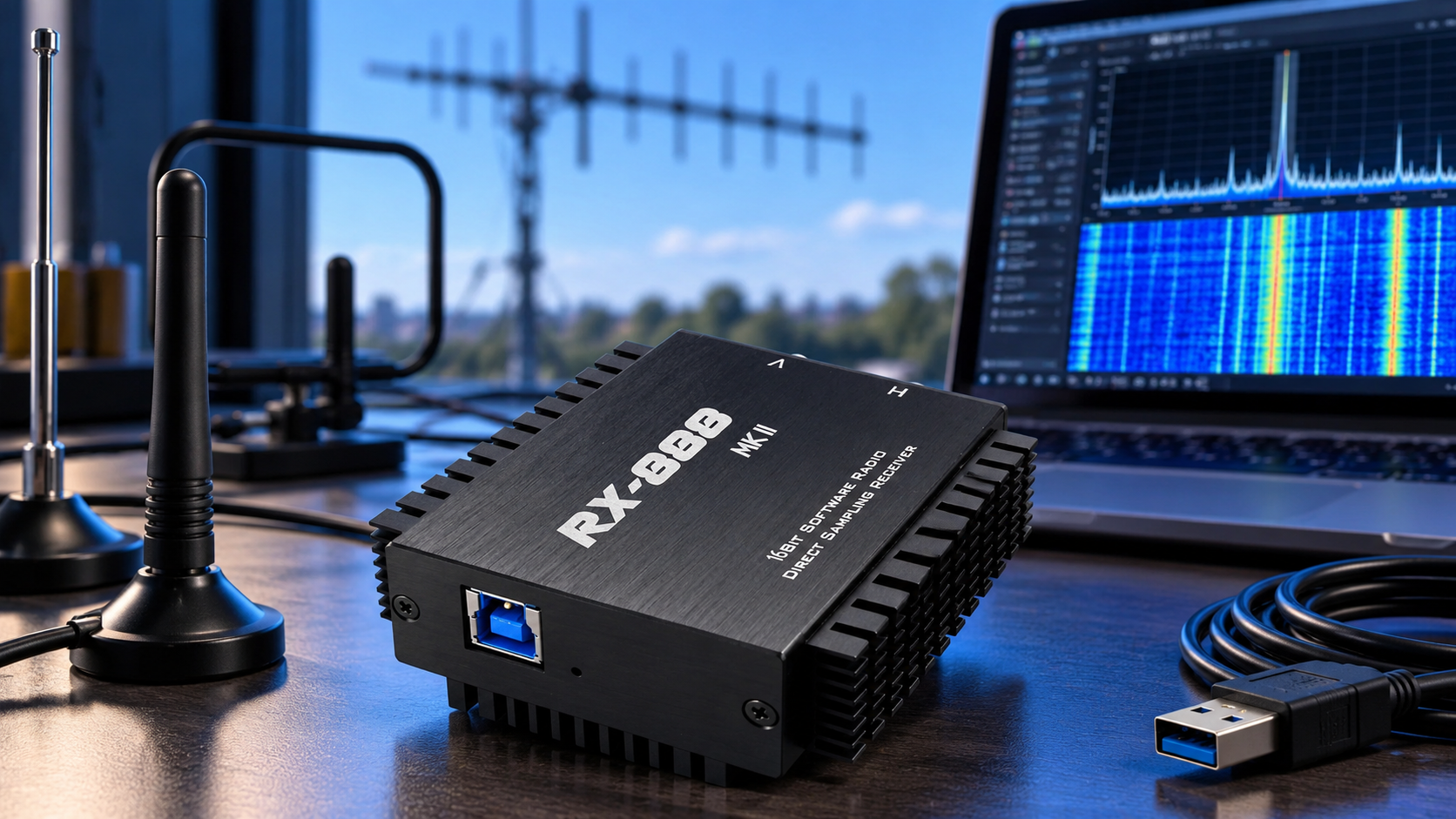
The RX888 MKII is a strong candidate for computer-based HF listening and wide-span spectrum work if you have a reliable USB 3.0 connection, suitable software and an antenna matched to your bands. For a first Windows setup, consider HDSDR with the project ExtIO package or SDR Console. This RX888 MKII buying guide explains why the computer, receive input and antenna installation matter as much as the receiver's headline bandwidth.
What you are buying: an HF-focused USB receiver
The RX888 MKII listing at SDRstore describes an LTC2208-based, 16-bit analog-to-digital converter (ADC), USB 3.0 connectivity and separate HF and VHF-labelled RF inputs. This is a receive-only device that works with a computer or suitable host server; it is not a standalone radio or transmitter.
- HF-labelled input: direct sampling for low- and medium-frequency reception, shortwave and operation extending through approximately 64 MHz.
- VHF-labelled input: an R828D tuner path, listed at 64–1700 MHz with up to 10 MHz real-time bandwidth.
The RX888 project page describes a nominal HF span up to 64 MHz. That figure does not apply to the entire VHF/UHF tuning range. The two input connectors serve different receive paths and should not be treated as two independent coherent receiver channels.
ADC sample rate, analog filtering and the usable spectrum delivered by an application are different specifications. Filter edges, software settings and processing capacity affect the usable bandwidth. Choose software for your intended input and workload before buying around the maximum figure.
Which RX888 MKII software should you use?
| Software route | Good starting use | Important condition |
|---|---|---|
| HDSDR + ExtIO | Windows listening and a documented first setup | Install the matching USB driver and complete ExtIO package |
| SDR Console | Windows spectrum displays and receiver workflows | Native RX888 integration; follow its driver and performance guidance |
| ka9q-radio | Linux-based HF receiving and networked receiver services | The RX888 documentation covers direct sampling, not the R828 tuner |
| SoapySDDC-based applications | Linux/macOS experimentation with compatible clients | Check the chosen driver build, architecture and input support |
The project's Windows quick-start guide uses HDSDR and the original ExtIO_sddc package. ExtIO is the interface between the application and receiver support library. Follow the package instructions, including its dependencies and application bitness.
SDR Console's RX888 documentation describes native integration and Cypress FX3 driver requirements. Do not assume its setup is identical to placing an ExtIO DLL in HDSDR's folder.
On Linux, ka9q-radio's RX888 instructions explicitly exclude the R828 tuner path. If VHF/UHF reception is essential, choose a stack that documents that input.
For Linux or macOS SoapySDR workflows, community options such as SDDC_Driver provide another route. That fork uses libusb and warns that its Windows driver arrangement conflicts with the original Cypress-based setup. Select one documented route before changing USB drivers.
PC requirements: prioritize USB, processing and sustained storage
For a new Windows station, a practical starting configuration is Windows 11 on an x86-64 computer, a modern multi-core processor, 16 GB RAM and an SSD. This is a buying recommendation, not a tested minimum for every full-bandwidth RX888 workload. Existing computers may be adequate at your chosen settings.
SDR Console's computer guidance explains how bandwidth, graphics processing and the number of receivers affect load. A processor's marketing tier alone does not establish performance. Test sustained reception with the actual application, display settings and decoders you intend to run.
- USB: use a genuine USB 3.0 data connection with a suitable cable. Start directly on the computer while establishing a working setup.
- Power: the RX888 quick-start guide specifies a USB 3.0 connection with a 2 A power supply. Verify a compatible power arrangement; a USB 3.0 label alone does not guarantee that current.
- Processing: leave headroom for filtering, demodulation, spectrum displays and any additional decoders.
- Storage: measure sustained write speed if recording wide spans. An internal SSD also avoids sharing the receiver's USB connection with an external recording drive.
- Cooling: allow airflow around the computer and receiver during long sessions.
A dedicated gaming graphics card is not a universal RX888 requirement. SDR Console can use supported graphics processing for FFT work, while other applications have different requirements. Start with the software's supported configuration rather than buying a GPU solely for the receiver.
Why wideband recording can fill a disk quickly
For an illustrative raw-stream budget, assume one real ADC sample occupies 16 bits, or two bytes. These are real samples, not a pair of 16-bit I and Q values.
| ADC sample rate | Raw payload | One minute |
|---|---|---|
| 32 MSPS | 64 MB/s | 3.84 GB |
| 64 MSPS | 128 MB/s | 7.68 GB |
| 128 MSPS | 256 MB/s | 15.36 GB |
MSPS means million samples per second. The table uses decimal units and excludes overhead. At 128 MSPS, one hour of this raw format is approximately 921.6 GB.
Your recording may be smaller after digital downconversion and decimation, or use a different sample format. Check what the application actually saves. If the ADC continues running at the same rate, simply zooming the waterfall does not reduce the incoming USB stream.
Choose the antenna for the band and location
The receiver's broad tuning range does not make one small antenna equally effective everywhere. For shortwave and HF, prioritize useful signal reception with manageable local noise. For VHF/UHF, select an antenna for the target band, polarization and installation.
| Listening goal | Antenna approach | Main check |
|---|---|---|
| HF with outdoor space | Suitable wire antenna or dipole with appropriate feed arrangement | Placement, local noise and overload from strong stations |
| Portable or limited-space HF | Passive loop or a suitable active receive loop | Signal level, positioning and active-antenna power requirements |
| VHF/UHF reception | Band-specific dipole, vertical or directional antenna | Correct tuner input, polarization and coax loss |
The YouLoop passive loop is a compact option for portable and limited-space experiments. Airspy documents its passive design and HF response. It needs no bias-tee power, but its signal level and suitability depend on the receiver and location; it is not a guaranteed best match for every RX888 installation.
Try different positions away from computers, displays and power supplies before adding amplification. Compare the wanted signal against the noise, not just its height on the spectrum display. For broader receiver and installation choices, see the shortwave-listening buying guide.
Check bias-tee power before connecting an active antenna
A bias tee sends DC power along the antenna coax. The RX888 retail listing specifies software-controlled 3.3 V bias-tee outputs. That does not establish compatibility with an antenna requiring 5 V or 12 V.
Match voltage, current, polarity and the DC path through any filters or adapters. Use an appropriate external injector when the antenna requires a different supply, while preventing unwanted DC from reaching the receiver. Leave bias-tee power off for an ordinary passive antenna unless its documentation requires otherwise.
Manage overload before adding more gain
RX888 MKII provides HF attenuation and adjustable front-end gain. Start conservatively. If the spectrum fills with unexpected signals or reception becomes worse as gain increases, reduce gain or add attenuation and compare again.
When strong medium-wave broadcasts interfere with reception above that band, a 2.6 MHz AM-reject high-pass filter may help. It also attenuates wanted signals below its cutoff, so remove it for low-frequency or medium-wave listening.
For VHF/UHF reception outside the FM broadcast band, an 88–108 MHz FM-block filter can be useful when strong FM stations cause overload. It is unsuitable when those stations are what you want to hear. Select filters for the interfering signal and wanted passband, rather than adding them automatically.
A sensible first setup
- Choose one documented software route and obtain its matching driver, support files and firmware image where required.
- Connect using a suitable USB 3.0 cable and confirm that the receiver is detected correctly.
- Select the input matching your antenna and target frequency.
- Start with a supported lower-bandwidth configuration, conservative gain and bias-tee power off for passive antennas.
- Receive a known local signal or broadcast, then increase bandwidth while watching processing load and dropouts.
- Test recording separately and confirm the saved file's format, size and playback.
If audio stutters, check the cable, USB controller, available power and processing load before changing RF settings at random. If the receiver works but reception is poor, check input selection, antenna placement, gain and filtering.
What to include in your purchase
Plan for the receiver, a compatible USB 3.0 data cable, a suitable computer, an antenna for your main bands and the correct coax or adapters. Add filters or active-antenna power hardware only when the installation needs them. The SDRstore package description lists one receiver; confirm any additional supplied accessories before ordering duplicates.
RX888 MKII makes the most sense when wide-span HF reception is a priority and you are willing to qualify the computer and software setup. For a lab or multi-unit station, use SDRstore's quotation process and specify the intended bands, operating system, recording bandwidth and antenna arrangement.
Frequently asked questions
Does RX888 MKII need USB 3.0?
Yes. Plan for a USB 3.0 host connection and suitable data cable. The receiver's high-rate sample stream makes USB bandwidth and reliable power central to the setup.
Can a laptop run RX888 MKII?
Yes, if its USB connection, power delivery and processing capacity support the chosen workload. Test sustained reception at your intended settings; a processor model alone cannot guarantee full-span operation.
Does RX888 MKII work on Linux or macOS?
Compatible projects exist, but support depends on the driver and application build. ka9q-radio documents the HF direct-sampling path; SoapySDDC-based workflows require checking the selected build and input support.
Can it receive 64 MHz of bandwidth at 1.7 GHz?
No. The approximately 64 MHz headline span relates to the direct-sampling input. The separate VHF/UHF tuner path is listed with up to 10 MHz real-time bandwidth.
Which antenna should I buy for HF listening?
A suitable outdoor wire or dipole is a practical option where space permits. For portable or limited-space use, consider a passive or active receive loop, accounting for signal level, local noise and any power requirements.
Can the RX888 bias tee power any active antenna?
No. The listing specifies 3.3 V bias-tee power. Confirm the antenna's voltage and current requirements and the DC behavior of every component between the antenna and receiver.
Can RX888 MKII transmit?
No. It is a receiver. Keep its antenna inputs isolated from transmitter outputs and use appropriate protection when sharing an antenna installation with transmitting equipment.
Shop products for this guide
Explore relevant products from our store.
No posts found
Write a review






We support all major card and digital payment options. More local methods are available and shown during checkout.
You enter into a binding sales contract once you have received an 'order confirmation and sales receipt' email from us, in line with our Sales & Delivery conditions. Therefore, sdrstore.eu has the right to cancel your order in the event of technical problems, delivery failure, Fair use policy and other similar situations.






Your payments are protected by advanced encryption and 3-D Secure authentication for safe online shopping.