








AIFW WaveSentry vs WaveSentry Pro: Is Thermal Imaging Worth Paying For?
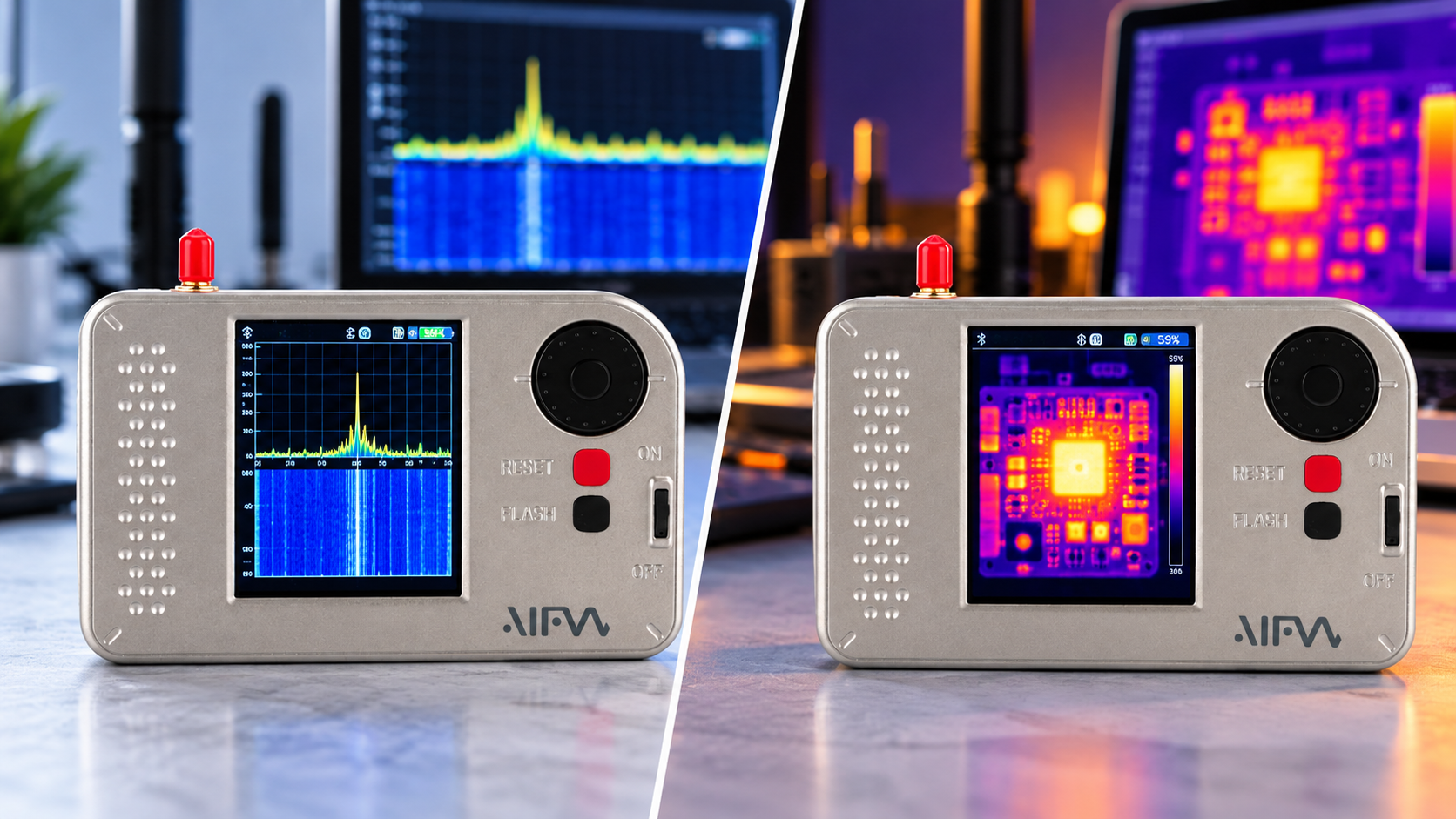
Choose AIFW WaveSentry for Wi-Fi and Bluetooth observation plus AM/FM reception. Choose WaveSentry Pro if you also want thermal visualization in the same handheld and expect to use it regularly. Thermal imaging is the documented hardware difference, rather than an upgrade to the Wi-Fi band or wireless scanning tools. At the observed SDRstore prices, Pro costs €69.70 more. For temperature-critical work, confirm the camera’s measurement specifications before choosing it.
WaveSentry vs WaveSentry Pro: what changes?
The two editions share an ESP32-based platform and a customized firmware family derived from ESP32 Marauder. The OpenSourceSDRLab product description identifies the added thermal camera as the hardware distinction.
| Feature | WaveSentry | WaveSentry Pro |
|---|---|---|
| Wi-Fi tools | AP discovery, packet observation and supported capture functions | The same advertised function set |
| Wi-Fi band | 2.4 GHz | 2.4 GHz; no documented 5 GHz upgrade |
| Bluetooth tools | Advertised Bluetooth, AirTag and Flipper observation modes | The same advertised modes |
| Radio receiver | AM and FM reception | AM and FM reception |
| Thermal camera | Not included | Included |
| Firmware source description | Supplier describes standard firmware as open source | Supplier describes thermal firmware as not open source; downloadable builds exist |
| Observed SDRstore price | €221.62 | €291.32 |
Prices were checked on 13 October 2026. Both editions are selected through the SDRstore WaveSentry listing; choose the required edition and check its current price before ordering.
What you get without paying for Pro
Standard WaveSentry already covers the advertised access-point scanning, wireless packet-observation modes and AM/FM receiver functions. If those are your main reasons for buying, the Pro camera does not establish an improvement to them.
Treat both editions as 2.4 GHz Wi-Fi tools. SDRstore confirms that limitation in its product questions, and the public firmware project uses the classic ESP32 development target. Espressif’s ESP32 documentation describes 2.4 GHz Wi-Fi, not dual-band 2.4/5 GHz operation.
A Wi-Fi or Bluetooth observation mode is not a guarantee of identifying every nearby device or reading its traffic. Results depend on the transmission, firmware and supported function. Use wireless captures only within an authorized testing scope.
When the thermal camera can justify the premium
You regularly work with powered electronics
Thermal visualization can help you investigate where accessible surfaces are warming. For example, in a low-voltage electronics project, you might compare the heat pattern around a regulator or radio module before and after changing the workload. This is an illustrative use case, not a tested WaveSentry Pro benchmark.
The benefit is convenience: one handheld offers wireless observation and a thermal view. It may suit a maker who moves between embedded-radio experiments and visual electronics checks.
You want to learn thermal-image interpretation
Pro adds a different kind of information from packet scanning. A thermal image represents infrared radiation from the surfaces in view; it is not a picture of radio-frequency emissions.
A warm object does not, by itself, identify a Wi-Fi transmitter or prove that a component is faulty. Compare observations with the device’s normal operating state and other evidence.
You prefer carrying a combined tool
If you already need WaveSentry’s wireless functions and frequently want a quick thermal view, the additional camera may be useful enough to justify the premium. If you already own a suitable thermal camera, consider whether combining the functions provides enough practical value.
Thermal visualization and accurate temperature measurement are different requirements
The verified product descriptions establish that Pro includes thermal imaging, but they do not establish its native sensor resolution, frame rate, temperature range or calibrated accuracy. A colorful image or a temperature number on a demonstration screen does not supply those specifications.
Before buying for detailed electronics inspection or quantitative measurements, obtain:
- Native thermal resolution: the detector’s pixel count, rather than the display resolution or an enlarged image.
- Field of view and working distance: whether the intended target occupies enough of the image to inspect.
- Temperature range and accuracy: the conditions under which the manufacturer specifies them.
- Measurement controls: available adjustments for emissivity and other relevant conditions.
- Export capabilities: whether the firmware can save images or measurement data in the format your workflow needs.
FLIR’s thermal-camera guidance explains that measurements concern object surfaces and depend on distance, ambient conditions and emissivity. Emissivity describes how effectively a surface emits thermal radiation. Reflective metal can produce misleading apparent temperatures.
These are general thermography principles, not specifications for WaveSentry Pro. If your work requires documented accuracy, repeatable reports or resolving very small components, compare a dedicated thermal camera with published specifications before deciding.
Firmware compatibility matters on both editions
Being based on ESP32 Marauder does not make every Marauder firmware image suitable for WaveSentry. OpenSourceSDRLab states that installing generic Marauder firmware removes access to the custom radio-receiver and thermal functions.
The WaveSentry repository provides public code, while its release page includes thermal-related builds and a Bruce UI build. A downloadable firmware binary is not the same as a complete public source release.
Use instructions for your exact hardware edition and chosen firmware. Before changing software, verify which wireless, radio and thermal functions it retains and how to restore a compatible build. Do not assume that an alternative interface preserves every factory function.
Which edition offers better value?
The observed €69.70 premium buys an additional sensing function. Its value depends on whether thermal imaging is part of your normal work.
- Choose WaveSentry: your priority is the shared wireless tools and radio receiver, or you already have a thermal camera.
- Choose WaveSentry Pro: you want an integrated thermal view for learning and exploratory electronics checks, after confirming that its camera capabilities suit the targets.
- Compare a dedicated thermal camera: thermal measurement is the main job and requires clearly documented performance.
- Compare an SDR: you need general RF sampling and signal-processing workflows rather than these specific ESP32 wireless tools. SDRstore’s HackRF One guide explains that different tool category.
Confirm the shipped firmware, charging requirements, included antennas and cables before purchase. No battery-runtime advantage is established for either edition. The presence of a thermal camera does not establish ruggedness, weather resistance or suitability for professional inspection reports.
Frequently asked questions
Is thermal imaging the only difference between WaveSentry and Pro?
OpenSourceSDRLab identifies the thermal camera as the hardware difference. Both editions advertise the same wireless and AM/FM receiver functions, but the thermal edition also needs compatible firmware.
Does WaveSentry Pro support 5 GHz Wi-Fi?
No 5 GHz capability is established for the advertised ESP32 platform. Treat both editions as 2.4 GHz Wi-Fi tools; paying for Pro adds thermal imaging.
Can a firmware update add thermal imaging to standard WaveSentry?
A firmware update alone cannot add the missing camera hardware. No verified standard-to-Pro retrofit process is established here.
Can WaveSentry Pro provide accurate temperature readings?
Its calibrated accuracy could not be verified from the checked product documentation. Obtain the camera’s specifications and measurement conditions before relying on temperature values for a quantitative task.
Can I install standard ESP32 Marauder firmware?
The supplier says generic Marauder firmware does not retain the custom radio and thermal functions. Choose a build explicitly compatible with the WaveSentry edition and features you need.
Is WaveSentry Pro firmware open source?
The supplier describes the thermal firmware as not open source. Public downloadable builds exist, but that does not prove that the complete thermal implementation is available as source code.
Is the Pro upgrade worth paying for?
Pro is worth considering when you need the shared wireless tools and expect to use thermal visualization regularly. Standard WaveSentry is the more economical choice when wireless observation and radio reception cover your needs. Select the required edition on the SDRstore listing, check current pricing and confirm the camera specifications for your intended task. For classroom, laboratory or multi-unit purchases, use “Add to Quote” to request matching editions and confirm the required configuration.
No posts found
Write a review






We support all major card and digital payment options. More local methods are available and shown during checkout.
You enter into a binding sales contract once you have received an 'order confirmation and sales receipt' email from us, in line with our Sales & Delivery conditions. Therefore, sdrstore.eu has the right to cancel your order in the event of technical problems, delivery failure, Fair use policy and other similar situations.






Your payments are protected by advanced encryption and 3-D Secure authentication for safe online shopping.