





HackRF H4M Complete Beginner Setup: From Unboxing to First Signal
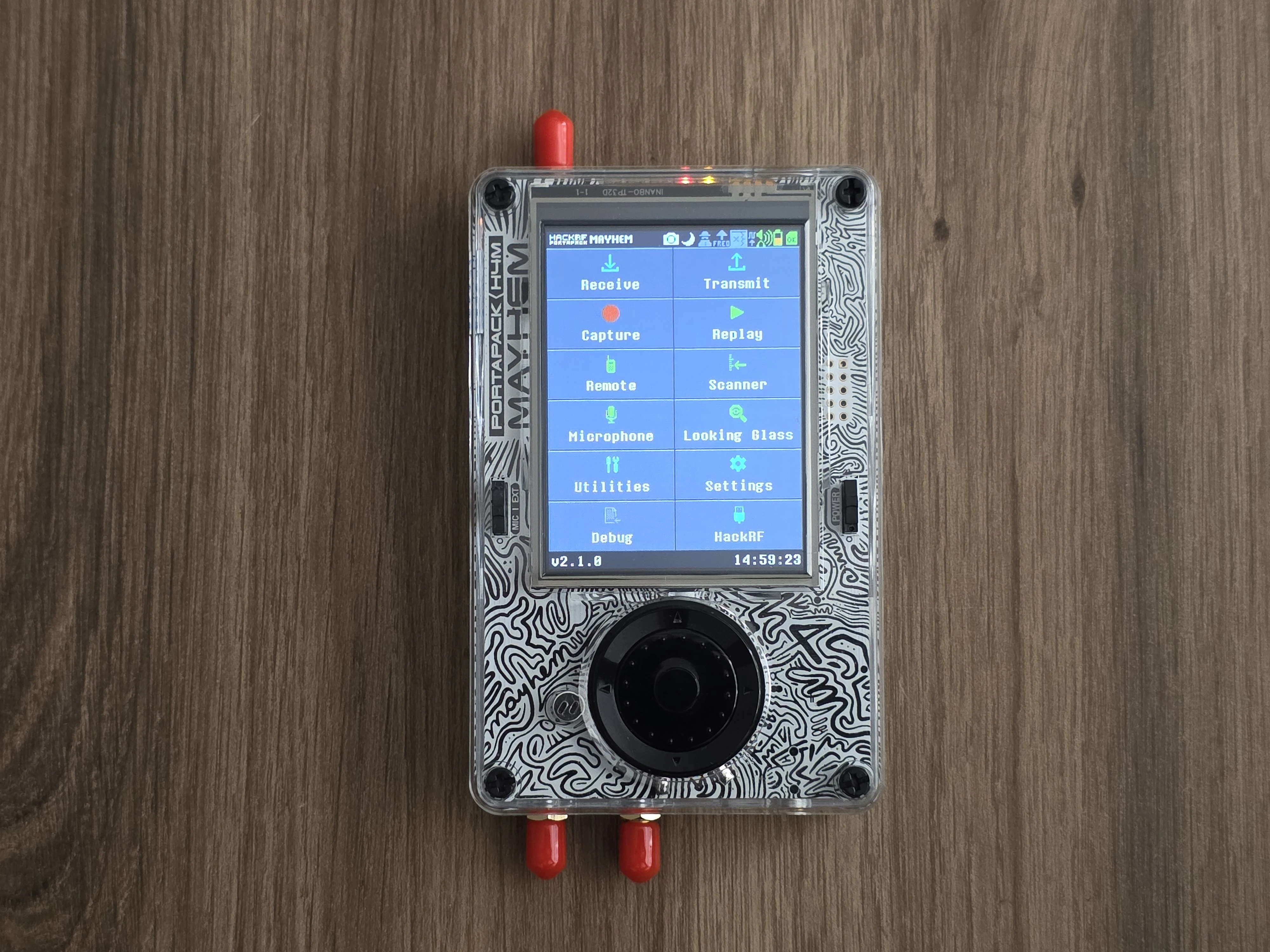
What's in Your H4M Package
Your HackRF H4M bundle should include:
- HackRF PortaPack H4M Device: Fully assembled SDR with integrated battery and display
- Charging Cable: USB-C cable for fast charging and data connection
- Antenna Collection (Based on which bundle is selected): Multiple antennas covering different frequency ranges:
- 700MHz–2700MHz wideband antenna (primary use)
- 2.4/5/5.8GHz blade antenna (WiFi/Bluetooth)
- GSM/3G/4G cellular antenna
- 40MHz–6GHz telescopic antenna
- Optional Accessories: Low Noise Amplifier (LNA), SMA cables, carrying case (varies by bundle)
H4M Key Features Overview
- Frequency Range: 1 MHz – 6 GHz (full HackRF One capability)
- Operation Modes: Receive, transmit, replay, spectrum analysis
- Power Management: True sliding power switch with battery disconnect
- Audio System: Built-in speaker, microphone, and headphone jack with auto-switching
- Display: Matte anti-glare screen for outdoor visibility
- Expandability: GPIO port for future modules and accessories
Step 1: Initial Hardware Setup
- Charge Your Device: Connect USB-C cable and charge for at least 30 minutes before first use.
- Power On: Use the sliding power switch on the side. The device should boot to the main menu.
- Connect Antenna: Start with the 700MHz–2700MHz antenna for general use and FM radio testing.
- Navigate Interface: Use the encoder wheel to scroll, center button to select, and side buttons for back/menu.
Step 2: Prepare Your SD Card
You'll need a microSD card (16-32GB) formatted to FAT32 for full functionality.
- Download Mayhem Firmware: Visit Mayhem GitHub releases.
- Get Two Files:
mayhem_vX.X.X_COPY_TO_SDCARD.zip(contains apps and maps)portapack-mayhem-vX.X.X.bin(firmware file)
- Format SD Card: Use FAT32 format (Windows: Disk Management, Mac: Disk Utility, Linux:
mkfs.vfat). - Extract and Copy: Unzip the SDCARD file and copy all contents to the SD card root.
Step 3: Install Latest Firmware
- Insert SD Card: Power off H4M, insert prepared SD card, power back on.
- Access Flash Utility: Navigate to Utilities → Flash Utility.
- Select Firmware: Choose the
.binfirmware file from your SD card. - Flash Process: Confirm installation and wait 1-2 minutes for completion.
- Reboot: Device will automatically restart with new firmware and all applications loaded.
Step 4: Your First Signal Reception
- Launch Audio App: From main menu, select Receive → Audio.
- Tune to FM Radio: Set frequency to 100.0 MHz (or local FM station).
- Adjust Settings:
- Sample Rate: 3 MHz
- Modulation: WFM (Wideband FM)
- LNA/VGA Gain: Start with 16-24 dB each
- Fine-tune Reception: Use encoder wheel to scan frequencies, adjust gains for clear audio.
Step 5: Explore Spectrum Analysis
- Open Looking Glass: Navigate to Receive → Looking Glass.
- Select Frequency Range: Choose "FM BROADCAST" preset to see all local FM stations.
- Observe Waterfall: Bright vertical lines indicate active signals.
- Customize View: Adjust min/max frequencies to focus on specific bands of interest.
Understanding the Interface
- Encoder Wheel: Scroll through options, adjust frequency/values
- Center Button: Select/confirm choices
- Left Button: Back/cancel
- Right Button: Context menu/options
- Power Switch: Slide to power on/off with true battery disconnect
- Audio Toggle: Switch between internal speaker and headphones
Essential Apps for Beginners
- Audio: General purpose receiver for AM/FM/SSB signals
- Looking Glass: Wideband spectrum analyzer with waterfall display
- Scanner: Automatic frequency scanning within defined ranges
- ADS-B RX: Track aircraft with map overlay (requires map files on SD)
- APRS RX: Receive amateur radio packet data
- Capture: Record RF signals for later analysis or replay
Recommended First Experiments
- FM Radio: 88-108 MHz, WFM mode for local broadcast stations
- Amateur Radio: 144-148 MHz (2 meters), NFM mode for local repeaters
- Aircraft Communications: 118-137 MHz, AM mode for air traffic control
- Weather Satellites: 137 MHz, WFM mode (requires external antenna)
- ISM Band: 433 MHz, monitor for IoT devices and sensors
Safety and Legal Considerations
- Receive Only Initially: Start with receive-only activities to learn the interface safely
- Check Local Laws: Transmission requires appropriate licensing in most countries
- Antenna Safety: Use appropriate antennas for each frequency band
- Power Limits: H4M transmit power is limited but still requires responsible use
Troubleshooting First Steps
- No Audio: Check antenna connection, verify correct modulation mode, adjust gains
- Weak Signals: Try different antenna, increase LNA/VGA gains gradually
- Battery Drain: Use power switch to fully disconnect battery when not in use
- SD Card Issues: Ensure FAT32 format, try different card if problems persist
Next Steps
Once comfortable with basic operation, explore advanced features like signal capture/replay, ADS-B aircraft tracking, amateur radio modes, and the GPIO expansion system for custom modules.
Get Your HackRF H4M Today!
Ready to explore the radio frequency spectrum? The H4M provides everything you need for professional SDR learning and experimentation in a portable, user-friendly package.
Get your H4M today!
Comments
No posts found
Write a review







We support all major card and digital payment options. More local methods are available and shown during checkout.
You enter into a binding sales contract once you have received an 'order confirmation and sales receipt' email from us, in line with our Sales & Delivery conditions. Therefore, sdrstore.eu has the right to cancel your order in the event of technical problems, delivery failure, Fair use policy and other similar situations.






Your payments are protected by advanced encryption and 3-D Secure authentication for safe online shopping.