








iCopy XS vs Proxmark3 vs Chameleon Ultra: Which RFID Tool Should You Buy?
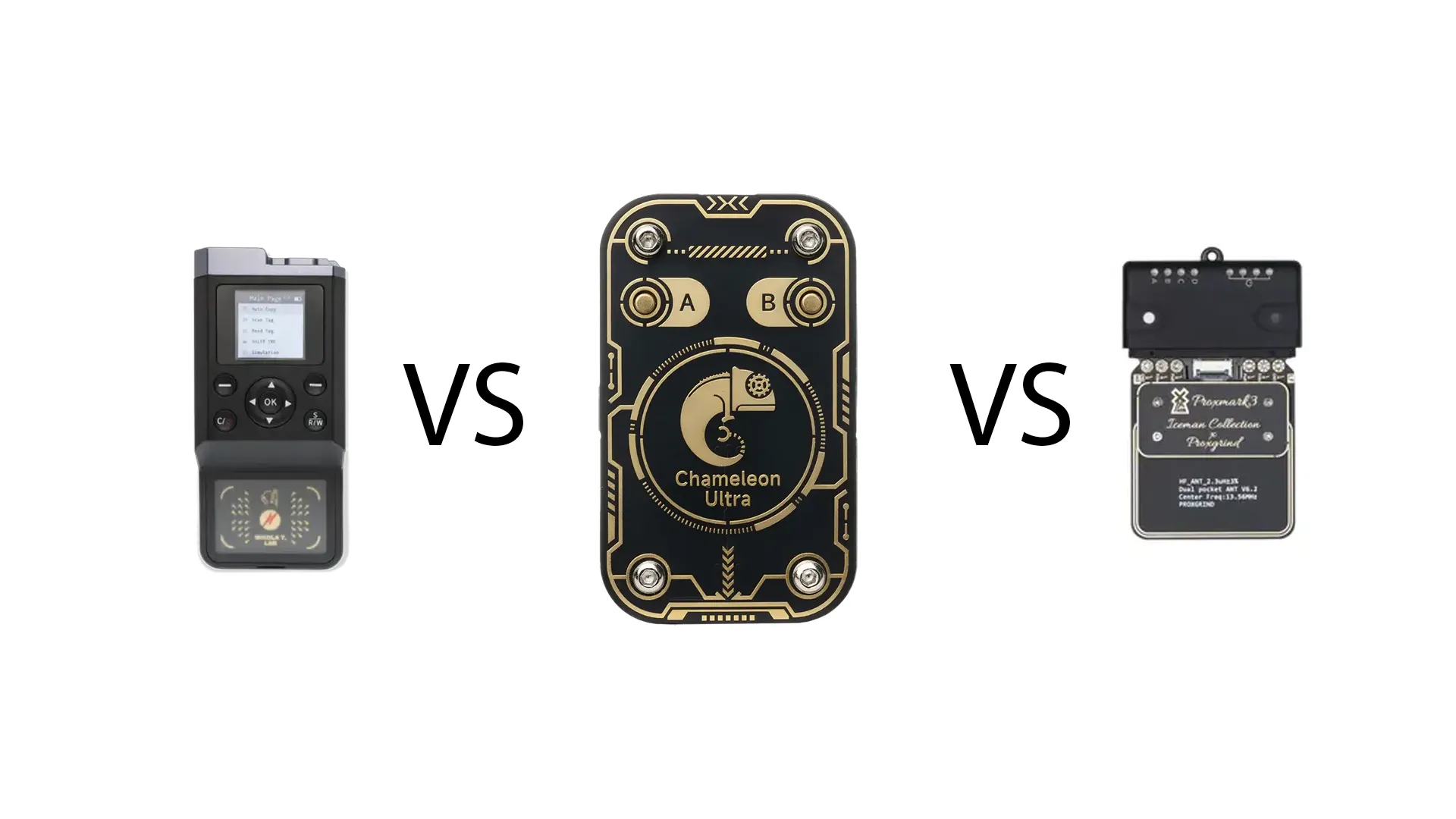
Choosing between iCopy XS, Proxmark3, and Chameleon Ultra can be confusing because all three tools are used in RFID and NFC testing, but they are not designed for exactly the same type of user. One is built for guided handheld badge workflows, one is the classic deep research platform, and one is a compact emulation-focused tool for portable testing.
This comparison is written for authorized RFID/NFC testing only. These tools should only be used on cards, badges, readers, and access-control systems that you own, manage, or have written permission to test. If you are buying for a company, lab, locksmith workflow, university, or security team, the goal should be documentation, testing, training, and access-control improvement.
In this guide, we compare the iCopy XS, Proxmark 3 RDV4.01, and Chameleon Ultra to help you choose the right RFID tool for authorized badge testing, access-control audits, research, and emulation.
Quick Answer: Which RFID Tool Should You Buy?
| Tool | Best For | Best Buyer |
|---|---|---|
| iCopy XS | Portable guided RFID/NFC badge testing with screen, buttons, and Proxmark mode | Locksmiths, facility teams, access-control professionals, authorized auditors |
| Proxmark3 RDV4 | Deep RFID/NFC research, protocol analysis, manual testing, and advanced workflows | Security researchers, red teams, universities, advanced technical users |
| Chameleon Ultra | Compact RFID/NFC emulation, slot-based testing, portable lab work, and open-source workflows | RFID developers, testers, researchers, and users focused on emulation |
The easiest recommendation is this: choose iCopy XS if you want a guided handheld tool, choose Proxmark3 if you want the deepest research platform, and choose Chameleon Ultra if you mainly want a compact emulation-focused device.
What Is the iCopy XS?
The iCopy XS is the advanced version of the iCopy-X family. It is a portable RFID/NFC tool built around Proxmark technology, but with a built-in screen, physical controls, battery, USB-C, storage, and a more guided field workflow.
The biggest advantage of the iCopy XS is convenience. Instead of needing a laptop and command-line tools for every task, users can perform many common authorized badge checks directly from the device.
iCopy XS is best for:
- Authorized badge testing
- Access-control audits
- Locksmith and facility workflows
- Fast badge identification
- Portable field use
- Users who want Proxmark power with an easier interface
- Teams that need a practical handheld RFID/NFC tool
The iCopy XS also includes Proxmark mode, which means advanced users can connect it to a computer and access more technical workflows when needed. This makes it more flexible than a simple standalone badge reader.
What Is Proxmark3 RDV4?
Proxmark3 RDV4 is the classic advanced RFID/NFC research platform. It is designed for users who want deep control, manual testing, protocol work, flexible antennas, and access to the Proxmark ecosystem.
Compared with iCopy XS, the Proxmark 3 RDV4.01 is less of a guided handheld appliance and more of a research instrument. It is usually better for technical users who are comfortable with command-line tools, firmware, antennas, and detailed RFID/NFC testing.
Proxmark3 is best for:
- Advanced RFID and NFC research
- Protocol analysis
- University and lab environments
- Authorized red-team work
- Users who want maximum manual control
- Testing many LF and HF technologies
- Learning how RFID systems work at a deeper level
If your main priority is flexibility and research depth, Proxmark3 is usually the strongest choice. It has a steeper learning curve, but it gives experienced users more control than a simplified handheld workflow.
What Is Chameleon Ultra?
Chameleon Ultra is a compact RFID/NFC research and emulation tool. It is especially attractive for users who want a small, portable device that can store multiple profiles, emulate supported tag types, and work through USB, BLE, CLI, GUI, or mobile-style workflows depending on the software used.
The Chameleon Ultra is not simply a Proxmark replacement. It is better understood as an emulation-focused and portable testing tool. It is useful for authorized lab testing, development, access-control research, and repeatable tag emulation workflows.
Chameleon Ultra is best for:
- RFID/NFC emulation testing
- Portable profile-based workflows
- Open-source RFID research
- Developers testing readers and access systems
- Users who want USB and BLE control options
- Compact everyday lab use
- Testing supported LF and HF technologies in authorized environments
Chameleon Ultra is especially interesting if you want a compact device for emulation and repeatable testing. For deep protocol research, Proxmark3 is still usually more complete. For guided badge workflows, iCopy XS is usually easier.
iCopy XS vs Proxmark3 vs Chameleon Ultra: Main Differences
| Feature | iCopy XS | Proxmark3 RDV4 | Chameleon Ultra |
|---|---|---|---|
| Main purpose | Guided handheld RFID/NFC badge testing | Advanced RFID/NFC research platform | Compact RFID/NFC emulation and testing |
| Ease of use | Easiest for field users | Most technical | Moderate, depends on app or CLI workflow |
| Standalone use | Yes, built-in screen and buttons | Usually best with a computer, optional accessories may expand use | Yes, with buttons and stored slots for supported workflows |
| Best strength | Fast guided workflow | Deep research flexibility | Portable emulation |
| Learning curve | Lowest | Highest | Medium |
| LF support | Yes, 125/134 kHz technologies | Yes, strong LF support | Yes, focused around supported 125 kHz workflows |
| HF support | Yes, 13.56 MHz technologies | Yes, strong HF support | Yes, focused around supported 13.56 MHz workflows |
| Best for beginners | Best if they need guided professional workflows | Best only for technical beginners willing to learn | Good for emulation-focused users |
| Best for professionals | Access-control and locksmith field use | Security research and technical audits | Reader testing, emulation, and development workflows |
Choose iCopy XS If You Want the Fastest Field Workflow
The iCopy XS is the best choice when speed and usability matter most. If you are working on-site, checking badges, documenting access-control technologies, or supporting a locksmith or facility workflow, the built-in screen and buttons make the process easier.
It is also useful for teams that do not want every user to learn the full Proxmark command-line environment. The guided interface can make common authorized tasks faster and more repeatable.
Reasons to choose iCopy XS
- You want a handheld RFID/NFC tool with screen and controls.
- You want a more guided workflow than Proxmark3.
- You need portable access-control testing.
- You work with badges in authorized professional environments.
- You want Proxmark mode available when deeper testing is needed.
- You prefer an appliance-style device rather than a research board.
The main limitation is that iCopy XS is not a universal magic badge tool. Buyers should understand compatibility limits, official blank-card requirements, and the fact that modern anti-copy systems may not be bypassable.
Choose Proxmark3 RDV4 If You Want Maximum Research Depth
Proxmark3 RDV4 is the right choice if you want the most flexible and research-focused RFID/NFC platform. It is the best option for users who want to understand protocols, test different antennas, work with LF and HF systems, and go deeper than a guided handheld device.
It is not the easiest device for a non-technical buyer. But for serious security researchers, universities, labs, and advanced testers, that depth is exactly the point.
Reasons to choose Proxmark3 RDV4
- You want the most advanced manual control.
- You are comfortable with command-line workflows.
- You need a strong platform for research and training.
- You want to study RFID/NFC protocols in detail.
- You need flexible antenna and accessory options.
- You are buying for a lab, university, or red-team environment.
If you want a professional research platform and are willing to learn it properly, Proxmark 3 RDV4.01 is usually the strongest long-term choice.
Choose Chameleon Ultra If You Want Portable Emulation
Chameleon Ultra is the best choice if your main focus is emulation and portable reader testing. It is compact, open-source, and designed for storing and switching between supported RFID/NFC profiles in authorized test scenarios.
It is especially useful for developers, access-control testers, and researchers who need to test how a reader behaves with different supported tags. It is not as broad as Proxmark3 for deep analysis, and it is not as guided as iCopy XS for field workflows, but it is very strong in its specific category.
Reasons to choose Chameleon Ultra
- You mainly care about RFID/NFC emulation.
- You want a small portable testing device.
- You like open-source tools and community firmware.
- You want USB and BLE software control options.
- You test readers and access systems in authorized environments.
- You want a compact device for repeated lab scenarios.
For buyers focused on emulation, Chameleon Ultra can be more practical than carrying a full Proxmark setup.
Which Tool Is Best for Locksmiths?
For locksmiths and access-control professionals, iCopy XS is usually the easiest recommendation. It is portable, guided, and designed for fast field work. The screen and buttons make it simpler to use during site visits, badge checks, and authorized customer jobs.
Proxmark3 can still be useful for advanced locksmiths who want deeper technical control. Chameleon Ultra can be useful for specific emulation tests, but it is not as complete as iCopy XS for guided badge workflows.
Which Tool Is Best for Security Researchers?
For serious security researchers, Proxmark3 RDV4 is usually the first choice because it gives the most flexibility and depth. It is better for learning protocol behavior, testing edge cases, using advanced workflows, and documenting technical findings.
iCopy XS can still be useful as a field tool, especially when speed matters. Chameleon Ultra is useful when the project focuses on emulation, repeatable testing, or compact portable workflows.
Which Tool Is Best for Businesses and Facility Teams?
For business users and facility teams, the right choice depends on who will use the tool. If the user is a technician who needs fast badge identification and guided testing, iCopy XS is the easiest fit. If the company has a technical security team, Proxmark3 may be better for deeper audits.
Chameleon Ultra is a good extra tool when the organization needs to test reader behavior and emulation scenarios in a controlled lab or authorized environment.
Which Tool Is Best for Beginners?
For beginners who want a practical professional tool, iCopy XS is the easiest to understand. For beginners who want to learn RFID/NFC deeply, Proxmark3 is better, but the learning curve is much higher. For beginners who specifically want to explore emulation, Chameleon Ultra can be a good middle option.
| Beginner Goal | Best Tool |
|---|---|
| I want the easiest handheld workflow | iCopy XS |
| I want to learn RFID/NFC security deeply | Proxmark3 RDV4 |
| I want portable emulation testing | Chameleon Ultra |
| I work in access-control field service | iCopy XS |
| I work in a research lab or red team | Proxmark3 RDV4 |
Important Compatibility Notes
None of these tools should be treated as universal. RFID and NFC systems vary widely by frequency, chip type, credential generation, reader configuration, encryption, anti-copy protections, and access-control backend.
Before buying, confirm the technologies you need to test. For example, older LF badges, MIFARE Classic cards, iCLASS systems, ISO 15693 tags, NTAG, Ultralight, and modern secure credentials can require very different tools and expectations.
Before choosing a tool, check:
- Whether your target cards are LF, HF, or both.
- Whether you need identification, emulation, research, or guided workflows.
- Whether your system uses modern anti-copy protections.
- Whether you need a screen and standalone field operation.
- Whether your team is comfortable with command-line tools.
- Whether you need official blanks or accessories.
- Whether your use case is fully authorized.
Best Buying Recommendation
If you want the safest general recommendation for professional authorized badge testing, choose iCopy XS. It is the easiest to use in the field and gives access-control professionals a practical handheld workflow.
If you want the strongest research platform, choose Proxmark 3 RDV4.01. It has the steepest learning curve, but it is the most flexible tool for serious RFID/NFC research.
If you want a compact emulation-focused device, choose Chameleon Ultra. It is ideal for supported emulation workflows, reader testing, and portable lab use.
Final Verdict
iCopy XS, Proxmark3, and Chameleon Ultra are all useful RFID/NFC tools, but they serve different buyers.
The iCopy XS is best for guided, portable, professional badge testing. Proxmark3 RDV4 is best for deep technical research and advanced RFID/NFC analysis. Chameleon Ultra is best for compact emulation-focused testing and open-source workflows.
For most field professionals, iCopy XS is the easiest tool to recommend. For researchers, Proxmark3 is the strongest platform. For emulation-focused users, Chameleon Ultra is the most convenient portable option.
FAQ
Which is better: iCopy XS, Proxmark3, or Chameleon Ultra?
iCopy XS is best for guided handheld badge testing, Proxmark3 is best for deep RFID/NFC research, and Chameleon Ultra is best for compact emulation-focused workflows.
Is iCopy XS based on Proxmark3?
Yes. iCopy XS is built around Proxmark technology and includes Proxmark mode for advanced users who want deeper control through a computer.
Is Proxmark3 better than iCopy XS?
Proxmark3 is better for advanced research and manual control. iCopy XS is better for easier handheld field workflows and guided authorized badge testing.
Is Chameleon Ultra better than Proxmark3?
Chameleon Ultra is better for compact emulation-focused testing, while Proxmark3 is better for broad RFID/NFC research and deeper protocol work.
Which RFID tool is best for beginners?
iCopy XS is the easiest for professional beginners who want a guided device. Proxmark3 is better for technical beginners who want to learn deeply. Chameleon Ultra is good for beginners focused on emulation.
Can these tools bypass modern access-control systems?
Buyers should not assume that any RFID/NFC tool can bypass modern secure access-control systems. Compatibility depends on the credential type, reader, encryption, anti-copy protection, and authorization.
Which tool should a locksmith buy?
For locksmiths and access-control professionals, iCopy XS is usually the most practical choice because it offers a portable screen-based workflow for authorized badge testing.
Which tool should a security researcher buy?
A security researcher should usually choose Proxmark3 RDV4 for maximum flexibility, then add iCopy XS or Chameleon Ultra if they need faster field workflows or portable emulation.
No posts found
Write a review






We support all major card and digital payment options. More local methods are available and shown during checkout.
You enter into a binding sales contract once you have received an 'order confirmation and sales receipt' email from us, in line with our Sales & Delivery conditions. Therefore, sdrstore.eu has the right to cancel your order in the event of technical problems, delivery failure, Fair use policy and other similar situations.






Your payments are protected by advanced encryption and 3-D Secure authentication for safe online shopping.