








MicroPhase U220 Setup Guide: Unboxing to First Signal
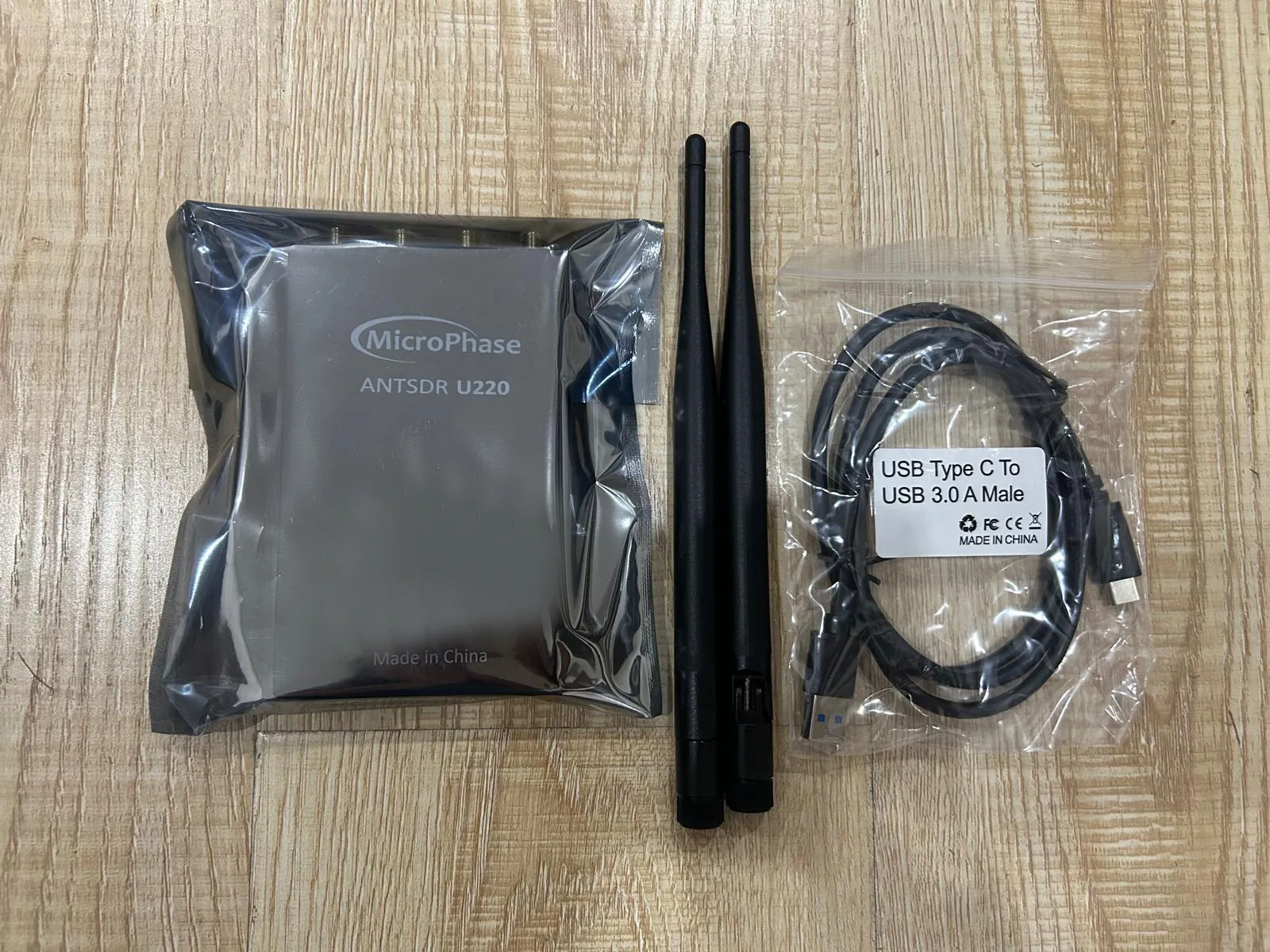
What's in the Box
Your MicroPhase U220 package should include:
- U220 SDR Board: Compact USB 3.0 device with 2× SMA RF connectors
- USB 3.0 Cable: High-speed Type-A to USB-C cable for data connection
- Quick Start Documentation: Basic connection and software information
- Optional Accessories: Antennas or enclosure (depending on bundle purchased)
U220 Key Specifications Overview
- RF Coverage: 70 MHz – 6 GHz with AD9361/AD9363 transceiver
- MIMO Capability: 2×2 full-duplex operation
- Bandwidth: Up to 56 MHz instantaneous bandwidth per channel
- Interface: USB 3.0 (Type-C) with 5 Gbps data rate
- FPGA: Xilinx Artix-7 for programmable DSP processing
- Power: USB-powered (2-6W), no external PSU required
Physical Setup and Connections
- Inspect the Device: Verify all 4 SMA connectors are secure and undamaged.
- Connect USB 3.0 Cable: Use the included USB-C cable and connect to a USB 3.0 port on your computer for optimal performance.
- Attach Antennas: Connect appropriate antennas to the SMA ports—TX1/RX1 and TX2/RX2 for MIMO operation.
- Power Verification: The U220 should power on automatically when connected via USB 3.0.
Software Installation (Windows)
- Download UHD Drivers: Get the latest UHD installer from Ettus Research for Windows.
- Install GNU Radio: Download GNU Radio for Windows from GNU Radio Wiki.
- Build U220 UHD Support: Download and compile the U220-specific UHD drivers from MicroPhase GitHub.
- Verify Installation: Open Command Prompt and run
uhd_find_devicesto detect the U220.
Software Installation (Linux)
# Update system packages
sudo apt update
# Install UHD and dependencies
sudo apt install libuhd-dev uhd-host cmake build-essential
# Download U220 UHD drivers
git clone https://github.com/MicroPhase/antsdr_uhd.git
cd antsdr_uhd/host
# Build and install U220 support
mkdir build && cd build
cmake ../
make -j4
sudo make install
sudo ldconfig
# Verify device detection
uhd_find_devices
First Signal Test with GNU Radio
- Launch GNU Radio Companion: Open with
gnuradio-companioncommand. - Create Basic Flowgraph:
- Add "UHD: USRP Source" block
- Set Device Arguments:
type=usrp - Set Sample Rate:
2e6(2 Msps) - Set Center Frequency:
100e6(FM broadcast band)
- Add Output Blocks: Connect to "QT GUI Frequency Sink" and "Audio Sink" for visual and audio output.
- Execute Flowgraph: Click the "Execute" button and verify spectrum display shows FM broadcast signals.
SDRangel Configuration
- Install SDRangel: Download from SDRangel GitHub or install via package manager.
- Add Device: Go to "Acquisition → Add sample source" and select "USRP" from the list.
- Configure Connection: Leave device string empty for automatic USB detection.
- Set Parameters:
- Sample Rate: Start with 2 MHz
- Center Frequency: 100 MHz (FM band)
- Gain: Begin with moderate settings (20-30 dB)
- Start Reception: Click "Start" and verify live spectrum display.
Performance Optimization
- USB 3.0 Requirement: Ensure connection negotiates at SuperSpeed (5 Gbps) for full bandwidth capability.
- Sample Rate Selection: Start conservatively (≤5 Msps) and increase based on host computer performance.
- Buffer Management: Adjust buffer sizes in software to prevent underruns during high sample rate operation.
- Thermal Considerations: Ensure adequate airflow around the U220 during extended high-bandwidth operation.
MIMO Configuration
- Dual-Channel Setup: In GNU Radio, use two "UHD: USRP Source" blocks with different channel numbers (0 and 1).
- Antenna Configuration: Connect antennas to both RX ports with proper spatial separation for MIMO effectiveness.
- Synchronization: Ensure both channels use identical sample rates and timing parameters.
- Phase Coherency: Perform calibration for applications requiring phase-matched channels.
Common Applications
- Spectrum Analysis: Monitor 70 MHz–6 GHz spectrum for interference or signal characterization
- Protocol Development: Build custom wireless protocols using the full-duplex capability
- Cellular Research: Deploy with srsRAN for LTE base station simulation
- Direction Finding: Use MIMO channels for angle-of-arrival estimation
- Academic Research: Investigate advanced MIMO and beamforming techniques
Troubleshooting
- Device Not Detected: Verify USB 3.0 connection and install proper UHD drivers for U220 support
- Poor Performance: Check USB connection speed and reduce sample rates if experiencing dropouts
- No RF Reception: Verify antenna connections and try known-strong signals (FM broadcast) for testing
- GNU Radio Errors: Ensure UHD version compatibility and proper device arguments in flowgraph blocks
Advanced Features
- Custom FPGA Development: Utilize the Artix-7 FPGA for specialized signal processing applications
- High-Speed Streaming: Leverage USB 3.0 bandwidth for sustained high-sample-rate operation
- Multi-Device Synchronization: Connect multiple U220 units for larger MIMO arrays
- Remote Operation: Use UHD's network streaming capabilities for distributed SDR deployments
Get Your MicroPhase U220 Today!
Experience professional-grade SDR performance with the compact, powerful U220 platform. Perfect for research, development, and advanced RF applications.
Get your U220 today!
Comments
No posts found
Write a review






We support all major card and digital payment options. More local methods are available and shown during checkout.
You enter into a binding sales contract once you have received an 'order confirmation and sales receipt' email from us, in line with our Sales & Delivery conditions. Therefore, sdrstore.eu has the right to cancel your order in the event of technical problems, delivery failure, Fair use policy and other similar situations.






Your payments are protected by advanced encryption and 3-D Secure authentication for safe online shopping.