








PortaPack H4M ESP32 MDK Extension: Compatibility and Is It Worth Buying?
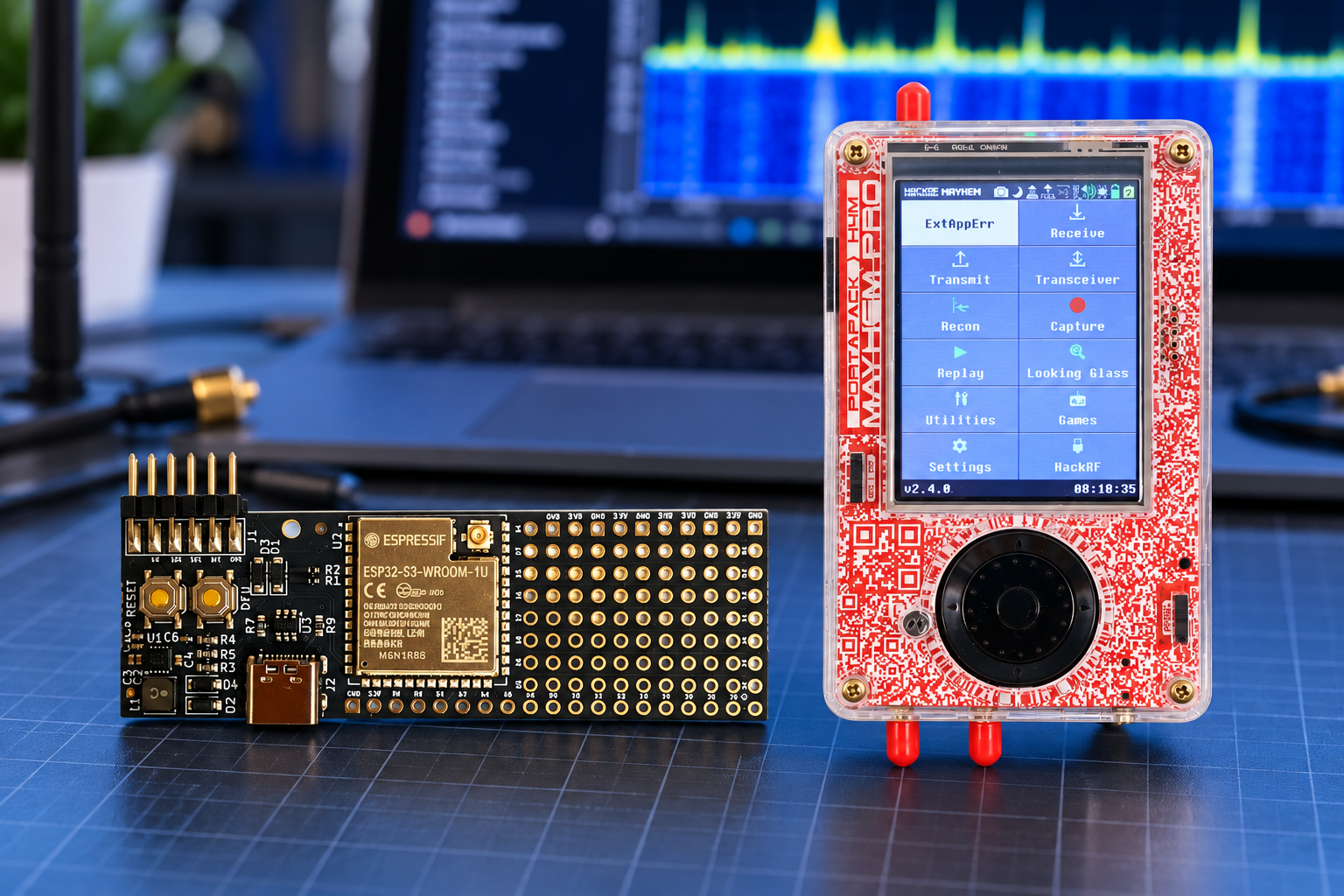
The PortaPack H4M ESP32 MDK is worth buying if you want to develop external-module applications or connect your H4M to custom electronics. It is intended for a compatible H4M-based setup and adds an ESP32-S3 development platform. Buy it for a defined project and supported software; ordinary Mayhem radio reception does not require it. Do not assume that the board alone adds remote Wi-Fi control, wireless SDR streaming or a complete wireless-testing suite.
What is the PortaPack H4M ESP32 MDK?
MDK means Module Developer Kit. The ESP32 MDK extension board sold by SDRstore is an accessory for development around the PortaPack H4M and HackRF ecosystem. It is not a complete software-defined radio (SDR), and the accessory purchase does not include a HackRF radio and PortaPack display.
The listing photographs show an ESP32-S3-WROOM-1U module, a USB-C socket, buttons, an expansion header and a perforated area for custom circuitry. SDRstore describes the board as pre-flashed with open-source Mayhem MDK firmware. That establishes the advertised firmware family, rather than a specific installed release or a guarantee that every third-party application is included.
What the ESP32-S3 can add
Espressif specifies the ESP32-S3 as a dual-core microcontroller with 2.4 GHz Wi-Fi and Bluetooth Low Energy. These are capabilities available to software developers. A finished PortaPack feature still needs the appropriate application and firmware.
| Capability | What it means for a buyer |
|---|---|
| 2.4 GHz Wi-Fi | A foundation for supported network applications or your own development. It does not establish 5 GHz Wi-Fi support or a ready-made remote-control interface. |
| Bluetooth Low Energy | Useful for supported BLE projects. The ESP32-S3 does not support Bluetooth Classic. |
| Custom electronics connections | Potential for serial devices, sensors and other compatible circuitry, subject to pin assignments, electrical limits and software support. |
| Separate microcontroller | Processing for an external module. It does not replace the HackRF RF front end or increase the radio’s sample rate. |
The Bluetooth distinction matters: Espressif’s ESP32-S3 documentation explicitly excludes Bluetooth Classic. A listing that says “Bluetooth” should therefore not be read as a promise of Classic Bluetooth audio or compatibility with every Bluetooth accessory.
PortaPack H4M ESP32 MDK compatibility
Compatibility has three parts: the host’s connector and electrical interface, physical clearance around the case, and the software combination. The Mayhem hardware guide identifies the H4M’s GPIO expansion port; GPIO means general-purpose input/output. Running Mayhem on another PortaPack does not automatically provide that same accessory connection.
| Your setup | Buying guidance |
|---|---|
| HackRF-based kit with PortaPack H4M | The intended configuration. Check the exposed expansion connector, module orientation, case clearance and required firmware. |
| Clifford Heath R10C Plus kit with H4M | SDRstore pairs this H4M kit with the MDK in its accessory-page bundle. Confirm the selected configuration and software requirements. |
| PortaPack H4M Pro | Mayhem documents an expansion port, but that alone does not verify this exact MDK pairing. Obtain confirmation for the board revision, connector and firmware combination. |
| Bare HackRF One | The radio alone does not supply the intended H4M display, menus and external-module connection. Do not buy the MDK expecting the documented PortaPack workflow. |
| Older H1/H2 PortaPack or another ESP32 board | Do not assume a direct substitute. Modified hardware requires its own pin mapping, wiring and software verification. |
The accessory connects into the PortaPack development environment. The name of the underlying HackRF-compatible radio board is only part of the compatibility check: the PortaPack revision, expansion interface and installed software also matter.
What can you actually do with the MDK?
Start with the documented UART example
The Mayhem MDK project documents an example UART application that appears in the PortaPack Utilities menu when the corresponding firmware is loaded and the module is connected. UART is a serial communication interface. The example provides a concrete starting point for working with external electronics through the PortaPack screen.
This is a stronger reason to buy than a broad promise of “more hacking features”: it gives a developer a defined example to study and extend. Check signal levels and the project’s pin definitions before attaching another device.
Develop a project around your own hardware
Possible development projects include displaying readings from a compatible sensor, exchanging data with a serial device, or building a network-connected status interface. These are project ideas, not a list of applications guaranteed to be installed on the shipped board.
For each idea, identify the peripheral, required firmware, PortaPack interface and any additional components. If no supported implementation exists, allow time for coding and debugging.
Understand the two software components
The MDK project describes two components: an application that runs on the PortaPack and firmware that runs on the ESP32-S3. In its documented build process, the PortaPack application is embedded in the ESP32 firmware. Updating only one side of a custom implementation may therefore be insufficient.
A pre-flashed MDK can reduce initial preparation, but it does not establish compatibility with every Mayhem release or third-party project. Before ordering for a specific application, check the required Mayhem version, MDK firmware and installation instructions together.
Developers should follow the project’s current build guidance. Its ESP32 firmware instructions use Espressif’s ESP-IDF development framework. A general ESP32 tutorial or an unrelated firmware image is not a substitute for the MDK project’s requirements.
What the extension does not upgrade
The ESP32 MDK does not change the HackRF’s RF hardware, analogue filtering or converter resolution. For reference, the official HackRF One specification describes a half-duplex radio with 8-bit sampling and sample rates up to 20 million samples per second. Adding a separate development board does not turn that radio into a full-duplex instrument.
Wi-Fi connectivity also does not establish a supported transport for raw in-phase and quadrature (I/Q) samples. If wireless SDR operation is your goal, require a documented implementation and measured throughput for your intended settings before treating this accessory as a solution.
For reception problems, first investigate the antenna, filters, gain settings and interference. The MDK is relevant when your missing capability is an external-module application or electronics interface.
Is the ESP32 MDK worth buying?
SDRstore listed the extension at €80.50 on 12 October 2026. Check the product page for current pricing. Its value depends on the work it enables, rather than how many wireless functions the chip could theoretically support.
- Buy it for embedded development: you want to use the H4M screen and controls with custom electronics and can follow the MDK software workflow.
- Buy it for a verified application: you have checked that the application supports the exact module, PortaPack and firmware combination.
- Wait if you are learning basic SDR: become comfortable with the standard Mayhem applications before adding another software and hardware dependency.
- Choose another accessory for an RF problem: an antenna or appropriate filter may better address the reception issue you are trying to solve.
If you mainly want an ESP32 for a standalone sensor or Wi-Fi project, a conventional development board may be sufficient. The MDK’s particular appeal is integration with the PortaPack environment.
Choose the host kit and check the complete setup
If you already own a suitable H4M, start with the extension alone. If you need the host, consider SDRstore’s HackRF One PortaPack H4M Mayhem Signature Edition kit or the Clifford Heath H4M R10C Plus kit. Check the selected bundle’s contents and confirm the MDK pairing for the supplied revision.
Before purchase, establish whether your project needs an additional antenna, USB data cable, sensor, wiring or other components. The photographed MDK has a small RF connector, but the listing does not provide a complete accessory inventory. Confirm the suitable antenna and supplied parts if Wi-Fi or BLE operation is central to your project.
Power down before attaching the board, check connector orientation and follow the hardware documentation’s electrical limits. For transmitting experiments, follow the applicable radio rules and use only systems you own or are authorized to test.
Frequently asked questions
Can I use the ESP32 MDK without a PortaPack H4M?
The documented PortaPack workflow requires a suitable host and expansion interface. An ESP32-S3 can run other standalone software, but that does not make the MDK a complete HackRF or provide the H4M screen and menus.
Does the MDK work with PortaPack H4M Pro?
Do not assume compatibility from the name alone. Mayhem documents an H4M Pro expansion port, but the accessory listing does not verify this exact board and firmware pairing. Confirm the supplied revisions before ordering.
Does the ESP32 MDK add 5 GHz Wi-Fi or Bluetooth Classic?
No. The pictured ESP32-S3 module provides 2.4 GHz Wi-Fi and Bluetooth Low Energy. Espressif does not specify 5 GHz Wi-Fi or Bluetooth Classic for the ESP32-S3.
Is ESP32 Marauder included?
The SDRstore listing advertises Mayhem MDK firmware, not ESP32 Marauder. Do not assume that a separate project is installed or supported merely because it also uses an ESP32.
Does pre-flashed mean no setup is required?
Not necessarily. Pre-flashed describes the advertised state of the MDK firmware. Your chosen application can still require compatible PortaPack software, installation steps, an antenna or additional electronics.
Will the MDK improve HackRF reception or battery life?
It does not upgrade the HackRF RF front end, and no measured reception or battery-life improvement is established here. Choose it for an external-module project rather than expecting a general radio-performance upgrade.
The buying decision
Buy the ESP32 MDK when you can name the external-module project or supported application you want to run. Confirm the host revision, software combination and required parts, then check the current extension listing. For a classroom, laboratory or multi-unit purchase, use its “Add to Quote” option to request the required quantities and confirm the complete configuration.
No posts found
Write a review






We support all major card and digital payment options. More local methods are available and shown during checkout.
You enter into a binding sales contract once you have received an 'order confirmation and sales receipt' email from us, in line with our Sales & Delivery conditions. Therefore, sdrstore.eu has the right to cancel your order in the event of technical problems, delivery failure, Fair use policy and other similar situations.






Your payments are protected by advanced encryption and 3-D Secure authentication for safe online shopping.