





LILYGO T-Embed CC1101 vs Flipper Zero: Which Should You Buy?
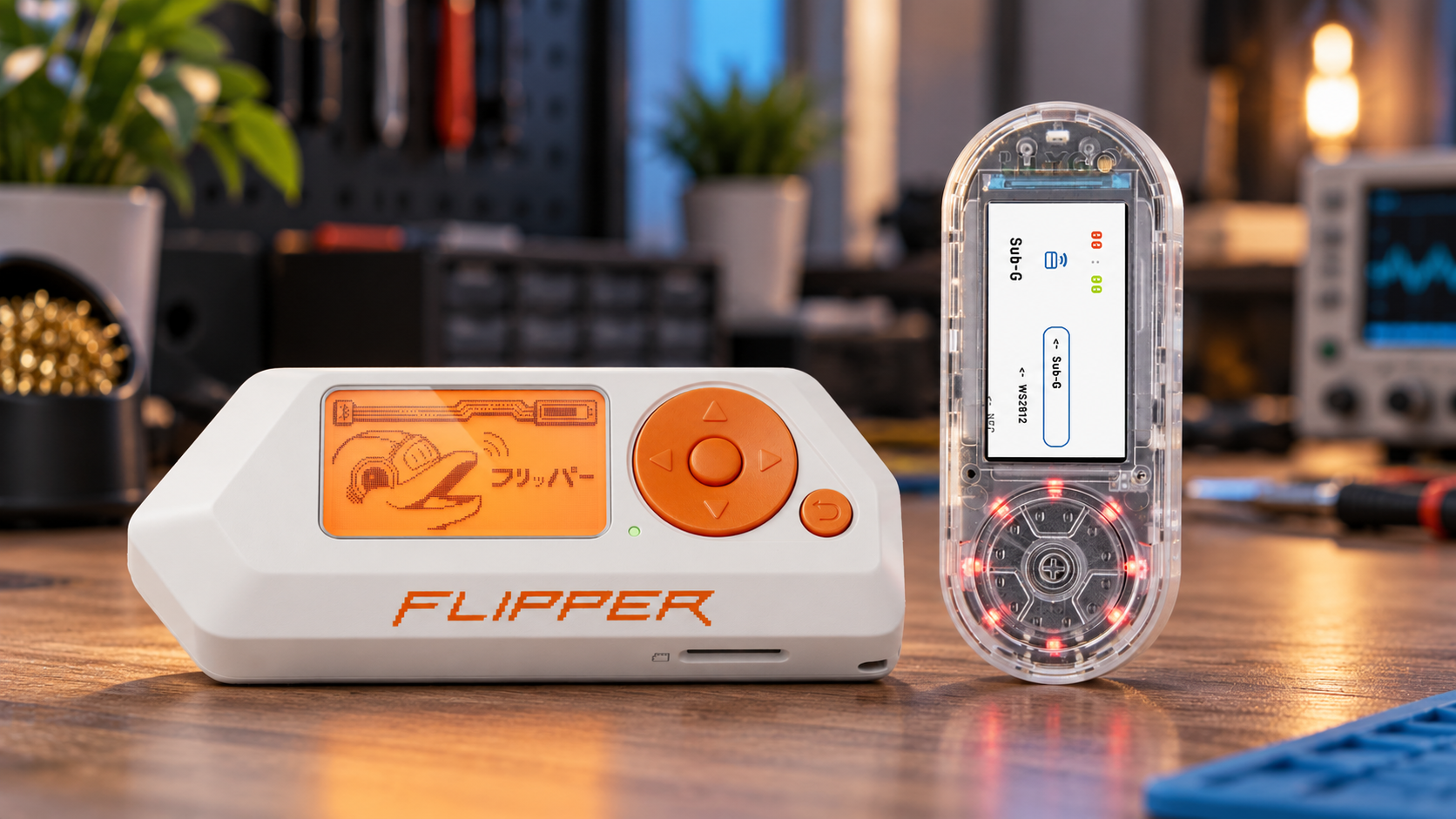
Choose Flipper Zero if you want an integrated handheld for supported Sub-GHz, NFC, 125 kHz RFID, infrared and iButton tasks, with an official update workflow. Choose the LILYGO T-Embed CC1101 if built-in Wi-Fi, a color screen and ESP32 development matter more, and you are comfortable selecting firmware. The key T-Embed CC1101 vs Flipper Zero tradeoff is software integration and missing hardware, not simply processor speed.
T-Embed CC1101 vs Flipper Zero at a glance
This comparison covers the standard LILYGO T-Embed CC1101 sold by SDRstore. It is different from the original T-Embed control-panel board and the CC1101 Plus. LILYGO identifies the Plus as the option with an additional nRF24L01 radio; the standard CC1101 model already includes PN532 NFC and infrared hardware.
| Feature | T-Embed CC1101 | Flipper Zero |
|---|---|---|
| Main platform | ESP32-S3 development platform | STM32WB55-based multi-tool |
| Wi-Fi | Built-in 2.4 GHz Wi-Fi | No built-in Wi-Fi; optional expansion |
| Bluetooth LE | Built in | Built in |
| Sub-GHz radio | CC1101 | CC1101 |
| 13.56 MHz NFC | PN532; functions depend on firmware | ST25R3916 with official NFC application |
| 125 kHz RFID | Not built in | Built in |
| iButton contacts | Not built in | Built in |
| Infrared | Transmit and receive hardware | Transmit and receive hardware |
| Display | 1.9-inch color, 320 × 170 | 1.4-inch monochrome, 128 × 64 |
| Controls | Rotary encoder and button | Directional pad and back button |
| Expansion | QWIIC connections and board-specific interfaces | External GPIO header and accessory modules |
Hardware details are documented in the LILYGO hardware guide and Flipper Zero technical specifications. A component being present does not establish that every firmware exposes the same functions.
Flipper Zero is the more integrated starting point
Flipper Zero is the stronger fit when you want to explore several supported technologies through one consistent interface. Its official software provides dedicated applications for Sub-GHz radio, NFC, low-frequency RFID and other built-in hardware.
The official update process uses Flipper Mobile App or qFlipper. Budget for a microSD card: Flipper's standard package does not include one, and the manufacturer requires it for normal setup.
This integration matters if you want to spend your time using supported tools rather than choosing between firmware projects. It also makes Flipper a reasonable choice for a teaching session where every participant should follow the same documented interface. Confirm the exact protocols needed for the lesson before purchasing multiple units.
T-Embed is better suited to Wi-Fi and ESP32 projects
T-Embed CC1101 combines built-in 2.4 GHz Wi-Fi and Bluetooth LE with a color display, portable battery power and an ESP32-S3. It is an appealing platform for a custom controller, wireless sensor display or handheld interface built around your own devices.
The LILYGO repository supplies hardware files, examples and development settings. You can build your own software or choose a compatible prebuilt project; writing an application from scratch is not required for every use.
By contrast, Flipper Zero does not have built-in Wi-Fi. Its optional WiFi Devboard adds ESP32-based development hardware. That accessory has its own software requirements, so compare the complete configuration rather than assuming it behaves like T-Embed's integrated ESP32 platform.
Firmware is part of the T-Embed buying decision
Bruce lists T-Embed CC1101 as a supported device, including its CC1101 and NFC hardware. Other community projects offer different interfaces and feature sets. Check support for your exact board and intended function before choosing an image.
There is also a community Flipper Zero ESP32 port supporting T-Embed CC1101. It brings Flipper-style services and applications to ESP32 hardware, but it is a separate community project rather than the official Flipper Zero firmware distribution.
A familiar menu does not add missing antennas or electrical interfaces. The port documents hardware-related limitations, and applications may need port-specific builds or changes. Do not assume an arbitrary Flipper application, file or companion tool will work unchanged.
For a smooth purchase, establish three things first: the firmware supplied by the seller, the project you intend to use, and whether that project's current build supports your required functions. Keep a known-working recovery image and back up saved data before changing firmware.
NFC does not replace 125 kHz RFID
T-Embed's PN532 handles 13.56 MHz high-frequency contactless communication. It does not provide a built-in 125 kHz low-frequency reader. Flipper Zero has separate NFC and low-frequency RFID hardware, plus physical iButton contacts.
If your main project involves supported 125 kHz proximity badges or iButton keys, Flipper is the more complete starting point. If you are developing around supported 13.56 MHz tags, T-Embed may fit, provided the selected firmware implements the operations you need.
Reading a card identifier is different from obtaining all protected data or reproducing an authenticated credential. Flipper's NFC reading documentation distinguishes card types and the data available from them. Neither product should be treated as a universal badge duplicator.
For a fuller explanation of the frequency difference, see the RFID versus NFC guide.
Sharing a CC1101 does not make the radio tools identical
Both devices use a CC1101 Sub-GHz transceiver. Its operational bands are 300–348 MHz, 387–464 MHz and 779–928 MHz; this is not uninterrupted coverage of every frequency between 300 and 928 MHz.
Supported protocols, antenna implementation, radio settings and firmware determine what you can do with that hardware. Flipper's official Sub-GHz application distinguishes decoding known protocols from recording raw signals. A recording does not establish that a remote can be reproduced successfully.
There is no basis here for claiming that one handheld has greater range. Range depends on the signal, environment, antenna and configuration. Also, a CC1101-based tool is not a replacement for a wideband software-defined radio when your goal is general I/Q capture and SDR signal processing.
Use either device only with systems you own or have permission to test. Radio transmission must follow local requirements; Flipper's regional frequency controls also limit what its official firmware allows you to transmit.
Compare the complete cost, including setup time
Check current local prices, taxes, delivery costs and included accessories. Avoid comparing a discounted bare device with an accessory bundle or a price from another region.
T-Embed offers value when you will use its built-in Wi-Fi, display and development flexibility. Flipper offers value when its integrated applications, LF RFID and iButton hardware cover tasks you would otherwise need to add separately.
Include a supported microSD card and a suitable USB data cable in your budget. Confirm what is already supplied. Battery capacity alone is not a useful runtime comparison: display brightness, radio use, sleep behavior and firmware all affect how long either device lasts.
Which should you buy?
- Choose Flipper Zero for a general handheld with supported NFC, 125 kHz RFID, iButton, infrared and Sub-GHz tools in one official software environment.
- Choose T-Embed CC1101 for built-in Wi-Fi, custom ESP32 applications and community firmware projects, when you are comfortable checking compatibility and managing firmware.
- Choose a specialist tool if your main task is deep RFID analysis or wideband SDR work. The Flipper alternatives guide compares those broader options.
If T-Embed matches your requirements, check its current listing and confirm the supplied firmware before ordering. For a classroom or multi-unit project, use SDRstore's quotation process and specify quantities, the exact CC1101 model and the functions your project requires.
Frequently asked questions
Can T-Embed CC1101 replace Flipper Zero?
For some Wi-Fi, NFC, infrared and Sub-GHz projects, yes, with suitable firmware. It is not a complete replacement because it lacks Flipper's built-in 125 kHz RFID hardware and iButton contacts.
Does the standard T-Embed CC1101 include NFC and infrared?
Yes. LILYGO documents PN532 NFC and infrared transmit-and-receive hardware on the standard CC1101 model. The Plus model adds an nRF24L01 radio; it is not required merely to obtain NFC or infrared.
Can T-Embed CC1101 read 125 kHz RFID badges?
Not with its built-in PN532. That chip handles 13.56 MHz contactless communication. A 125 kHz project needs suitable additional hardware or a different device.
Can T-Embed run Flipper Zero firmware?
A community ESP32 port exists for T-Embed CC1101. It is separate from the official Flipper Zero firmware and has its own hardware, application and compatibility limits.
Does Flipper Zero have built-in Wi-Fi?
No. Flipper Zero has Bluetooth LE, while Wi-Fi-related development requires an appropriate external module and software. T-Embed CC1101 has built-in 2.4 GHz Wi-Fi.
Which is the better choice for a beginner?
Flipper Zero is generally the easier starting point for using its documented built-in tools. T-Embed suits a beginner who wants to learn ESP32 development and sees firmware selection and troubleshooting as part of the project.
Shop products for this guide
Explore relevant products from our store.
No posts found
Write a review




We support all major card and digital payment options. More local methods are available and shown during checkout.
You enter into a binding sales contract once you have received an 'order confirmation and sales receipt' email from us, in line with our Sales & Delivery conditions. Therefore, sdrstore.eu has the right to cancel your order in the event of technical problems, delivery failure, Fair use policy and other similar situations.





Your payments are protected by advanced encryption and 3-D Secure authentication for safe online shopping.