








Proxmark3 Bundles 1–4 Compared: What Is Included and Which Should You Buy?
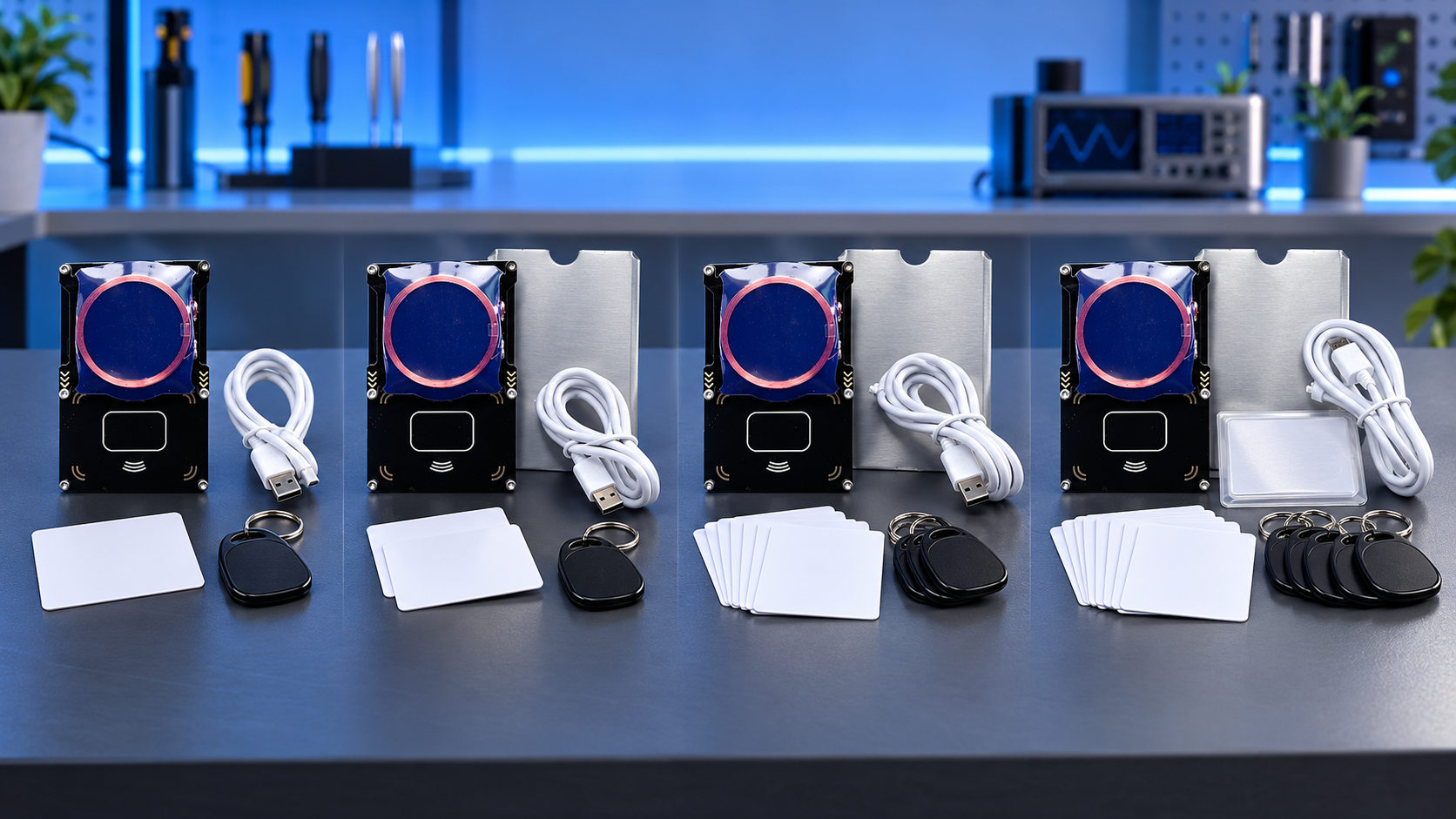
Choose Proxmark3 Bundle 1 for the lowest-cost starting point, Bundle 2 for a CUID-labelled card and fob, Bundle 3 for a mixed UID/CUID pair, or Bundle 4 for the widest range of pictured test media. SDRstore’s listing images identify the same Proxmark3 RDV3 board with an AT91SAM7S512 chip across all four kits. The higher bundle numbers describe different packages; Bundle 4 does not mean RDV4 hardware.
Proxmark3 bundle comparison: what the listing images show
The main differences are the included cards and key fobs. All four images show the reader board in a clear enclosure, an attached circular low-frequency antenna, a USB cable and shielding sleeves. The table records the labels visible in the full-size product images; those labels should not be treated as independent verification of every media chip or the currently installed firmware release.
| Bundle | Pictured cards and fobs | Other image labels | Listed price |
|---|---|---|---|
| Bundle 1 | 1 S50 4UID + T5577 card; 1 S50 4UID + T5577 fob | 5 “Block Shield” sleeves; “Official Firmware 2.0” | €72.21 |
| Bundle 2 | 1 S50 CUID + T5577 card; 1 S50 CUID + T5577 fob | 5 “Block Shield” sleeves; “Official Firmware 2.0” | €78.10 |
| Bundle 3 | 1 S50 4UID + T5577 card; 1 S50 CUID + T5577 fob | 5 “Block Shield” sleeves; “Official Firmware 2.0” | €87.92 |
| Bundle 4 | 1 S50/7UID medium; 1 S70/7UID medium; 1 S50/4UID + T5577 fob | “ICEMAN Firmware”; S50/S70 media marked “Random Card or Tag”; sleeves pictured without a stated quantity | €100.52 |
Prices were observed on 12 October 2026. Check the linked listings for current pricing and configurations. Bundle 4’s image shows two white cards, but its “Random Card or Tag” wording means you should confirm the supplied form factor if card-shaped media are essential.
What stays the same across the four kits?
Each listing image names the board Proxmark3 RDV3 with AT91SAM7S512. There is no pictured progression from a smaller-memory board in Bundle 1 to a faster or newer board in Bundle 4.
Microchip specifies 512 KB of flash memory and 64 KB of SRAM for the AT91SAM7S512. Flash stores firmware; SRAM is working memory. A “512 KB” board description therefore does not mean 512 KB of RAM.
The RfidResearchGroup Proxmark3 project distinguishes generic RDV1/RDV2/RDV3 and Proxmark3 Easy hardware from RDV4. Use software and build settings appropriate to the actual board. These listing photos do not establish the manufacturer or provenance of the supplied hardware.
Understanding the card and fob labels
Radio-frequency identification (RFID) media can use different frequency bands, memory layouts and identifier formats. For background, see SDRstore’s guide to RFID and NFC frequencies, tags and readers. The bundled-media labels describe the test blanks, not a promise of compatibility with every existing credential.
- S50 and S70: shorthand commonly used for MIFARE Classic-compatible 1K and 4K media respectively. Bundle 4 depicts one of each, giving it a wider choice of memory layouts.
- 4UID and 7UID: labels for four-byte and seven-byte unique identifiers. Identifier length and memory capacity are separate characteristics.
- UID and CUID: vendor labels used to distinguish types of changeable-identifier media. The community often associates CUID with Gen2 or direct-write media, but the label alone does not verify the precise chip generation supplied in a particular order.
- + T5577: indicates a low-frequency component alongside the high-frequency component in the same pictured card or fob. It does not represent an additional separate card.
The RfidResearchGroup notes on changeable-identifier cards document these naming conventions and the differences between media families. Match the blank’s exact behaviour to your project rather than choosing solely by its appearance or bundle number.
Which Proxmark3 bundle should you buy?
Bundle 1: the economical starting point
Bundle 1 suits a buyer who wants the reader plus a card and a fob labelled S50 4UID + T5577. It provides two physical formats for initial experiments without paying for the wider selection pictured in Bundle 4.
Choose Bundle 1 when basic four-byte-identifier and low-frequency test media fit your plans. Choose another package if you specifically need CUID-labelled blanks or seven-byte S50/S70 media.
Bundle 2: CUID-labelled media in both formats
Bundle 2 pairs a CUID-labelled card with a CUID-labelled fob. At the observed prices, it costs €5.89 more than Bundle 1.
The reason to choose Bundle 2 is its pictured media type, not extra processing speed. If CUID behaviour matters to your work, confirm the shipped blank’s chip generation and supported write method before ordering.
Bundle 3: a mixed UID/CUID pair
Bundle 3 combines the UID-labelled card pictured in Bundle 1 with the CUID-labelled fob pictured in Bundle 2. This suits a buyer who specifically wants that combination rather than two similarly labelled blanks.
Bundle 3 is €9.82 above Bundle 2 at the observed prices, but its images do not establish a hardware upgrade. Because both the label and physical format differ between its card and fob, the pair is not a controlled comparison of chip behaviour alone.
Bundle 4: the broadest pictured media selection
Bundle 4 depicts S50/7UID and S70/7UID media plus an S50/4UID + T5577 fob. Its image also labels the firmware Iceman. This is the most relevant package when your project calls for both 1K and 4K media with seven-byte identifiers alongside the dual-frequency fob.
Bundle 4 costs €28.31 more than Bundle 1 at the observed prices. That premium buys a different pictured package, not verified RDV4 hardware or guaranteed support for a particular badge system. If you already own suitable test blanks, compare the value of the included media before paying more.
Check firmware and setup requirements before ordering
The firmware names in the comparison table are transcribed from the product images. They describe the graphics, rather than a verified current installed release. If preloaded Iceman firmware is a purchase requirement, confirm the exact shipped firmware and the matching client software for your selected bundle.
Plan to use a computer for the normal Proxmark3 client workflow. The RfidResearchGroup project documents support for Windows, Linux and macOS, among other platforms. Follow its instructions for your operating system and board revision, and use compatible client and device firmware versions.
The listings specify no built-in battery. A USB power bank can supply power, but it does not provide the computer client or guarantee that a particular standalone mode is available. Standalone features depend on the firmware build.
Use the reader with media you own or have permission to assess. Included blanks and an RFID reader do not guarantee that another credential can be reproduced: protocol, chip capabilities and security features all affect what is possible.
Frequently asked questions
Does Proxmark3 Bundle 4 include RDV4 hardware?
No. SDRstore’s Bundle 4 image identifies the board as RDV3 with an AT91SAM7S512 chip. “Bundle 4” is the package number, not the hardware revision.
Which bundle is best for a beginner?
Bundle 1 is the lowest-priced starting point among the four observed listings if its UID-labelled card and fob suit your first projects. A beginner who already needs seven-byte S50 and S70 test media has a clearer reason to choose Bundle 4.
What changes between Proxmark3 Bundles 2 and 3?
Bundle 2 pictures a CUID-labelled card and fob. Bundle 3 pictures a UID-labelled card and a CUID-labelled fob. Their images identify the same RDV3 board and show the same firmware label.
Are five shielding sleeves included in every bundle?
The images for Bundles 1–3 explicitly state five “Block Shield” sleeves. Bundle 4 pictures sleeves but does not state their quantity. Check the Bundle 4 listing with the seller if the count matters to your order.
Does every bundle come with Iceman firmware?
The images alone do not establish that. Bundle 4’s image says “ICEMAN Firmware”, while the other three images say “Official Firmware 2.0”. Confirm the currently supplied firmware for the exact bundle if this determines your purchase.
Will the included cards work with every RFID system?
No. The supplied media have specific identifier formats and chip capabilities. A compatible frequency is only one requirement; protocol, memory organisation, authentication and the target reader’s checks also matter.
Choose by the media your project needs
Bundle 1 is the budget choice; Bundle 2 supplies the CUID-labelled pair; Bundle 3 supplies the mixed pair; Bundle 4 offers the widest depicted selection. Compare the inventory against your planned test media, then check the relevant product listing for current pricing and supplied firmware. For a laboratory or multi-unit purchase, use the product page’s “Add to Quote” option to request the required quantities and confirm media specifications.
No posts found
Write a review






We support all major card and digital payment options. More local methods are available and shown during checkout.
You enter into a binding sales contract once you have received an 'order confirmation and sales receipt' email from us, in line with our Sales & Delivery conditions. Therefore, sdrstore.eu has the right to cancel your order in the event of technical problems, delivery failure, Fair use policy and other similar situations.






Your payments are protected by advanced encryption and 3-D Secure authentication for safe online shopping.