








iCopy-XS Basic vs Intermediate vs Advanced: Which Package Do You Need?
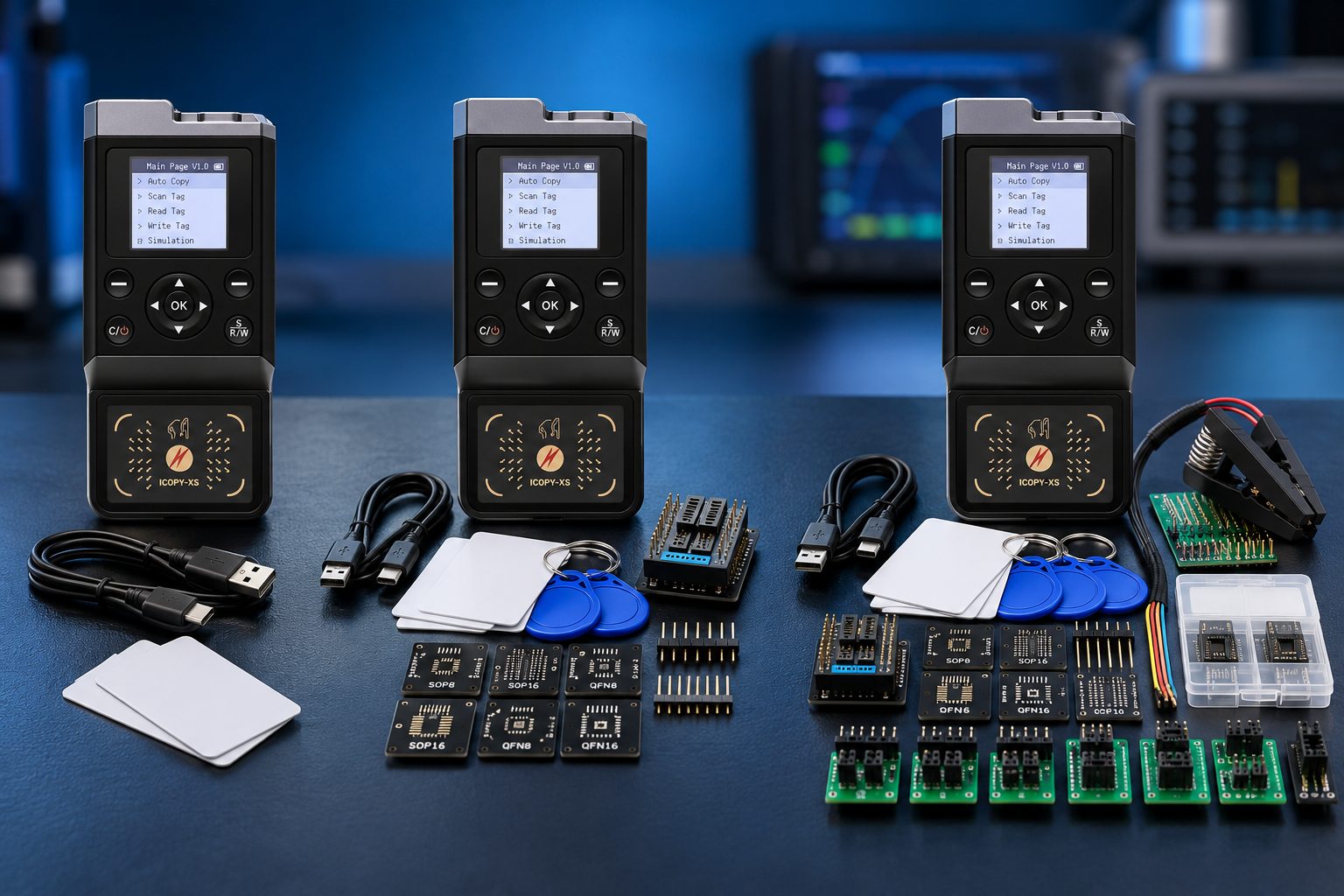
Choose iCopy-XS Basic for common MIFARE 1K 4-byte UID and supported low-frequency credential work. Choose Intermediate when you need a wider selection of MIFARE, Ultralight and NTAG-compatible blanks. Choose Advanced when your work also requires compatible iCLASS Legacy, iCLASS Elite or iCODE SLI/SLIX blanks. All three SDRstore packages include the same full iCopy-XS device. The difference is the supplied blank-tag assortment.
iCopy-XS Basic vs Intermediate vs Advanced: the quick comparison
The package names describe the included cards, tags and stickers. Buying Basic does not give you a reduced-feature XS device, and buying Advanced does not add a faster processor or unlock a separate level of XS hardware.
| Package | What is supplied | Main reason to choose it |
|---|---|---|
| Basic | iCopy-XS plus Basic Card Pack | Known MIFARE 1K 4-byte UID and LF requirements |
| Intermediate | iCopy-XS plus Basic and Intermediate Card Packs | More MIFARE memory sizes, UID formats, Ultralight and NTAG blanks |
| Advanced | iCopy-XS plus Basic and Advanced Card Packs | Additional iCLASS Legacy, iCLASS Elite and iCODE-compatible blanks |
The official iCopy-XS package description and SDRstore listings confirm this bundle structure. Advanced includes Basic plus Advanced; it does not mean Basic plus Intermediate plus Advanced.
The wider packs cover many of the same blank families but contain different assortments and quantities. Choose by the media you need, rather than assuming the highest package contains the most of every card.
Basic: a focused starter package
The Basic assortment concentrates on MIFARE 1K-compatible blanks with 4-byte identifiers and low-frequency media. SDRstore lists Gen1, Gen2 and Gen2a compatible cards, HF stickers and test media, plus T5577 LF cards, a sticker and test media.
Basic makes sense when you already know the credential formats used in your authorized test environment. It also suits a buyer who wants the XS device first and plans to add specific compatible blanks as requirements become clear.
- You mainly work with supported LF credentials or MIFARE 1K 4-byte UID formats.
- You do not currently need the wider HF blank assortment.
- You prefer to purchase additional media for identified projects.
Check the iCopy-XS Basic package for its current contents and price.
Intermediate: a broader MIFARE and NFC assortment
Intermediate adds blanks for MIFARE 1K with a 7-byte UID, MIFARE 4K with 4-byte and 7-byte UIDs, Ultralight, Ultralight C, Ultralight EV1 and NTAG-compatible formats. Its extra pack also contains common MIFARE 1K 4-byte compatible cards and T5577 LF cards.
The official Intermediate pack description documents these additional media types. This makes Intermediate a sensible starting point for an authorized lab working with varied MIFARE and NFC tag families, without a specific requirement for the Advanced pack's iCLASS or iCODE blanks.
For example, a training bench comparing several MIFARE memory sizes and NTAG-compatible test media benefits from variety more than extra copies of one common blank.
Compare the iCopy-XS Intermediate package if that matches your planned work.
Advanced: choose it for the additional credential families
Advanced covers the broader MIFARE, Ultralight and NTAG assortment and adds iCLASS Legacy, iCLASS Elite and iCODE SLI/SLIX-compatible blanks. Those additions are listed in the official Advanced pack description.
The reason to pay for Advanced is a planned need for these extra media families. The package is useful for a mixed RFID teaching collection or a professional test bench whose supported credentials extend beyond the Intermediate assortment.
It is less compelling when your entire workload uses one common LF or MIFARE format. More variety does not automatically provide better value for repeated work with a single tag type.
Review the iCopy-XS Advanced package against your actual media requirements.
Advanced does not include the iCLASS SE/SEOS decoder
iCLASS Legacy and iCLASS Elite blanks are not the same purchase requirement as iCLASS SE or SEOS workflows. The Advanced package's published contents do not include the separate iCS Decoder.
The manufacturer's decoder documentation describes it as an accessory requiring an iCopy-X. It also states that the relevant target system must accept legacy credentials, so the accessory is not a universal solution for every SE or SEOS deployment.
If SE/SEOS is your reason for buying, confirm the exact system, supported workflow, decoder and required blank media before selecting a package. The word Advanced alone does not resolve that compatibility question.
Match the blank to the credential
Radio-frequency identification (RFID) credentials can look alike while using different technologies. The same operating frequency does not establish compatible memory, security or writing behavior.
For MIFARE-compatible media, check the memory size and identifier format. UID means unique identifier; the pack descriptions distinguish 4-byte and 7-byte formats. Gen1, Gen2 and Gen2a also describe different blank-card writing behavior and should not be treated as interchangeable.
NXP's MIFARE Classic documentation describes memory organization and authentication requirements. Reading an identifier is not equivalent to reproducing every protected part of a credential.
The official iCopy-X FAQ specifies iCopy-X branded blank badges for the supported standard workflow. Do not budget on generic blank cards working as substitutes.
Buying a wider pack also does not remove device limitations. The official product documentation lists MIFARE DESFire, EMV payment cards and iCLASS Elite with custom keys as unsupported. Some iCODE operations are described as partial support.
How to choose without buying unused blanks
- List the credential families you expect to work with in your authorized environment.
- Confirm the exact formats and required operation, rather than choosing by badge appearance or frequency alone.
- Match those formats to the supplied blank assortment.
- Estimate how many blanks of each type you need. A mixed starter assortment may not cover repeated work with one format.
- Check current package contents, price and any separate accessories before ordering.
As a dated price comparison, SDRstore's EUR listings displayed €566.96 for Basic, €646.39 for Intermediate and €782.57 for Advanced on 12 October 2026. That placed Intermediate €79.43 above Basic and Advanced €136.18 above Intermediate. Check the linked listings for current pricing.
For varied MIFARE and NFC work, Intermediate is a reasonable default. For a known narrow workload, choose Basic. For identified iCLASS Legacy, Elite or iCODE media requirements, choose Advanced.
If you are still choosing the device itself, read iCopy XS vs Proxmark3 vs Chameleon Ultra. For company or university purchases, use Add to Quote on the relevant product page and specify the package, quantity and additional media required.
Use the equipment with credentials, readers and systems you own or have permission to test.
Frequently asked questions
Do all three packages include the same iCopy-XS device?
Yes. SDRstore's Basic, Intermediate and Advanced packages all include the full XS device. The supplied blank-card assortment changes.
Is iCopy-XS Basic the older iCopy-X Basic hardware model?
No. In this package comparison, Basic names the card bundle supplied with an XS device. Separate iCopy-X family model names should not be confused with XS package options.
Does Advanced include the entire Intermediate pack?
No. The listed Advanced bundle contains the XS device, Basic Card Pack and Advanced Card Pack. Although the extra packs share several media types, their quantities and assortments differ.
Can I buy Basic and add compatible blanks later?
Yes. Additional compatible iCopy-X blank media can be purchased separately. Confirm the exact type and device compatibility before ordering.
Does Advanced include the iCS Decoder?
No. The published Advanced contents list iCLASS Legacy and Elite blanks, but not the separate decoder accessory required for supported SE/SEOS workflows.
Which package should a beginner choose?
Choose Basic when you know your work only needs its supplied formats. Choose Intermediate when you want a broader MIFARE and NFC assortment. Choose Advanced for specific additional media requirements, rather than assuming it has more capable XS hardware.
No posts found
Write a review






We support all major card and digital payment options. More local methods are available and shown during checkout.
You enter into a binding sales contract once you have received an 'order confirmation and sales receipt' email from us, in line with our Sales & Delivery conditions. Therefore, sdrstore.eu has the right to cancel your order in the event of technical problems, delivery failure, Fair use policy and other similar situations.






Your payments are protected by advanced encryption and 3-D Secure authentication for safe online shopping.