








ACARS with RTL-SDR: Decode Aircraft Messages Beyond ADS-B
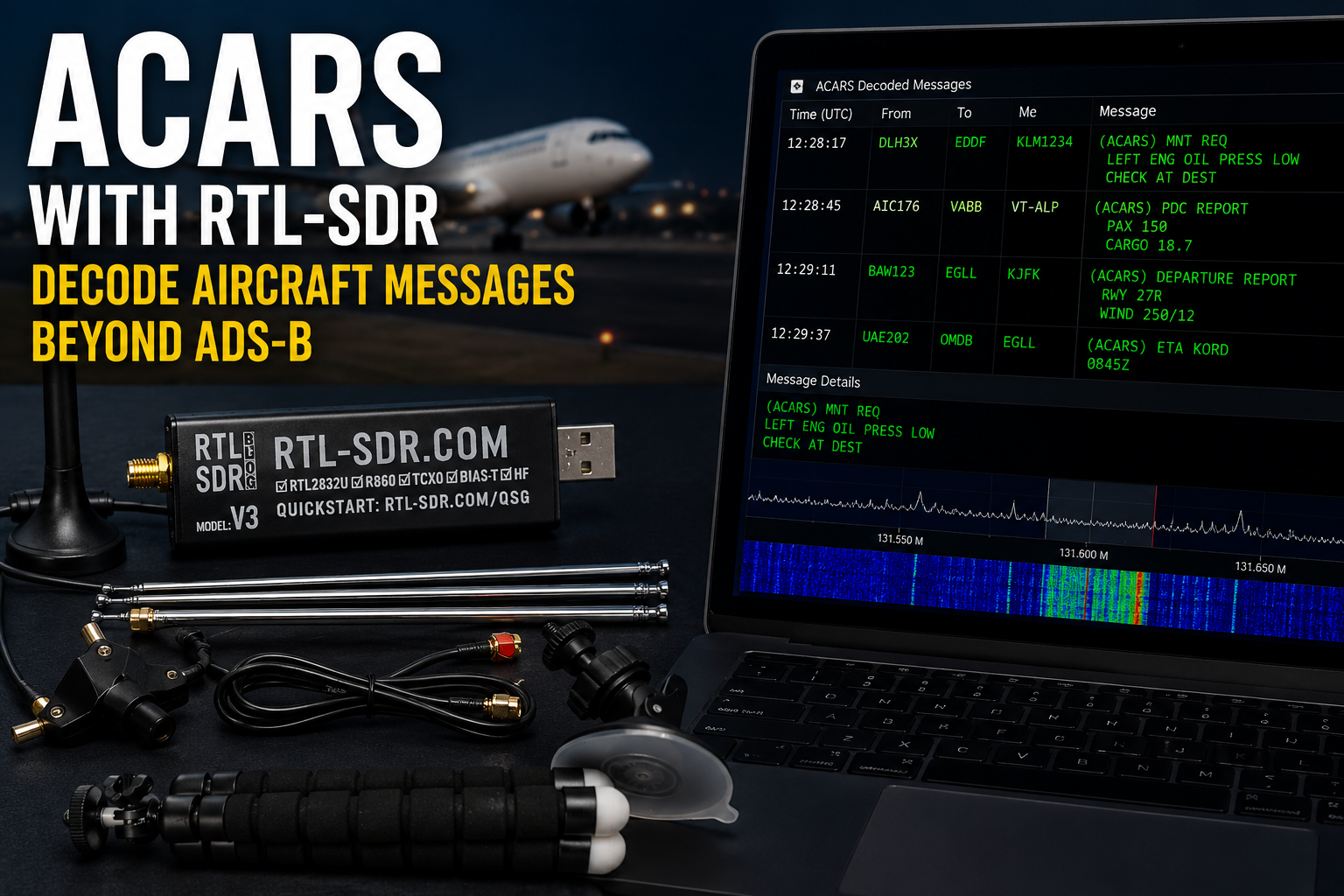
ADS-B is the most popular aircraft-tracking project for RTL-SDR users, but it is not the only aviation signal you can receive. If you want to go beyond dots on a map, ACARS and VDL Mode 2 can show short aircraft operational messages, airline datalink activity, position reports, maintenance-related data, and other air-to-ground or ground-to-air communication events.
With a low-cost RTL-SDR receiver, a suitable VHF airband antenna, and the right decoder software, you can monitor classic VHF ACARS and newer VDL2 signals from aircraft in your area. The setup is different from ADS-B because ACARS and VDL2 use VHF airband frequencies around 130–137 MHz, not 1090 MHz.
This guide explains how to decode ACARS with RTL-SDR, how VDL2 differs from classic ACARS, which software to use, which frequencies to try, what antenna works best, and how to avoid the most common beginner mistakes.
Browse current equipment in the RTL-SDR receivers, kits, antennas, and accessories category. For aircraft tracking at 1090 MHz, read Best SDR for ADS-B: RTL-SDR Kits, Antennas, Filters, and LNAs Compared.
Quick Answer: Can RTL-SDR Decode ACARS?
Yes. RTL-SDR can decode classic VHF ACARS and VDL Mode 2 when paired with the correct software and a VHF airband antenna. For classic ACARS, use acarsdec. For VDL Mode 2, use dumpvdl2. For beginners, VDL2 on 136.975 MHz is often a good first test because it is widely used and normally produces more activity near busy airports.
| Signal type | Common decoder | Typical frequency range | Best use |
|---|---|---|---|
| ADS-B | dump1090, readsb, tar1090, PiAware | 1090 MHz | Live aircraft positions on a map |
| Classic VHF ACARS | acarsdec | Usually around 129–132 MHz, depending on region | Older short aircraft operational messages |
| VDL Mode 2 | dumpvdl2 | Commonly around 136.700–136.975 MHz | Higher-volume digital datalink messages carrying ACARS-style content |
The short recommendation: start with ADS-B if you want maps. Start with ACARS or VDL2 if you want to learn aviation datalink monitoring.
ACARS vs ADS-B: What Is the Difference?
ADS-B and ACARS are both aviation-related signals, but they serve different purposes.
| Feature | ADS-B | ACARS / VDL2 |
|---|---|---|
| Main purpose | Aircraft position broadcasting | Short operational and datalink messages |
| Typical beginner frequency | 1090 MHz | 131.525, 131.725, 131.825, or 136.975 MHz depending on mode and region |
| Beginner software | dump1090, readsb | acarsdec for classic ACARS, dumpvdl2 for VDL2 |
| Output style | Aircraft position, altitude, callsign, speed, and track | Text-like operational messages, message labels, station data, and datalink frames |
| Antenna focus | 1090 MHz antenna with clear sky view | VHF airband antenna around 118–137 MHz |
| Best beginner result | Live aircraft map | Message log and datalink activity |
ACARS is not a replacement for ADS-B. It is a different layer of aviation monitoring. Many hobbyists use both: ADS-B for position tracking and ACARS/VDL2 for datalink activity.
Classic ACARS vs VDL Mode 2
When people say “ACARS,” they often mix two related but different VHF workflows.
Classic VHF ACARS
Classic ACARS, sometimes called Plain Old ACARS, uses older VHF datalink channels. It can be decoded with software such as acarsdec. In Europe, common frequencies include 131.525 MHz, 131.725 MHz, and 131.825 MHz. In North America, common channels include 129.125 MHz, 130.025 MHz, 130.450 MHz, 131.125 MHz, and 131.550 MHz.
VDL Mode 2
VDL Mode 2 is a newer and more efficient VHF datalink technology. It can carry ACARS-style messages and other datalink protocols. The most common first frequency to try is 136.975 MHz, the Common Signalling Channel. In Europe, other VDL2 frequencies may include 136.725 MHz, 136.775 MHz, 136.825 MHz, and 136.875 MHz depending on location and network activity.
Which should beginners try first?
If you are near busy airspace, try VDL2 on 136.975 MHz first with dumpvdl2. If you want classic ACARS, try acarsdec with the regional ACARS channels that fit within the same RTL-SDR bandwidth window.
Recommended Hardware for ACARS with RTL-SDR
1. RTL-SDR receiver
A genuine RTL-SDR Blog receiver is a strong starting point for ACARS and VDL2 because the target signals are in the VHF airband. The RTL-SDR Blog V3 kit remains one of the easiest beginner choices because it includes the receiver and a multipurpose antenna set. The RTL-SDR Blog V3 USB-C dongle is useful if you prefer a modern USB-C form factor and already have antennas.
If you already own an RTL-SDR Blog V4, it can also receive ACARS and VDL2. However, because V4 availability is limited, the V3 or V3 USB-C is usually the safer current buying direction.
2. VHF airband antenna
ACARS and VDL2 are not 1090 MHz ADS-B signals. A dedicated ADS-B antenna is not ideal for ACARS because it is tuned for a much higher frequency.
For ACARS and VDL2, use:
- A VHF airband antenna around 118–137 MHz
- An adjustable dipole set to a suitable length for the airband
- A simple outdoor vertical antenna for permanent stations
- A VHF discone or wideband receiving antenna if you also monitor airband voice
Place the antenna near a window or outdoors with a clear view of the sky. Aircraft are moving transmitters, so antenna height and placement matter.
3. FM block filter where needed
Strong FM broadcast stations around 88–108 MHz can overload an RTL-SDR receiver and reduce performance around the nearby VHF airband. If your waterfall looks overloaded or noisy, a filter can help.
View the Broadcast FM Block Filter for strong local FM environments.
4. Low-noise amplifier only when justified
Do not add an LNA automatically. An LNA may help when the antenna is outdoors and the cable run is long, but it can also overload the receiver if strong FM broadcast, airband, or pager signals are nearby.
Read Do You Need an LNA for SDR?
Best Software for ACARS and VDL2
| Software | Best for | RTL-SDR support | Beginner note |
|---|---|---|---|
| acarsdec | Classic VHF ACARS | Yes | Can decode multiple classic ACARS channels within the same RTL-SDR bandwidth window. |
| dumpvdl2 | VDL Mode 2 | Yes | Good first choice for 136.975 MHz VDL2 monitoring. |
| SDR++ or SDR# | Visual signal checking | Yes | Use to confirm bursts before debugging decoder software. |
| rtl_test | Dongle verification and PPM checks | Yes | Use before blaming acarsdec or dumpvdl2. |
| Raspberry Pi and systemd | Permanent receiver station | Yes | Useful after manual decoding works. |
Step 1: Install RTL-SDR Drivers
Before installing ACARS software, confirm that your RTL-SDR works correctly.
Linux quick check
sudo apt update
sudo apt install rtl-sdr
rtl_test
If rtl_test finds the dongle, the receiver is visible to the system. If it fails, fix RTL-SDR drivers and permissions before installing acarsdec or dumpvdl2.
Windows quick check
On Windows, install the correct RTL-SDR driver with Zadig, then test the receiver in SDR# or SDR++. Do not start with decoder troubleshooting until the waterfall shows normal VHF activity.
Read the full Windows guide: RTL-SDR Setup Guide for Windows: SDR#, SDR++, Zadig, Drivers, and First Signal.
Step 2: Check the Signal Visually First
Before running a decoder, open SDR++ or SDR# and tune around the target frequency.
Try these first frequencies
| Region or mode | Frequency to try | Decoder |
|---|---|---|
| VDL2 worldwide first test | 136.975 MHz | dumpvdl2 |
| Europe classic ACARS | 131.525 MHz, 131.725 MHz, 131.825 MHz | acarsdec |
| North America classic ACARS | 129.125 MHz, 130.025 MHz, 130.450 MHz, 131.125 MHz, 131.550 MHz | acarsdec |
| Europe VDL2 examples | 136.725 MHz, 136.775 MHz, 136.825 MHz, 136.875 MHz, 136.975 MHz | dumpvdl2 |
You should see short bursts rather than continuous voice audio. If you see nothing for a long time, improve antenna placement before changing software.
Step 3: Decode Classic ACARS with acarsdec
acarsdec is a multi-channel classic VHF ACARS decoder with RTL-SDR support. It can monitor several frequencies at once, but with RTL-SDR the selected frequencies must fit within the same practical bandwidth window.
Linux install direction
On Debian or Ubuntu, the common build workflow is:
sudo apt update
sudo apt install build-essential cmake git libusb-1.0-0-dev librtlsdr-dev libxml2-dev zlib1g-dev pkg-config

git clone https://github.com/szpajder/libacars.git
cd libacars
mkdir build && cd build
cmake ../
make
sudo make install
sudo ldconfig

cd ~
git clone https://github.com/TLeconte/acarsdec.git
cd acarsdec
mkdir build && cd build
cmake .. -Drtl=ON
make
sudo make install
Check the current upstream documentation before building because repositories, dependencies, and maintained forks can change.
Example Europe command
acarsdec -o 2 -g 42 -r 0 131.525 131.725 131.825Example North America command
acarsdec -o 2 -g 42 -r 0 130.025 130.450 131.125 131.550Use these as starting examples, not fixed universal commands. Your best gain, frequency correction, antenna position, and local channels may differ.
Step 4: Decode VDL Mode 2 with dumpvdl2
dumpvdl2 is the recommended decoder for VDL Mode 2. VDL2 often produces more traffic than classic ACARS near busy airports and along active air routes.
Basic RTL-SDR command
The simplest RTL-SDR test uses device 0, a manual gain setting, and the default VDL2 frequency of 136.975 MHz:
dumpvdl2 --rtlsdr 0 --gain 40 --correction 0If your build produces a local binary in the source folder, you may need to run:
./dumpvdl2 --rtlsdr 0 --gain 40 --correction 0Decode a specific VDL2 channel
dumpvdl2 --rtlsdr 0 --gain 40 --correction 0 136.975MDecode multiple nearby VDL2 channels
dumpvdl2 --rtlsdr 0 --gain 40 --correction 0 136.725M 136.775M 136.875M 136.975MStart with only 136.975 MHz. Add more channels only after the first setup works.
Step 5: Choose Gain Carefully
Too little gain means weak bursts are missed. Too much gain raises the noise floor, clips strong aircraft bursts, and can reduce decoder performance.
Good starting gain values
- Start around 28–40 dB for many RTL-SDR airband setups.
- Use SDR++ or SDR# to check whether the noise floor jumps too high.
- Reduce gain if strong local signals overload the receiver.
- Increase gain only if bursts are clearly weak and the noise floor remains controlled.
For VDL2, signal-to-noise ratio matters more than simply maximizing gain. A clean signal with moderate gain is usually better than an overloaded signal with maximum gain.
Step 6: Set Frequency Correction If Needed
Genuine RTL-SDR Blog receivers include a stable TCXO, so frequency error is usually small. Still, frequency correction can matter for VDL2 decoding.
Check PPM with rtl_test
rtl_test -pLet it run for several minutes and look for the cumulative PPM estimate. Then pass that value to the decoder if needed.
dumpvdl2 correction example
dumpvdl2 --rtlsdr 0 --gain 40 --correction 1 136.975Macarsdec correction example
acarsdec -o 2 -g 42 -p 1 -r 0 131.525 131.725 131.825Do not guess large correction values. If you own a genuine TCXO-based RTL-SDR, start near zero and adjust only when the decoder output or signal position suggests a consistent offset.
Step 7: Improve the Antenna Before Replacing the SDR
If you receive few or no ACARS messages, the antenna is usually the first thing to improve.
Antenna tips for ACARS and VDL2
- Use a VHF airband antenna, not a dedicated 1090 MHz ADS-B antenna.
- Place the antenna high and near a window or outdoors.
- Keep the antenna away from laptops, routers, monitors, LED lights, and power supplies.
- Use a shorter coax cable if possible.
- If using a dipole, adjust it for the VHF airband rather than ADS-B.
- Try both vertical and slightly angled placements.
- Test when aircraft traffic is active in your area.
The included RTL-SDR multipurpose dipole kit can work for first tests, but a better outdoor VHF antenna will normally improve reception more than changing the receiver.
ACARS and VDL2 on Raspberry Pi
A Raspberry Pi can run a permanent ACARS or VDL2 station once your manual command works. Do not build a systemd service before proving the receiver, antenna, frequency, and gain manually.
Recommended workflow
- Test the RTL-SDR with
rtl_test. - Verify signals visually in SDR++ or another SDR application.
- Run acarsdec or dumpvdl2 manually.
- Adjust antenna placement and gain.
- Log output to a file only after messages are decoding reliably.
- Create a systemd service for boot-time operation.
- Check logs after reboot.
For broader Raspberry Pi SDR ideas, read Best SDR for Raspberry Pi: RTL-SDR, ADS-B, AIS, Satellites, and Remote Monitoring.
Common ACARS with RTL-SDR Problems
| Problem | Likely cause | Fix |
|---|---|---|
| No messages at all | Poor antenna placement, wrong frequency, no traffic, or driver issue | Check waterfall first, move antenna, and try 136.975 MHz VDL2. |
| RTL-SDR not found | Driver or permissions problem | Run rtl_test, fix Zadig on Windows, or fix udev rules on Linux. |
| Messages appear only occasionally | Weak signal or low aircraft traffic | Improve antenna height, use shorter cable, and test near busier flight periods. |
| Decoder shows many errors | Poor signal-to-noise ratio, overload, or frequency offset | Adjust gain, check PPM correction, and consider an FM block filter. |
| ACARS channels do not fit together | Selected frequencies are too far apart for one RTL-SDR window | Use fewer channels, choose a regional set within the same 2 MHz span, or use multiple receivers. |
| VDL2 bursts visible but no decode | Gain, PPM, bandwidth, or wrong decoder settings | Start with default 136.975 MHz, use moderate gain, and verify RTL-SDR frequency correction. |
Should You Feed ACARS or VDL2 Data Online?
Some communities accept ACARS or VDL2 feeds, but you should think carefully before forwarding aircraft message data. Unlike ADS-B position data, ACARS may include operational text, maintenance details, routing information, and other content that should be handled responsibly.
Before feeding or publishing any decoded data:
- Check local laws and regulations.
- Read the terms of the receiving platform.
- Do not publish sensitive or personally identifying content.
- Do not use decoded information for operational decisions.
- Do not interfere with aviation communications.
- Use the project for education, RF learning, and responsible monitoring.
Legal, Privacy, and Safety Notes
Radio-monitoring laws vary by country. In some places, receiving aviation communications may be legal for personal use but publishing, forwarding, or acting on message content may be restricted. In other places, decoding or storing certain communications may be restricted.
Use ACARS and VDL2 decoding responsibly:
- Receive only. Do not transmit on aviation frequencies.
- Do not interfere with aircraft or ground stations.
- Do not share sensitive message content publicly.
- Do not use decoded data for flight safety, navigation, or operational decisions.
- Respect airline, crew, passenger, and operational privacy.
- Check your local laws before decoding, logging, or forwarding messages.
An RTL-SDR is receive-only, which is ideal for passive learning. Do not use transmit-capable SDR hardware around aviation bands unless you are legally authorized and operating in a controlled test environment.
Recommended ACARS Starter Setup
| Item | Recommended choice | Why |
|---|---|---|
| Receiver | RTL-SDR Blog V3 kit or RTL-SDR Blog V3 USB-C dongle | Affordable, stable, receive-only, and suitable for VHF airband reception. |
| Antenna | VHF airband antenna or adjustable dipole | ACARS and VDL2 are around 130–137 MHz, not 1090 MHz. |
| Software for classic ACARS | acarsdec | Multi-channel classic VHF ACARS decoding. |
| Software for VDL2 | dumpvdl2 | VDL Mode 2 message decoding and protocol analysis. |
| Optional filter | FM block filter | Useful when local FM broadcast stations overload the receiver. |
| Optional platform | Raspberry Pi | Good for a permanent receiver after manual testing works. |
Related SDRstore.eu Guides
- Best SDR for ADS-B: RTL-SDR Kits, Antennas, Filters, and LNAs Compared
- RTL-SDR Setup Guide for Windows: SDR#, SDR++, Zadig, Drivers, and First Signal
- RTL-SDR Blog V3 Kit Review: Is It Still Worth Buying in 2026?
- RTL-SDR V3 vs V4 vs V4 Lite: Which Budget SDR Should You Buy?
- Best SDR for Raspberry Pi: RTL-SDR, ADS-B, AIS, Satellites, and Remote Monitoring
- Do You Need an LNA for SDR?
Official and Technical Resources
- SKYbrary: Aircraft Communications, Addressing and Reporting System
- acarsdec GitHub repository
- Maintained acarsdec fork
- dumpvdl2 GitHub repository
- libacars GitHub repository
- Airframes VDL introduction
- RTL-SDR Blog quick-start guide
Final Recommendation
For most beginners, the best ACARS setup is an RTL-SDR Blog V3 receiver, a VHF airband antenna, and a computer or Raspberry Pi running acarsdec and dumpvdl2. Start with VDL2 on 136.975 MHz because it is a strong first test frequency in many locations. Then add classic ACARS channels such as 131.525 MHz, 131.725 MHz, and 131.825 MHz if they are active in your region.
If nothing decodes, do not immediately replace the receiver. First check RTL-SDR drivers, antenna placement, waterfall visibility, gain, PPM correction, and local signal activity. For ACARS and VDL2, a better antenna location often improves results more than a more expensive SDR.
ACARS with RTL-SDR is one of the best next projects after ADS-B because it teaches aviation datalink monitoring, VHF reception, decoder setup, gain control, and responsible handling of real-world radio messages.
FAQ
Can RTL-SDR decode ACARS?
Yes. RTL-SDR can decode classic VHF ACARS with acarsdec and VDL Mode 2 with dumpvdl2 when paired with a suitable VHF airband antenna.
What frequency should I use for ACARS in Europe?
Common classic ACARS frequencies in Europe include 131.525 MHz, 131.725 MHz, and 131.825 MHz. For VDL Mode 2, 136.975 MHz is a strong first frequency to try.
What frequency should I use for ACARS in North America?
Common classic ACARS frequencies in North America include 129.125 MHz, 130.025 MHz, 130.450 MHz, 131.125 MHz, and 131.550 MHz. Activity varies by location and airline network.
What is the difference between ACARS and VDL2?
Classic ACARS uses older VHF datalink channels and is commonly decoded with acarsdec. VDL Mode 2 is a newer, more efficient digital VHF datalink and is commonly decoded with dumpvdl2.
Is ACARS the same as ADS-B?
No. ADS-B is mainly used for aircraft position broadcasts, usually on 1090 MHz. ACARS and VDL2 carry short operational and datalink messages on VHF aviation channels around 130–137 MHz.
Can I use my ADS-B antenna for ACARS?
A 1090 MHz ADS-B antenna is not ideal for ACARS or VDL2 because ACARS uses VHF airband frequencies. Use a VHF airband antenna or an adjustable dipole instead.
Which software should I use for ACARS with RTL-SDR?
Use acarsdec for classic VHF ACARS and dumpvdl2 for VDL Mode 2. Use SDR++ or SDR# first if you want to visually confirm that signals are present.
Why am I not receiving any ACARS messages?
The most common causes are poor antenna placement, wrong frequency, low aircraft traffic, receiver overload, incorrect gain, missing RTL-SDR drivers, or frequency correction problems. Start by checking the signal visually in an SDR waterfall.
Can I run an ACARS decoder on Raspberry Pi?
Yes. A Raspberry Pi can run acarsdec or dumpvdl2 as a permanent receiver after you confirm that manual decoding works. Test the antenna, gain, and frequencies first before creating an automatic service.
Is it legal to decode ACARS?
Radio-monitoring laws vary by country. Check your local laws before decoding, logging, forwarding, or publishing aircraft messages. Do not transmit, interfere, share sensitive content, or use decoded messages for operational decisions.
No posts found
Write a review






We support all major card and digital payment options. More local methods are available and shown during checkout.
You enter into a binding sales contract once you have received an 'order confirmation and sales receipt' email from us, in line with our Sales & Delivery conditions. Therefore, sdrstore.eu has the right to cancel your order in the event of technical problems, delivery failure, Fair use policy and other similar situations.






Your payments are protected by advanced encryption and 3-D Secure authentication for safe online shopping.