








TinySA Ultra vs TinySA Ultra Plus: Which Spectrum Analyzer Should You Buy?
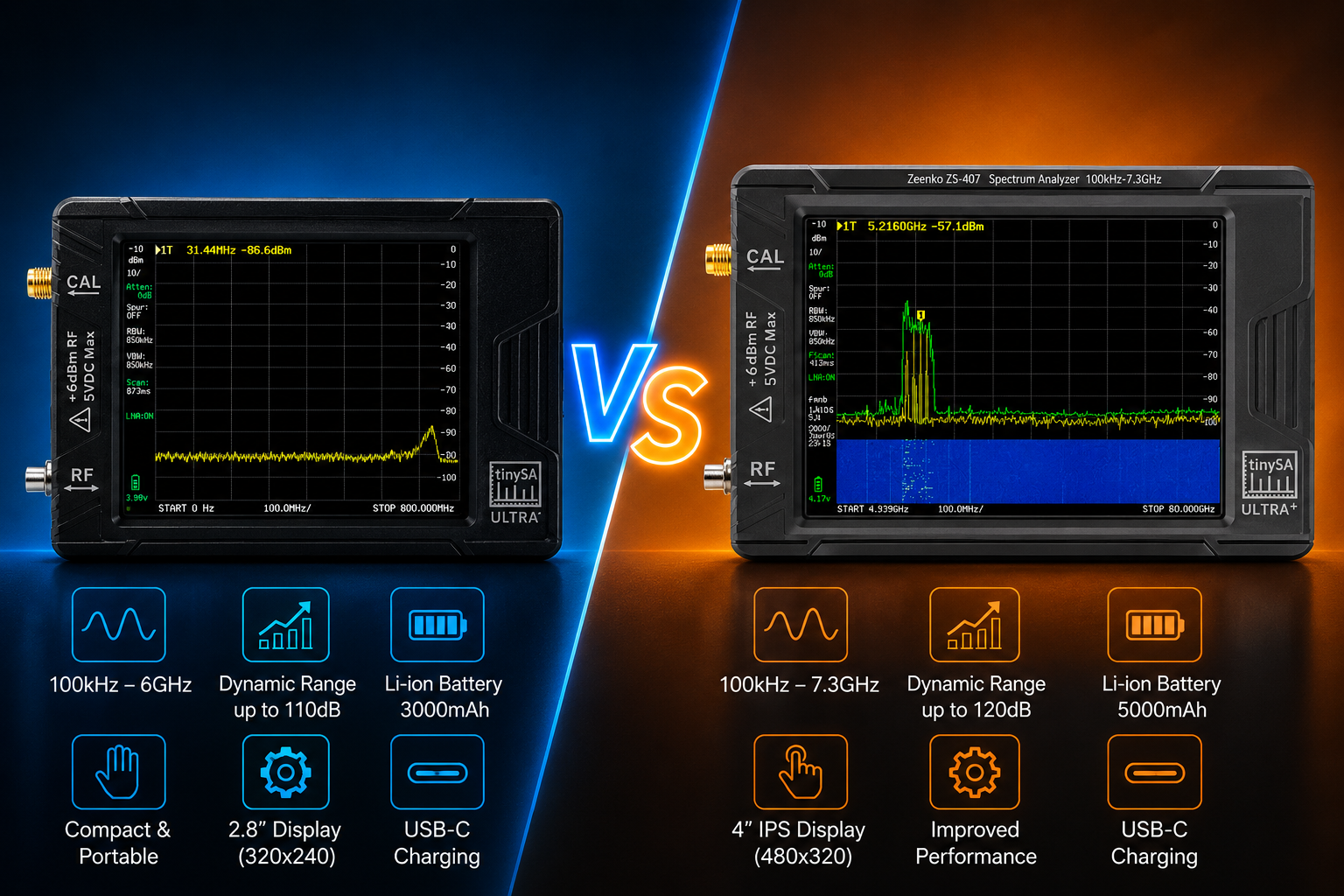
The tinySA Ultra and tinySA Ultra Plus are compact handheld spectrum analyzers designed for RF signal inspection, interference hunting, transmitter checks, spectrum education, SDR troubleshooting, and basic signal-generator work. They look similar and share much of the same interface, but their frequency coverage and intended use are not identical.
The most important detail is that “tinySA Ultra Plus” refers to two different models: the ZS406 and the higher-frequency ZS407. A product listing that only says “Ultra Plus” is incomplete. Before buying, check the exact model number.
The original tinySA Ultra is normally identified as the ZS405. It remains a strong choice for HF, VHF, UHF, Sub-GHz, 2.4 GHz, and general RF work. The Ultra Plus ZS406 expands normal-mode coverage to 900 MHz and adds a larger battery, while the Ultra Plus ZS407 extends calibrated Ultra-mode operation to approximately 7.3 GHz and is the better choice for 5.8 GHz and 6 GHz measurements.
This guide compares tinySA Ultra ZS405 vs Ultra Plus ZS406 vs Ultra Plus ZS407, including frequency range, display, battery, phase noise, resolution bandwidth, signal-generator modes, high-frequency limitations, input safety, and which model provides the best value for different RF projects.
Browse the TinySA Ultra ZS405-style spectrum analyzer, TinySA Ultra Plus ZS406, TinySA Ultra Plus ZS407, spectrum analyzers and RF analysis tools, and request a formal quote from SDRstore.eu.
Quick Answer: Which TinySA Should You Buy?
| User or project | Recommended model | Why |
|---|---|---|
| General RF beginner | TinySA Ultra ZS405 | Good value for HF, VHF, UHF, Sub-GHz, 2.4 GHz, interference hunting, and learning. |
| 433 MHz, 868 MHz, or 915 MHz work | Ultra Plus ZS406 | Its normal mode reaches 900 MHz, covering 868 MHz directly without switching to Ultra mode. |
| 5.8 GHz RF work | Ultra Plus ZS407 | The ZS407 provides specified coverage beyond the ZS405 and ZS406 limits. |
| 6 GHz WiFi-band visibility | Ultra Plus ZS407 | Its 7.3 GHz range covers much of the 6 GHz wireless spectrum for signal presence and relative checks. |
| Longest field use | Ultra Plus ZS406 or ZS407 | Both Plus models use a larger nominal 5000 mAh battery. |
| Lowest purchase cost | TinySA Ultra ZS405 | Best when you do not need reliable coverage beyond approximately 5.3 GHz. |
| Best overall capability | Ultra Plus ZS407 | Widest specified range and improved high-frequency signal-generation and phase-noise capability. |
The simple recommendation: buy the ZS405 for affordable general RF work, the ZS406 for 868/900 MHz normal-mode coverage and longer field use, and the ZS407 if you genuinely need 5.8 GHz or 6 GHz measurements.
TinySA Ultra Plus Is Not One Model
There are two Ultra Plus versions:
- TinySA Ultra Plus ZS406
- TinySA Ultra Plus ZS407
The ZS406 and ZS407 share a similar enclosure, screen, interface, battery capacity, and menu structure, but their high-frequency hardware is different.
The ZS406 reaches approximately 5.4 GHz in Ultra mode. The ZS407 reaches approximately 7.3 GHz and includes improvements intended to make it more useful at higher microwave frequencies.
Do not buy based only on a title such as “TinySA Ultra+ 2025.” Check the exact model printed on the product, packaging, firmware information, and seller listing.
TinySA Ultra vs Ultra Plus Specifications
| Feature | TinySA Ultra ZS405 | Ultra Plus ZS406 | Ultra Plus ZS407 |
|---|---|---|---|
| Normal-mode frequency range | 100 kHz–800 MHz | 100 kHz–900 MHz | 100 kHz–900 MHz |
| Specified Ultra-mode range | Up to approximately 5.3 GHz | Up to approximately 5.4 GHz | Up to approximately 7.3 GHz |
| Display | 4-inch, 480×320 | Approximately 4-inch, 480×320 | Approximately 4-inch, 480×320 |
| Points per sweep | Up to 450 | Up to 450 | Up to 450 |
| Resolution bandwidth | Approximately 200 Hz–850 kHz | Approximately 200 Hz–850 kHz | Approximately 200 Hz–850 kHz |
| Nominal battery capacity | Approximately 3000 mAh | Approximately 5000 mAh | Approximately 5000 mAh |
| Sine-wave generator range | Up to approximately 800 MHz | Up to approximately 900 MHz | Up to approximately 900 MHz |
| Higher-frequency generator mode | Square-wave/test modes above normal range | Approximately 4.4–5.4 GHz depending on mode | Approximately 6.0–7.3 GHz depending on mode |
| MicroSD support | Yes | Yes | Yes |
| Audio output | Yes | Yes | Yes |
| Best use | General RF work below 5.3 GHz | Sub-GHz work and longer portable use | 5.8 GHz and 6 GHz signal inspection |
Specifications above describe the official model families. Performance in Ultra mode is not identical to normal-mode performance, and measurements become more dependent on calibration, signal level, harmonic mixing, attenuation, and instrument limitations at higher frequencies.
Frequency Range: The Main Difference
TinySA Ultra ZS405
The ZS405 covers 100 kHz–800 MHz in its strongest normal operating range. Ultra mode extends signal observation to approximately 5.3 GHz.
This is enough for many common applications:
- HF and amateur radio bands
- FM broadcast
- Airband
- VHF and UHF radio
- 315 MHz and 433 MHz devices
- 868 MHz and 915 MHz through Ultra-mode workflows
- 1090 MHz ADS-B
- 1575 MHz GNSS-band interference checks
- 2.4 GHz WiFi, BLE, and Zigbee visibility
- Many signals below approximately 5.3 GHz
TinySA Ultra Plus ZS406
The ZS406 extends the normal-mode range from 800 MHz to 900 MHz. This sounds like a small change, but it is useful for European 868 MHz ISM, LoRa, Meshtastic, industrial telemetry, and other signals near 900 MHz.
Normal mode generally provides a more straightforward measurement path than the harmonic-based Ultra-mode architecture, so direct 868 MHz coverage is a meaningful advantage for Sub-GHz users.
Its Ultra-mode upper range changes only slightly, from approximately 5.3 GHz to 5.4 GHz. Therefore, the ZS406 is not a major upgrade for users focused on 5 GHz or 6 GHz signals.
TinySA Ultra Plus ZS407
The ZS407 extends Ultra-mode coverage to approximately 7.3 GHz. This is the model to choose when you need to inspect:
- 5.8 GHz ISM signals
- 5 GHz WiFi upper channels
- Parts of the 6 GHz WiFi spectrum
- 6 GHz laboratory signals
- Microwave links below 7.3 GHz
- Higher-frequency oscillators and test sources
- RF leakage around modern wireless hardware
The ZS407 can show that a signal is present and support relative field comparisons in these bands. It is not a vector signal analyzer and cannot replace professional WiFi 6E/7 modulation analysis, error-vector-magnitude measurement, channel-power certification, or regulatory testing.
Is TinySA Ultra Plus a Millimeter-Wave Analyzer?
No. Neither the ZS406 nor ZS407 should be described as a true mmWave spectrum analyzer.
The ZS407 reaches approximately 7.3 GHz in its specified Ultra mode. Millimeter-wave systems are normally associated with much higher frequencies, commonly starting around 30 GHz.
The ZS407 is better described as a compact handheld microwave spectrum analyzer for signals below approximately 7.3 GHz. Calling it a 5G mmWave analyzer can mislead buyers because it does not cover common cellular mmWave bands such as 24 GHz, 26 GHz, 28 GHz, or 39 GHz.
Normal Mode vs Ultra Mode
Normal mode and Ultra mode do not provide identical performance.
Normal mode
Normal mode is the preferred range for the most reliable everyday measurements. It generally offers:
- More direct signal conversion
- Better calibrated amplitude behavior
- Fewer harmonic ambiguities
- Simpler interpretation
- Better confidence for relative RF checks
Ultra mode
Ultra mode extends frequency coverage through a different conversion and harmonic-mixing process. It is extremely useful for the price, but users must understand its limitations.
Possible Ultra-mode limitations include:
- Higher noise floor at the upper end of the range
- Reduced dynamic range
- Images or harmonic ambiguity
- Slower or more complex sweeps
- Greater dependence on signal level
- Less amplitude confidence than a professional calibrated analyzer
Ultra mode is best for finding signals, comparing relative levels, checking whether an oscillator or transmitter is active, and investigating interference. It should not be treated as laboratory-grade proof of exact signal power or regulatory compliance.
ZS406 vs ZS407: Is the ZS407 Worth More?
The ZS407 is worth the higher price when the additional frequency range solves a real requirement.
Buy the ZS407 if you work with:
- 5.8 GHz analog or digital links
- 5 GHz wireless systems near the upper band edge
- 6 GHz WiFi signal-presence checks
- Microwave oscillators between 5.4 and 7.3 GHz
- Higher-frequency RF leakage or interference
- Research and teaching that needs broader coverage
Buy the ZS406 instead if:
- Your work stops below approximately 5.4 GHz.
- You mainly monitor 433, 868, 915, 1090, 1575, or 2400 MHz.
- You want the larger battery but do not need 6 GHz coverage.
- You prefer the lower-cost Plus model.
- You already have another instrument for 5.8 GHz and above.
The ZS407 is not automatically better for every measurement. Below 900 MHz, the practical experience is similar enough that many users will not benefit from paying more unless they need the added high-frequency range or improved high-frequency performance.
Display and User Interface
The TinySA Ultra and both Ultra Plus models use a similar four-inch touchscreen format with approximately 480×320 resolution and up to 450 displayed sweep points.
Common interface features include:
- Touchscreen control
- Jog switch or physical control
- Center-frequency and span settings
- Start and stop frequency
- Markers and peak search
- Max hold
- Waterfall display
- Reference level
- Attenuation control
- Optional LNA
- Resolution-bandwidth selection
- MicroSD screenshots and data storage
- USB PC control
Do not upgrade from a ZS405 to an Ultra Plus only for a significantly different interface. The user experience remains broadly familiar.
Battery Differences
The original ZS405 generally uses a nominal battery capacity around 3000 mAh, while the ZS406 and ZS407 use approximately 5000 mAh batteries.
The larger battery is useful for:
- Interference hunting around buildings
- Outdoor antenna-site work
- Facility RF surveys
- Portable transmitter checks
- University field exercises
- Longer monitoring sessions
Actual runtime depends on screen brightness, battery condition, LNA use, firmware, sweep settings, USB connection, temperature, and how frequently the display is updated. Battery-capacity claims should not be interpreted as guaranteed operating hours under every condition.
Resolution Bandwidth and Sweep Detail
All three models offer selectable resolution filters from approximately 200 Hz to 850 kHz.
Narrower RBW is useful for:
- Separating nearby signals
- Inspecting narrow carriers
- Lowering the displayed noise floor
- Examining close-in spurs
Wider RBW is useful for:
- Faster sweeps
- Wideband signal discovery
- Short RF bursts
- General interference hunting
The 450 sweep points are useful for a handheld analyzer, but they also explain why short or frequency-hopping events can be missed across a wide span. A swept analyzer only examines individual points during each sweep.
For transient, burst, frequency-hopping, or continuously changing signals, consider:
- Reducing span
- Using max hold
- Using zero-span mode
- Using an SDR with IQ recording
- Using a professional real-time spectrum analyzer
Phase Noise Differences
Phase noise affects how clearly the analyzer can inspect weak signals close to a strong carrier. Lower phase noise is better.
The official model comparison shows the ZS407 with improved phase-noise performance compared with the ZS405, while the ZS406 remains closer to the original Ultra architecture.
This can make the ZS407 more useful for:
- Inspecting close-in spurs
- Comparing oscillator quality
- Looking at weak signals near stronger carriers
- Higher-frequency signal-generator checks
Despite the improvement, use a professional spectrum analyzer or phase-noise test system when the result must be precise, traceable, or included in a formal engineering report.
Signal Generator Comparison
All three devices include signal-generator functionality when they are not being used as spectrum analyzers.
| Generator feature | ZS405 | ZS406 | ZS407 |
|---|---|---|---|
| Clean sine-wave range | Approximately 100 kHz–800 MHz | Approximately 100 kHz–900 MHz | Approximately 100 kHz–900 MHz |
| Higher-frequency output | Square-wave or RF test output to several GHz | Square-wave/test output to approximately 5.4 GHz depending on mode | Square-wave/test output to approximately 7.3 GHz depending on mode |
| AM/FM modulation | Supported | Supported | Supported |
| Sweep output | Supported | Supported | Supported |
The ZS407 is the best generator option of the three when higher-frequency output is required. However, higher-frequency output modes may contain strong harmonics or spurs and should not be confused with a clean professional microwave signal generator.
Use the built-in generator for:
- Receiver checks
- Educational demonstrations
- Simple filter comparisons
- SDR input validation
- Controlled cabled RF tests
Use a professional signal generator when you need accurate level, low phase noise, high spectral purity, traceable calibration, or standards-based modulation.
Can TinySA Ultra Plus Analyze WiFi?
It can show WiFi-band activity, but “analyze WiFi” can mean several different things.
It can help with:
- Seeing whether a WiFi channel is active
- Comparing relative signal levels
- Checking general band occupancy
- Finding strong local interference
- Comparing antenna positions
- Confirming that a 2.4, 5, or 6 GHz transmitter is active
It cannot provide:
- WiFi packet decoding
- SSID or client identification
- Channel-utilization statistics from packets
- Error vector magnitude
- Modulation-quality analysis
- Standards-compliant transmit measurements
- Real-time capture of every short WiFi burst
Use a monitor-mode WiFi adapter for packet-level analysis and a professional vector signal analyzer for detailed modulation measurements.
Can TinySA Ultra Plus Analyze 5G?
It can display some sub-7.3 GHz RF activity, including certain cellular and private-network bands within its frequency range. It cannot analyze common cellular mmWave bands or decode 5G network information.
Use it for:
- Basic signal-presence checks
- Relative field-strength comparisons
- Interference discovery
- Laboratory oscillator or signal-source checks
Do not treat it as a substitute for:
- 5G vector signal analysis
- 3GPP-compliant RF testing
- Cell identification and network decoding
- mmWave measurements
- Certified base-station or UE testing
Input Safety Is the Same Priority on Every Model
The tinySA input is sensitive. The listed absolute maximum with no internal attenuation is generally around +6 dBm. Best measurement performance usually requires a much lower input level.
Never connect an unknown transmitter directly to the analyzer.
Safe-input checklist
- Determine transmitter power before connecting it.
- Use external attenuators for conducted measurements.
- Start with internal attenuation enabled.
- Use a dummy load when radiation is unnecessary.
- Use an RF power meter if the level is unknown.
- Use a DC block if bias voltage may be present.
- Keep transmit antennas away from the analyzer input when possible.
- Store the analyzer with the input protected.
A stronger frequency range does not mean a stronger input. The ZS407 still needs the same careful RF handling as the ZS405 and ZS406.
TinySA Ultra vs Ultra Plus for Common RF Projects
| Project | ZS405 | ZS406 | ZS407 |
|---|---|---|---|
| FM broadcast and VHF | Excellent | Excellent | Excellent |
| 433 MHz devices | Excellent | Excellent | Excellent |
| 868 MHz LoRa/Meshtastic | Usable through Ultra-mode workflow | Better direct normal-mode choice | Better direct normal-mode choice |
| 915 MHz devices | Ultra mode | Just above normal-mode range | Just above normal-mode range |
| 1090 MHz ADS-B | Good for visibility | Good for visibility | Good for visibility |
| 1575 MHz GNSS interference | Useful for basic checks | Useful for basic checks | Useful for basic checks |
| 2.4 GHz WiFi/BLE | Useful | Useful | Useful |
| 5.8 GHz links | Outside specified upper range | Outside specified upper range | Recommended model |
| 6 GHz WiFi visibility | No | No | Useful for basic spectrum visibility |
| Formal compliance testing | No | No | No |
Should Existing TinySA Ultra Owners Upgrade?
Keep the ZS405 if:
- You mainly work below 800 MHz.
- You use it for FM, VHF, UHF, 433 MHz, or general RF learning.
- Ultra-mode operation to approximately 5.3 GHz is enough.
- Battery runtime is acceptable.
- You already own a separate analyzer or SDR for 5.8 GHz.
Upgrade to ZS406 if:
- 868 MHz is a major part of your work.
- You want it covered in normal mode.
- You need longer portable operation.
- You want the newer model but do not need 6 GHz.
Upgrade to ZS407 if:
- You need 5.8 GHz measurements.
- You work around the 6 GHz WiFi spectrum.
- You want the widest specified frequency range.
- You need improved high-frequency generator capability.
- You want the most capable tinySA model available.
For most existing ZS405 owners, the ZS406 is a modest upgrade. The ZS407 is the more meaningful upgrade because it opens a genuinely new frequency range.
Authentic Models, Firmware, and Clone Risk
The tinySA project has been widely copied. Some clones may look similar but use different hardware, poor RF components, incompatible firmware, inaccurate calibration data, or unsupported modifications.
Before buying, check:
- Exact model number: ZS405, ZS406, or ZS407
- Seller reputation and warranty
- Whether official firmware can be installed
- Whether the device passes built-in self-test
- Whether calibration data is present
- Frequency-range claims that match official documentation
- Included microSD card, cables, adapter, and antenna
Be cautious of listings that claim:
- Professional laboratory accuracy without qualification
- True real-time spectrum analysis
- 5G mmWave coverage
- WiFi packet decoding
- Certified EMI compliance measurements
- Guaranteed extreme battery runtime
TinySA Ultra Plus vs Professional Spectrum Analyzer
The Ultra Plus models expand what a low-cost handheld analyzer can do, but they remain budget swept analyzers.
| Requirement | TinySA Ultra Plus | Professional analyzer |
|---|---|---|
| Signal-presence checks | Very useful | Excellent |
| Portable interference hunting | Very useful | Excellent but more expensive |
| Basic harmonic screening | Useful | More accurate and higher dynamic range |
| 6 GHz signal visibility | ZS407 only | Available on suitable models |
| Real-time transient capture | Limited | Available on real-time models |
| Vector modulation analysis | No | Available on signal analyzers |
| Traceable amplitude accuracy | Limited | Much better |
| Formal EMI/compliance work | No | Correct calibrated equipment required |
Read: TinySA vs Professional Spectrum Analyzer: What Can a TinySA Ultra Really Do?.
Best Model by Buyer Type
Best for beginners: TinySA Ultra ZS405
The original Ultra provides the core tinySA experience at the lowest cost. It is enough for learning center frequency, span, RBW, attenuation, markers, max hold, interference hunting, and transmitter checks.
Best for Sub-GHz users: Ultra Plus ZS406
The 900 MHz normal-mode range makes the ZS406 attractive for 868 MHz LoRa, Meshtastic, industrial telemetry, remote controls, and European ISM monitoring.
Best for advanced hobbyists: Ultra Plus ZS407
The ZS407 is the best choice for buyers who expect to work with 5.8 GHz links, 6 GHz wireless systems, microwave oscillators, or broader RF research.
Best for universities: Mix ZS406 and ZS407
A teaching lab can use ZS406 units for general student benches and keep one or more ZS407 units for higher-frequency demonstrations.
Best for RF product teams: ZS407 plus professional tools
The ZS407 is useful for portable troubleshooting and early screening, but product teams should combine it with NanoVNA, RF power meters, attenuators, SDRs, and professional analyzers when measurement confidence matters.
Recommended Hardware Packages
Package 1: Beginner RF analyzer kit
- TinySA Ultra ZS405
- Basic antenna set
- Fixed attenuators
- 50-ohm dummy load
- Short SMA cables and adapters
Best for: RF beginners, students, SDR users, amateur radio, and general interference checks.
Package 2: Sub-GHz and LoRa monitoring kit
- TinySA Ultra Plus ZS406
- 433 MHz antenna
- 868 MHz antenna
- 915 MHz antenna where regionally appropriate
- Directional antenna
- RTL-SDR or HackRF receive monitor
- Attenuator set
Best for: LoRa, Meshtastic, industrial IoT, remote controls, and Sub-GHz interference hunting.
Package 3: 5.8 GHz and 6 GHz visibility kit
- TinySA Ultra Plus ZS407
- 5.8 GHz antenna
- 6 GHz-capable antenna
- Known-good microwave SMA cables
- External attenuators
- HackRF Pro or another SDR for complementary IQ capture where supported
Best for: 5.8 GHz links, upper 5 GHz WiFi, basic 6 GHz WiFi visibility, and microwave laboratory work.
Package 4: RF product-testing bench
- TinySA Ultra Plus ZS407
- Professional spectrum analyzer where required
- NanoVNA-H4 or higher-frequency VNA
- RF power meter
- Signal generator
- Attenuators and dummy loads
- SDR receiver
- Near-field probes
- Shield box
Best for: IoT development, RF troubleshooting, pre-compliance screening, wireless product validation, and university labs.
Purchase-Order Justification Examples
TinySA Ultra ZS405 justification
TinySA Ultra is required as an affordable handheld spectrum analyzer for RF education, signal-presence checks, interference hunting, SDR troubleshooting, transmitter screening, and general spectrum monitoring below approximately 5.3 GHz.
TinySA Ultra Plus ZS406 justification
TinySA Ultra Plus ZS406 is required for portable RF monitoring with direct normal-mode coverage through 900 MHz, including 868 MHz LoRa, Meshtastic, industrial telemetry, and Sub-GHz interference investigations.
TinySA Ultra Plus ZS407 justification
TinySA Ultra Plus ZS407 is required for portable spectrum visibility through approximately 7.3 GHz, including 5.8 GHz links, 6 GHz wireless-band checks, microwave signal validation, RF education, and early-stage product troubleshooting.
RF safety accessory justification
External attenuators, dummy loads, RF power meters, DC blocks, and known-good cables are required to protect the analyzer input, verify signal levels, prevent overload, and create safe repeatable RF measurements.
Request a Quote for TinySA Spectrum Analyzers
Universities, RF laboratories, amateur-radio groups, cybersecurity teams, IoT companies, telecom labs, wireless product developers, and public-sector buyers can request a formal quotation directly from SDRstore.eu.
Use the Add to Quote button on product pages or the document icon on product cards. Add TinySA Ultra ZS405, Ultra Plus ZS406, Ultra Plus ZS407, antennas, attenuators, RF power meters, dummy loads, NanoVNA, SDR receivers, cables, adapters, and project requirements to one quote request.
A quote request is useful when you need:
- Multiple spectrum analyzers for a university lab
- Sub-GHz monitoring kits
- 5.8 GHz or 6 GHz signal-inspection equipment
- RF cybersecurity lab hardware
- Product-development test benches
- Antennas and attenuators for specific frequency bands
- Formal pricing for business or public procurement
Read the SDRstore.eu quote-request guide.
Related SDRstore.eu Guides
- TinySA vs Professional Spectrum Analyzer
- TinySA Ultra Setup Guide
- What Is a Spectrum Analyzer?
- Spectrum Analyzer vs Oscilloscope
- What Is a Signal Generator?
- NanoVNA vs TinySA
- SDR Hardware for RF Product Testing
- RF Spectrum Monitoring for Facilities and Labs
- Sub-GHz Security Testing Tools
- RF Cybersecurity Lab Equipment Checklist
Official and Technical Resources
- tinySA official website
- Official tinySA model comparison
- tinySA Ultra specifications
- tinySA Ultra technical description
- tinySA first-use guide
- tinySA PC control
- Official tinySA buying information
Final Recommendation
Choose the TinySA Ultra ZS405 if you want the lowest-cost four-inch tinySA for general RF work and do not need specified measurements above approximately 5.3 GHz.
Choose the Ultra Plus ZS406 if your work focuses on 868 MHz, Sub-GHz IoT, LoRa, Meshtastic, or portable field use. Its 900 MHz normal-mode limit and larger battery are its most useful improvements.
Choose the Ultra Plus ZS407 if you need 5.8 GHz, 6 GHz WiFi-band visibility, higher-frequency signal generation, or the widest available tinySA frequency range. It is the most capable model and the most meaningful upgrade from the original Ultra.
None of these devices replaces a professional calibrated spectrum analyzer, real-time analyzer, vector signal analyzer, or certified EMI receiver. They are best understood as exceptionally capable portable RF visibility tools for their size and price.
FAQ
What is the difference between TinySA Ultra and TinySA Ultra Plus?
The original TinySA Ultra ZS405 covers 100 kHz–800 MHz in normal mode and approximately 5.3 GHz in Ultra mode. Ultra Plus models extend normal mode to 900 MHz, use a larger battery, and offer either approximately 5.4 GHz coverage on the ZS406 or 7.3 GHz coverage on the ZS407.
Are there two TinySA Ultra Plus models?
Yes. The Ultra Plus is available as the ZS406 and ZS407. The ZS406 reaches approximately 5.4 GHz, while the ZS407 reaches approximately 7.3 GHz.
Is the TinySA Ultra Plus ZS407 worth it?
It is worth it when you need 5.8 GHz, 6 GHz wireless-band visibility, wider microwave coverage, or improved high-frequency performance. For work below 5.4 GHz, the ZS406 may provide better value.
Is the ZS406 better than the original TinySA Ultra?
It is a modest upgrade. Its main advantages are 900 MHz normal-mode coverage and a larger battery. Its Ultra-mode upper limit is only slightly higher than the original ZS405.
Can TinySA Ultra Plus measure 6 GHz WiFi?
The ZS407 can display signal activity in much of the 6 GHz WiFi range because it reaches approximately 7.3 GHz. It cannot decode WiFi packets or perform professional modulation-quality and compliance measurements.
Can the ZS406 measure 5.8 GHz?
The ZS406’s specified Ultra-mode range ends near 5.4 GHz, so it is not the correct choice for dependable 5.8 GHz work. Choose the ZS407 instead.
Is TinySA Ultra Plus a mmWave spectrum analyzer?
No. The ZS407 reaches approximately 7.3 GHz, while common mmWave systems operate at much higher frequencies. It should be described as a handheld microwave spectrum analyzer, not a mmWave analyzer.
Can TinySA Ultra Plus replace a professional spectrum analyzer?
No. It is useful for signal discovery, interference hunting, relative measurements, education, and early troubleshooting. Professional calibrated equipment is still needed for high dynamic range, phase-noise testing, compliance, production, and formal reports.
Which TinySA is best for LoRa and Meshtastic?
The ZS406 or ZS407 is preferable for European 868 MHz projects because normal mode extends to 900 MHz. The original ZS405 can still observe these signals using its extended operating mode.
Which TinySA has the best battery?
The Ultra Plus ZS406 and ZS407 use a larger nominal 5000 mAh battery compared with the approximately 3000 mAh battery in the original ZS405. Actual runtime depends on settings and operating conditions.
Can TinySA Ultra Plus generate signals?
Yes. Both Ultra Plus models include sine-wave, higher-frequency test-output, sweep, AM, and FM generator functions. The ZS407 offers the widest high-frequency output range, but it does not replace a clean calibrated professional RF generator.
Can SDRstore.eu quote multiple TinySA analyzers for a lab?
Yes. Use the Add to Quote button on product pages or the document icon on product cards. Add ZS405, ZS406, ZS407, antennas, attenuators, RF power meters, dummy loads, cables, and project notes so the complete lab setup can be quoted together.
No posts found
Write a review






We support all major card and digital payment options. More local methods are available and shown during checkout.
You enter into a binding sales contract once you have received an 'order confirmation and sales receipt' email from us, in line with our Sales & Delivery conditions. Therefore, sdrstore.eu has the right to cancel your order in the event of technical problems, delivery failure, Fair use policy and other similar situations.






Your payments are protected by advanced encryption and 3-D Secure authentication for safe online shopping.