








RF Spectrum Monitoring for Facilities, Labs, and Critical Infrastructure
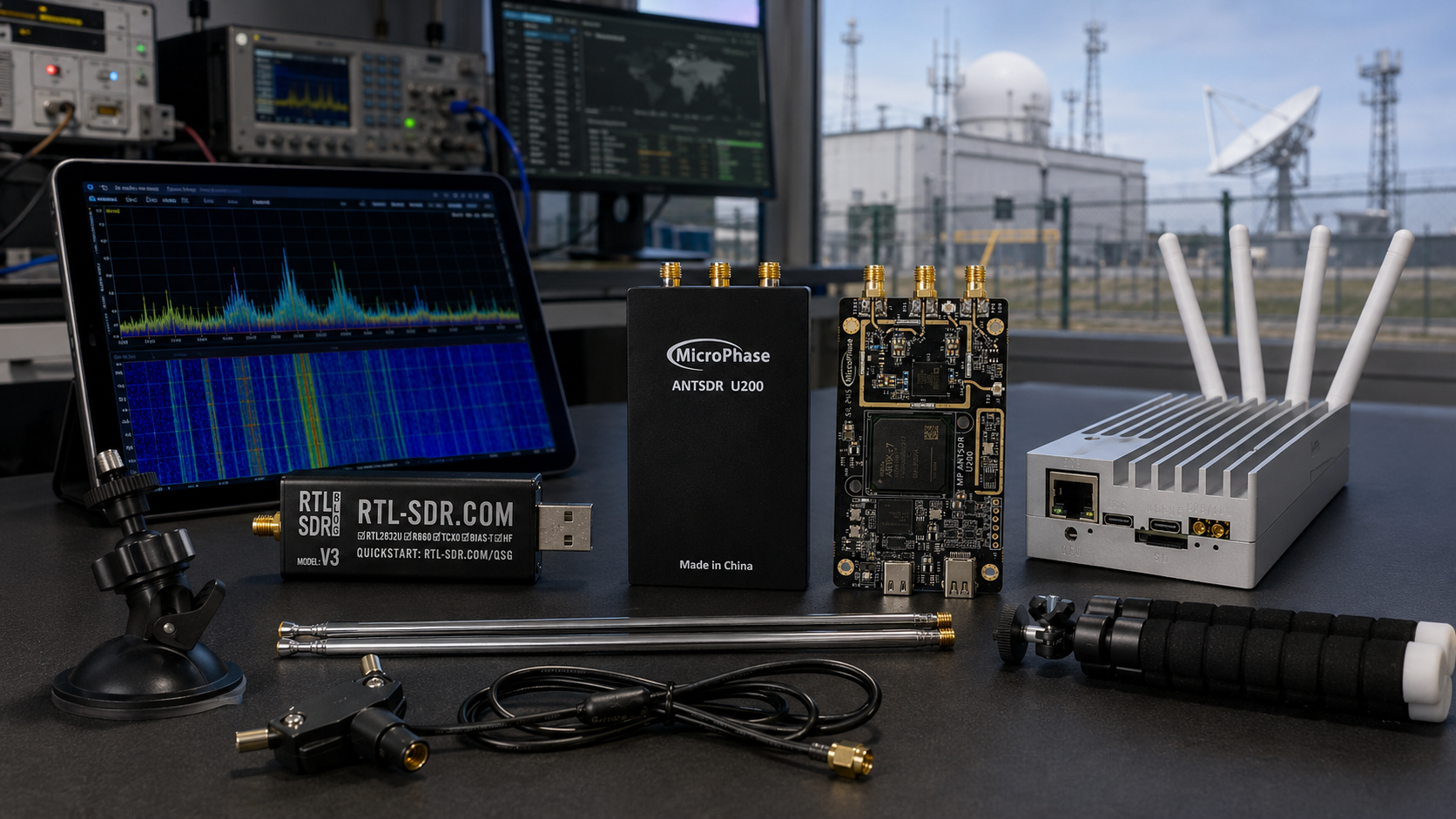
RF spectrum monitoring helps facilities, laboratories, campuses, factories, data centers, ports, airports, warehouses, utilities, and critical-infrastructure operators understand what is happening in the radio environment around them. A good monitoring setup can reveal interference, unexpected transmitters, elevated noise floors, GNSS disruption, drone-related RF activity, wireless device problems, and changes in the local spectrum baseline.
Software-defined radio makes RF monitoring more affordable and flexible. Instead of using only one expensive bench instrument, a site can deploy SDR receivers, spectrum analyzers, antennas, logging software, and dashboards to watch selected bands over time. This does not replace certified compliance testing or national spectrum authority work, but it gives engineering and security teams useful visibility before, during, and after RF incidents.
This guide explains how to build legal RF spectrum monitoring for facilities, labs, and critical infrastructure using SDR hardware, antennas, spectrum analyzers, OpenWebRX, GNU Radio, SigMF logging, dashboards, baseline workflows, and RF test tools.
Browse software-defined radio hardware, RTL-SDR receivers, HackRF SDR devices, KrakenSDR coherent receivers, spectrum analyzers, RF power meters, and request a formal quote from SDRstore.eu.
Quick Answer: What Hardware Do You Need for RF Spectrum Monitoring?
| Monitoring goal | Recommended hardware | Why it matters |
|---|---|---|
| Low-cost RF baseline monitoring | RTL-SDR Blog V3 USB-C, antennas, Raspberry Pi or mini PC | Good for always-on receive-only monitoring in supported bands, training, and long-term baseline logs. |
| Wideband facility monitoring | HackRF Pro, band-specific antennas, logging PC | Useful for observing many facility-relevant bands up to 6 GHz, including ISM, drone, IoT, and wireless links. |
| Portable RF troubleshooting | TinySA Ultra or handheld spectrum analyzer | Useful for fast field checks, interference hunting, and confirming whether a band is unusually active. |
| Direction finding and localization research | KrakenSDR, matched antennas, calibrated array | Helps estimate the bearing of supported signals when antenna geometry and calibration are correct. |
| Antenna and cable validation | NanoVNA, known-good cables, filters, adapters | Prevents false alarms caused by broken antennas, bad cables, poor matching, or receiver overload. |
| Critical infrastructure monitoring | Multi-layer system: SDR nodes, spectrum analyzer, GNSS receiver, logging server, independent alarms | Important sites need multiple sources of evidence, not one receiver or one dashboard. |
The simple rule: start with receive-only monitoring, build a baseline, document what normal looks like, then use alerts to investigate meaningful changes. Do not transmit, jam, spoof, or interfere with other systems.
What Is RF Spectrum Monitoring?
RF spectrum monitoring means observing radio-frequency activity over time. It can be as simple as a waterfall display on one SDR or as advanced as multiple synchronized monitoring nodes feeding a central dashboard.
A facility monitoring system may track:
- Noise floor changes
- Unexpected transmitters
- Interference in operational bands
- 2.4 GHz and 5.8 GHz wireless activity
- Drone-related RF activity
- GNSS L1/Galileo E1 interference
- LoRa, Sub-GHz, telemetry, and IoT bands
- VHF/UHF radio activity
- Private network or test-lab signals
- RF conditions before and after equipment changes
RF monitoring is most useful when it is continuous. A one-time scan can show what is happening now, but long-term logging shows patterns, changes, recurring interference, and evidence around incidents.
Legal Boundary: Monitoring Is Not Jamming
RF spectrum monitoring should be passive unless the site has explicit authorization for a controlled transmit test. Most facilities, companies, universities, and security teams should focus on receive-only monitoring, logging, analysis, and lawful escalation.
| Activity | Recommended for normal facilities? | Notes |
|---|---|---|
| Passive spectrum monitoring | Yes, subject to local law and privacy policy | Receiving and logging RF activity in selected bands. |
| Signal strength and noise-floor logging | Yes | Useful for baseline monitoring and interference detection. |
| Remote ID or public broadcast monitoring | Often useful where applicable | Follow local privacy and aviation rules. |
| Direction finding | Useful when passive and authorized | Requires calibration and careful interpretation. |
| Jamming | No | Can disrupt authorized communications and is illegal in many jurisdictions. |
| Spoofing or takeover | No | Not appropriate for normal facility monitoring. |
| Decoding private communications | Avoid unless clearly authorized | Privacy and communications laws may apply. |
The correct facility workflow is detect, document, verify, and escalate. RF monitoring should support operations and security, not interfere with other users of the spectrum.
Why Facilities and Critical Infrastructure Need RF Monitoring
Many facilities rely on wireless systems even when they do not think of themselves as RF-heavy sites. Wi-Fi, Bluetooth, GNSS, access control, handheld radios, LoRaWAN, remote sensors, industrial IoT, wireless cameras, telemetry, private LTE/5G, and drone activity can all affect operations.
Facilities that benefit from RF monitoring
- Data centers
- Factories and industrial plants
- Warehouses and logistics hubs
- Ports and maritime facilities
- Airports and aviation training sites
- Energy and utility sites
- Telecom facilities
- Research laboratories
- Universities and campuses
- Hospitals and medical research sites
- Prisons and secure facilities
- Public events and stadiums
- Drone test ranges
- RF product testing labs
Problems RF monitoring can help investigate
- Intermittent Wi-Fi failures
- Industrial sensor dropouts
- Unexplained GNSS timing or positioning issues
- Drone activity near a sensitive perimeter
- Unauthorized wireless devices
- Wireless camera interference
- LoRa or Sub-GHz noise problems
- Private 5G lab interference
- RF product test failures
- Recurring noise at specific times of day
Monitoring Goals by Site Type
| Site type | Priority bands or signals | Recommended monitoring approach |
|---|---|---|
| Data center | GNSS timing, Wi-Fi, Bluetooth, cellular, facility telemetry | GNSS monitor, spectrum baseline, wireless inventory, incident logging. |
| Factory | Wi-Fi, Bluetooth, LoRa, Sub-GHz telemetry, industrial wireless links | Always-on SDR nodes plus portable spectrum analyzer for troubleshooting. |
| University RF lab | SDR test bands, ISM bands, VHF/UHF, GNSS, private 5G test frequencies | Lab monitoring dashboard, spectrum analyzer, clear transmit-test procedures. |
| Port or logistics hub | GNSS, AIS, VHF marine, Wi-Fi, drone RF, telemetry | GNSS monitoring, VHF/AIS receiver, drone RF awareness, long-term logs. |
| Airport or aviation site | GNSS, VHF airband, ADS-B, drone RF, local wireless | Passive monitoring only, strict escalation procedure, authority coordination. |
| Energy or utility site | GNSS timing, SCADA-adjacent wireless, private radios, telemetry, drones | Multi-layer monitoring with strong logging and controlled incident workflow. |
| Cybersecurity lab | IoT, Sub-GHz, 2.4 GHz, 5.8 GHz, GNSS, drone RF | SDR lab bench, RF tools, datasets, safe receive-only monitoring rules. |
Hardware Layer 1: Low-Cost SDR Monitoring Nodes
Low-cost SDR nodes are useful for baseline monitoring and distributed visibility. They can be placed at different parts of a site to show whether an RF event is local, building-wide, or site-wide.
RTL-SDR monitoring node
The RTL-SDR Blog V3 USB-C is useful for entry-level receive-only monitoring in its supported frequency range.
Use RTL-SDR nodes for:
- VHF/UHF monitoring
- ADS-B, AIS, ACARS, and public broadcast observation where applicable
- Sub-GHz device monitoring within supported coverage
- Training and RF awareness
- Low-cost distributed sensors
- OpenWebRX receive stations
- Long-term waterfall and power logging
Limitations: RTL-SDR is receive-only and does not directly cover all common 2.4 GHz or 5.8 GHz monitoring requirements. Use it where it fits, and choose wider-band equipment for higher-frequency facility monitoring.
Remote SDR node checklist
- SDR receiver
- Raspberry Pi, mini PC, or Linux host
- Band-specific antenna
- Low-loss cable where needed
- Power supply or PoE solution
- Weatherproofing for outdoor nodes
- Local storage or network logging
- Time synchronization for logs
- Clear hostname and location label
Hardware Layer 2: Wideband SDR for Facility Surveys
For facility-wide monitoring, especially around 2.4 GHz, 5.8 GHz, ISM bands, drone RF, and lab signals, a wider-band SDR is useful.
The HackRF Pro is useful for receive-side wideband monitoring, RF surveys, GNU Radio workflows, and defensive signal analysis.
Use HackRF Pro for:
- 2.4 GHz and 5.8 GHz activity checks
- Drone RF monitoring support
- IoT and ISM-band observation
- RF lab surveys
- Wideband waterfall captures
- GNU Radio and Python logging pipelines
- Defensive wireless security research
Important note: HackRF Pro is transmit-capable, but facility monitoring should use it receive-only unless the site has a legal, controlled, authorized transmit-test procedure.
Hardware Layer 3: Portable Spectrum Analyzers
An SDR is flexible, but a portable spectrum analyzer is often faster for field troubleshooting. A handheld analyzer helps an engineer walk around a facility, check a suspicious area, compare antennas, and verify whether RF activity is present.
The TinySA Ultra and higher-range spectrum analyzers are useful for quick scans and field checks.
Use a spectrum analyzer for:
- Finding interference sources
- Checking band occupancy
- Comparing normal and abnormal conditions
- Validating filters and antennas
- Portable troubleshooting during incidents
- Taking evidence screenshots for incident reports
A spectrum analyzer shows RF energy. It does not automatically identify the source. Combine it with site inventory, SDR logs, directional antennas, and operational context.
Hardware Layer 4: Direction Finding and Spatial Monitoring
Sometimes a facility needs to know not only that a signal exists, but also where it may be coming from. Direction finding can help, but it requires careful expectations.
KrakenSDR is useful for coherent receive-side direction-finding research in supported frequency ranges when used with matched antennas, known geometry, and calibration.
Use direction finding for:
- Locating unauthorized transmitters
- Investigating recurring interference
- Drone RF bearing research
- Training facility engineers and security teams
- Comparing signal direction across multiple monitoring points
Limitations: reflections from walls, metal structures, racks, fences, vehicles, cranes, and water can distort bearings. Direction finding should be treated as evidence to guide investigation, not automatic proof.
Hardware Layer 5: Antennas, Filters, and Cables
Antennas decide what the monitoring system can actually hear. Poor antennas create blind spots and false confidence.
Antenna checklist
- Choose antennas for the target band.
- Use omnidirectional antennas for general monitoring.
- Use directional antennas for investigation and perimeter checks.
- Use active GNSS or L-band antennas for GPS/Galileo monitoring.
- Use stable mounts and document antenna height.
- Use low-loss cable for long runs.
- Weatherproof outdoor installations.
- Keep antennas away from noisy electronics and metal cabinets.
- Label antennas and cables in the monitoring dashboard.
Filters and overload control
Strong local transmitters can overload SDR receivers. Filters help isolate the band of interest and reduce false readings.
- FM block filters for strong broadcast FM areas
- AM reject filters for HF/direct-sampling experiments
- Band-pass filters for target monitoring bands
- Attenuators when signals are too strong
- LNAs only when the system is noise-limited, not overloaded
Before adding an LNA, check whether the receiver is already overloaded. More gain is not always better.
Hardware Layer 6: RF Measurement and Validation Tools
| Tool | Use in facility monitoring | SDRstore.eu link |
|---|---|---|
| TinySA Ultra or spectrum analyzer | Fast field scans, band occupancy, interference checks, screenshots | Spectrum analyzers |
| NanoVNA | Validate antennas, cables, filters, and RF paths | NanoVNA-H4 |
| RF power meter | Conducted power checks in controlled lab tests | RF power meters |
| Dummy loads | Safe transmitter testing in RF labs without unnecessary radiation | RF dummy loads |
| Attenuators | Protect SDR inputs and create repeatable test paths | RF test and measurement equipment |
| Band-specific antennas | Improve monitoring sensitivity in target bands | Antennas |
Software for RF Spectrum Monitoring
OpenWebRX
OpenWebRX is useful when a facility wants browser-based access to an SDR receiver. It is a good option for shared monitoring stations, training, remote receiver access, and basic facility spectrum visibility.
Use OpenWebRX for:
- Remote browser-based SDR access
- Multi-user viewing
- Waterfall monitoring
- Training and awareness
- Low-cost monitoring nodes
Read: OpenWebRX vs No-SDR vs BrowSDR.
GNU Radio
GNU Radio is useful when the monitoring project needs custom signal processing, energy detection, spectrogram generation, feature extraction, automated logging, or machine-learning dataset creation.
Use GNU Radio for:
- Custom spectrum scanners
- Band-power logging
- Signal classification research
- RF fingerprinting datasets
- Trigger-based IQ recording
- Integration with Python dashboards
SigMF recordings
SigMF is useful for storing IQ recordings with metadata. For serious monitoring, raw files without metadata quickly become hard to use.
Store metadata such as:
- Center frequency
- Sample rate
- Bandwidth
- Gain
- SDR model and serial number
- Antenna type and location
- Clock source
- Capture time
- Site location or zone
- Operator notes
Build a Site RF Baseline First
RF monitoring is only useful if you know what normal looks like. A facility should collect baseline data before relying on alerts.
Baseline checklist
- Record normal RF activity during work hours.
- Record overnight and weekend activity.
- Record known wireless systems and channels.
- Record GNSS signal quality if timing is important.
- Record Wi-Fi and Bluetooth activity around the facility.
- Record Sub-GHz and telemetry bands.
- Record normal drone Remote ID or nearby aviation activity where relevant.
- Record maintenance windows and temporary equipment.
- Record antenna locations and receiver settings.
- Repeat the baseline after major facility changes.
Monitoring Bands by Use Case
| Use case | Common bands to consider | Notes |
|---|---|---|
| Wi-Fi and Bluetooth awareness | 2.4 GHz and 5 GHz ranges | High false-alarm risk in busy facilities; build a baseline. |
| Drone RF awareness | Remote ID, 2.4 GHz, 5.8 GHz, site-specific bands | Combine RF monitoring with Remote ID and visual confirmation. |
| GNSS interference monitoring | GPS L1 / Galileo E1 around 1575.42 MHz | Use active GNSS antennas and compare with GNSS receiver metrics. |
| Industrial IoT and telemetry | 433 MHz, 868 MHz, 915 MHz, LoRaWAN bands, local allocations | Region-specific bands and legal limits apply. |
| Radio communications | VHF/UHF business, marine, airband, amateur, or public-service allocations where lawful | Monitor only within legal and privacy constraints. |
| RF product testing | Product-specific operating bands and harmonics | Use spectrum analyzer, RF power meter, attenuators, and controlled tests. |
| Private 5G or lab networks | Authorized lab test bands | Use shielding, attenuators, and clear lab procedures. |
Example Monitoring Architectures
Architecture 1: Small facility RF awareness node
- 1× RTL-SDR Blog V3 USB-C
- 1× Raspberry Pi or mini PC
- 1× band-specific antenna
- OpenWebRX or simple power logger
- Local dashboard or remote access
Best for: basic RF awareness, training, receiving public signals, and building a first baseline.
Architecture 2: Lab spectrum monitoring station
- 1× HackRF Pro
- 1× RTL-SDR receiver for secondary monitoring
- 1× TinySA Ultra or spectrum analyzer
- Band-specific antennas
- GNU Radio logging flowgraphs
- SigMF recording workflow
- NanoVNA for antenna and cable checks
Best for: RF labs, cybersecurity labs, university departments, product-test benches, and training centers.
Architecture 3: Multi-node facility monitoring network
- Multiple SDR nodes across the facility
- Central logging server
- Time-synchronized logs
- Remote dashboards
- Band-specific antennas per node
- Automated threshold alerts
- Incident review process
Best for: warehouses, campuses, data centers, industrial sites, ports, and large facilities.
Architecture 4: Critical infrastructure RF monitoring layer
- SDR monitoring nodes
- GNSS interference monitor or GNSS receiver logs
- Portable spectrum analyzer
- Direction-finding equipment where appropriate
- Independent timing checks if PNT matters
- Central evidence storage
- Security operations integration
- Written escalation procedure
Best for: critical infrastructure, telecom facilities, utilities, ports, aviation-related sites, and safety-sensitive operations. Use professional engineering and certified systems where the monitoring result affects safety or operational decisions.
Alerting: What Should Trigger an Investigation?
Do not alert on every RF spike. Busy facilities generate many normal RF changes. Good alerts are tied to site risk and baseline behavior.
| Alert type | Possible meaning | First investigation step |
|---|---|---|
| Sudden noise-floor increase | Interference, jammer, new equipment, overload, or local fault | Compare across nodes and check known equipment changes. |
| Repeated signal at same time daily | Scheduled equipment, industrial process, wireless system, or external source | Check maintenance schedules and facility operations. |
| New strong signal near sensitive equipment | Unauthorized device, temporary transmitter, or faulty electronics | Use portable analyzer and directional antenna. |
| GNSS signal degradation | GNSS interference, antenna fault, multipath, or timing receiver issue | Compare GNSS receiver logs with SDR spectrum data. |
| Drone Remote ID or 2.4/5.8 GHz anomaly near perimeter | Possible drone activity or normal Wi-Fi/Bluetooth event | Correlate with Remote ID, visual confirmation, and site logs. |
| Multiple nodes see the same event | Site-wide or external source | Compare timing and signal strength between nodes. |
Incident Logging Checklist
- Date and time of event
- Monitoring node ID
- Location of antenna
- Frequency range
- Signal bandwidth
- Signal strength or relative power
- Waterfall screenshot
- IQ recording if appropriate
- Receiver gain and settings
- Antenna and cable used
- Nearby equipment status
- Known facility events at the same time
- Visual confirmation where relevant
- Action taken
- Escalation notes
For serious incidents, preserve raw logs and avoid editing original recordings. Store analysis outputs separately.
Common False Alarms
| False alarm source | Why it looks suspicious | How to reduce confusion |
|---|---|---|
| Wi-Fi access points | Strong and changing 2.4 GHz/5 GHz activity | Inventory site APs and channels. |
| Bluetooth and BLE devices | Frequent short bursts | Record normal BLE device behavior. |
| Wireless cameras | Continuous video-like RF traffic | Document security camera systems. |
| USB power supplies and switching regulators | Broadband noise or spurs | Move antennas away from electronics and test with battery power. |
| Bad antenna cable | Sudden signal drop or unstable readings | Validate cables with known-good replacements. |
| Receiver overload | False wideband artifacts and poor sensitivity | Add filtering or attenuation and reduce gain. |
| Maintenance equipment | Temporary transmitters or noisy devices | Coordinate with facilities and maintenance teams. |
Security and Privacy Considerations
RF monitoring can collect sensitive operational metadata. Treat logs carefully, especially when monitoring facilities, campuses, or public areas.
- Collect only what is needed for the monitoring purpose.
- Limit access to recordings and dashboards.
- Define retention periods.
- Do not publish identifiers or sensitive signal captures unnecessarily.
- Separate training data from incident evidence.
- Follow local privacy, labor, telecom, and cybersecurity laws.
- Document the purpose of monitoring and who is responsible for it.
- Use receive-only monitoring unless a controlled transmit test is authorized.
Recommended SDRstore.eu Hardware Packages
Package 1: Entry-level facility monitoring kit
- RTL-SDR Blog V3 USB-C
- Band-specific antenna
- Raspberry Pi or mini PC
- OpenWebRX or simple logging software
- Short SMA cable and adapters
Best for: awareness, training, low-cost baseline monitoring, and first monitoring nodes.
Package 2: Wideband RF monitoring kit
- HackRF Pro
- 2.4 GHz and 5.8 GHz antennas
- Sub-GHz antenna
- Laptop or mini PC
- GNU Radio or SDRangel workflow
- Logging and screenshot procedure
Best for: facility surveys, IoT bands, drone RF awareness, lab monitoring, and wideband defensive RF analysis.
Package 3: RF lab and cybersecurity monitoring bench
- HackRF Pro
- RTL-SDR receiver
- TinySA Ultra or higher-range spectrum analyzer
- NanoVNA-H4
- RF power meter
- Dummy loads
- Attenuators, filters, antennas, cables, and adapters
Best for: universities, RF cybersecurity labs, product-test labs, and organizations that need both monitoring and measurement tools.
Package 4: Direction-finding and localization research kit
- KrakenSDR 5-channel coherent RTL-SDR
- Matched antennas for target band
- Stable antenna array mount
- Known antenna geometry
- Linux host or Raspberry Pi-class controller
- Calibration and mapping workflow
Best for: direction-finding research, RF source localization training, drone RF monitoring research, and multi-antenna facility investigations.
Package 5: Critical-infrastructure monitoring layer
- Multiple SDR monitoring nodes
- GNSS receiver or GNSS interference monitor where timing matters
- Portable spectrum analyzer
- Direction-finding equipment where appropriate
- Central logging server
- Time synchronization for logs
- Incident dashboard
- Written escalation workflow
Best for: telecom facilities, data centers, utilities, ports, aviation-adjacent sites, logistics hubs, and other critical operations.
Purchase-Order Justification Examples
SDR monitoring nodes justification
SDR monitoring nodes are required to create a continuous RF spectrum baseline across the facility, detect changes in band activity, support interference investigations, and provide time-stamped evidence during RF incidents.
HackRF Pro monitoring justification
HackRF Pro is required as a wideband receive-side SDR platform for facility RF monitoring, 2.4 GHz and 5.8 GHz spectrum observation, IoT and drone RF awareness, lab signal analysis, and defensive wireless-security workflows.
Spectrum analyzer justification
A portable spectrum analyzer is required to confirm RF activity in the field, investigate interference, compare normal and abnormal spectrum conditions, validate antennas and filters, and support incident documentation.
KrakenSDR direction-finding justification
KrakenSDR is required for passive multi-channel direction-finding research and facility RF localization workflows, helping estimate the bearing of supported RF signals when used with a calibrated antenna array.
NanoVNA and RF accessory justification
NanoVNA, filters, attenuators, antennas, cables, dummy loads, and RF power meters are required to validate the RF monitoring chain, prevent receiver overload, check antenna performance, and produce repeatable monitoring results.
Request a Quote for RF Spectrum Monitoring Hardware
Facilities, laboratories, universities, cybersecurity firms, data centers, factories, ports, telecom teams, critical-infrastructure operators, and public-sector buyers can request a formal quotation directly from SDRstore.eu.
Use the Add to Quote button on product pages or the document icon on product cards. Add SDR receivers, HackRF Pro, KrakenSDR, TinySA Ultra, NanoVNA, RF power meters, antennas, filters, cables, adapters, dummy loads, attenuators, and project notes to one quote request.
A quote request is useful when you need:
- RF spectrum monitoring nodes for a facility
- Wideband receive-side SDR monitoring hardware
- Portable RF interference investigation tools
- GNSS or drone RF awareness support equipment
- Direction-finding research hardware
- RF measurement tools included in one offer
- Formal pricing for university, company, or public-sector procurement
- A phased monitoring rollout across multiple buildings or sites
Read the SDRstore.eu quote-request guide.
Related SDRstore.eu Guides
- RF Cybersecurity Lab Equipment Checklist
- SDR Hardware for RF Product Testing
- Drone RF Detection with SDR
- GNSS Spoofing Detection with SDR
- RF Fingerprinting Explained
- OpenWebRX vs No-SDR vs BrowSDR
- SDR Hardware for Wireless Communications Courses
- How to Choose SDR Hardware for a Research Grant or University Purchase Order
Official and Technical Resources
- ITU Handbook on Spectrum Monitoring
- FCC Jammer Enforcement
- FCC Jammers enforcement area
- CISA GPS Interference guidance
- ETSI Radio and Radio Equipment Directive overview
- OpenWebRX official website
- GNU Radio official website
- SigMF official specification
Final Recommendation
For a small facility, start with one or two receive-only SDR monitoring nodes, a portable spectrum analyzer, band-specific antennas, and a simple baseline logging workflow. For RF labs and cybersecurity teams, add HackRF Pro, TinySA Ultra, NanoVNA, attenuators, dummy loads, RF power meters, and GNU Radio or SigMF recording workflows.
For larger facilities and critical infrastructure, deploy multiple monitoring nodes across the site, synchronize logs, add GNSS and drone RF awareness where relevant, maintain a known equipment inventory, and create a written incident escalation process.
The strongest RF monitoring system is not just the most expensive receiver. It is the setup where antennas, locations, logging, baselines, dashboards, RF tools, staff procedures, and legal boundaries are designed together from the beginning.
FAQ
What is RF spectrum monitoring?
RF spectrum monitoring is the process of observing radio-frequency activity over time. It helps facilities and labs detect interference, unexpected transmitters, noise-floor changes, GNSS issues, drone RF activity, and changes in the local RF baseline.
Can SDR be used for facility RF monitoring?
Yes. SDR receivers can monitor selected frequency ranges, record IQ samples, show waterfalls, log band power, and feed dashboards. They are especially useful for baseline monitoring, education, RF troubleshooting, and defensive spectrum awareness.
What hardware is best for RF spectrum monitoring?
RTL-SDR is useful for low-cost receive-only nodes, HackRF Pro is useful for wideband receive-side monitoring up to 6 GHz, TinySA Ultra is useful for portable spectrum checks, KrakenSDR is useful for direction-finding research, and NanoVNA helps validate antennas and cables.
Is RF monitoring legal?
Passive receive-only monitoring is generally the safest approach, but laws vary by country, site type, signal type, and data handling. Do not jam, spoof, interfere with, or decode private communications without authorization.
Can RF monitoring detect jammers?
RF monitoring can help detect signs of jamming or interference, such as sudden noise-floor increases, broadband energy, repeated pulses, or loss of GNSS/wireless performance. It should be combined with logs, field checks, and proper escalation.
Can RF monitoring detect drones?
It can help detect drone-related RF activity such as Remote ID broadcasts, 2.4 GHz or 5.8 GHz link activity, and unusual perimeter RF changes. Detection is stronger when combined with Remote ID tools, visual confirmation, and site procedures.
Do I need a spectrum analyzer if I already have SDR?
Yes, it is strongly recommended. SDR is flexible for logging and software workflows, while a spectrum analyzer is faster for field checks, interference hunting, and confirming band activity during incidents.
Why do I need a baseline?
A baseline shows what normal RF activity looks like at the site. Without it, normal Wi-Fi, Bluetooth, industrial IoT, wireless cameras, maintenance equipment, or nearby transmitters may trigger false alarms.
Can OpenWebRX be used for facility monitoring?
Yes. OpenWebRX is useful for browser-based SDR access, training, shared monitoring, and remote receiver stations. For alerting and incident handling, it should be combined with logging and site procedures.
Can SDRstore.eu quote a complete RF monitoring setup?
Yes. Use the Add to Quote button on product pages or the document icon on product cards. Add SDRs, HackRF Pro, KrakenSDR, TinySA Ultra, NanoVNA, antennas, filters, cables, RF tools, and project notes so the full monitoring setup can be quoted together.
No posts found
Write a review






We support all major card and digital payment options. More local methods are available and shown during checkout.
You enter into a binding sales contract once you have received an 'order confirmation and sales receipt' email from us, in line with our Sales & Delivery conditions. Therefore, sdrstore.eu has the right to cancel your order in the event of technical problems, delivery failure, Fair use policy and other similar situations.






Your payments are protected by advanced encryption and 3-D Secure authentication for safe online shopping.