








SDR Hardware for Wireless Communications Courses: Teaching Kits for Universities
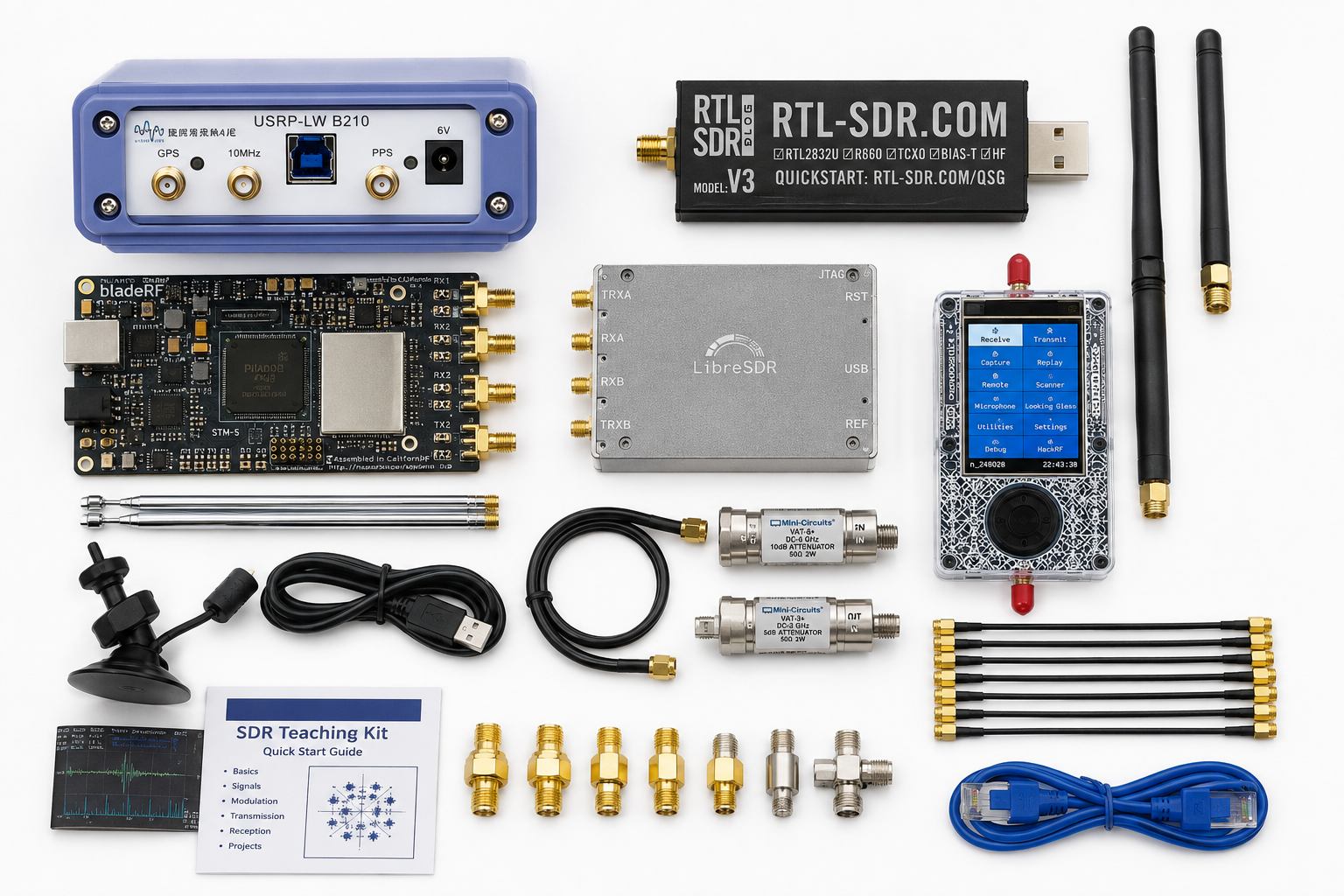
Software-defined radio is one of the best ways to teach modern wireless communications. Instead of explaining modulation, filtering, sampling, antennas, channel effects, MIMO, and cellular systems only on a whiteboard, universities can let students receive real signals, build GNU Radio flowgraphs, measure antennas, compare RF hardware, and experiment with complete communication links.
The best SDR teaching lab is not one expensive radio locked in a cabinet. It is a structured kit that matches the course level: low-cost receive-only SDRs for beginners, transmit-capable SDRs for digital communications labs, MIMO-capable SDRs for advanced wireless courses, and RF measurement tools for antennas, filters, signal validation, and safe experiments.
This guide explains how to choose SDR hardware for wireless communications courses, including RTL-SDR teaching kits, HackRF Pro, PLUTO+, bladeRF 2.0 micro, USRP B210, USRP X310, GNU Radio, antennas, filters, NanoVNA, TinySA Ultra, attenuators, dummy loads, and university purchase-order planning.
Browse software-defined radio hardware, RTL-SDR receivers and kits, HackRF devices, PlutoSDR and PLUTO+ SDR radios, bladeRF SDR devices, USRP SDR devices, and RF test and measurement equipment.
Quick Answer: Which SDR Teaching Kit Should a University Buy?
| Course level | Recommended hardware | Best use |
|---|---|---|
| Beginner wireless communications | RTL-SDR Blog V3 Kit or RTL-SDR Blog V3 USB-C | Receive-only spectrum observation, FM, ADS-B, AIS, ACARS, satellites, filters, sampling, and GNU Radio basics. |
| Digital communications lab | HackRF Pro, PLUTO+, or AD936x-style SDR | Transmit/receive experiments, modulation, packet links, controlled lab signals, and GNU Radio flowgraphs. |
| Advanced SDR and MIMO | bladeRF 2.0 micro, PLUTO+, USRP B210 | 2×2 MIMO, full-duplex direction, custom waveforms, channel estimation, and wireless research projects. |
| 5G, O-RAN, AI-RAN, and research courses | USRP B210, USRP X310, strong Linux workstation | srsRAN, OpenAirInterface, Open5GS, private 5G, MIMO, and research-grade lab modules. |
| Antenna and RF measurement modules | NanoVNA, TinySA Ultra, RF power meter, dummy loads, attenuators | SWR, return loss, spectrum scans, conducted power checks, safe transmitter testing, and RF troubleshooting. |
The simple rule: use RTL-SDR for every student, add a smaller number of transmit-capable SDRs for lab benches, and reserve USRP or bladeRF hardware for advanced modules, final-year projects, graduate labs, and research.
Why SDR Is Ideal for Wireless Communications Courses
Wireless communications can feel abstract when students only see equations and block diagrams. SDR makes the course practical because students can connect theory to real signals.
With SDR hardware, students can learn:
- Sampling and aliasing
- Frequency-domain analysis
- AM, FM, SSB, FSK, PSK, QAM, and OFDM basics
- Filtering, gain, noise, dynamic range, and overload
- Antennas, impedance, SWR, and return loss
- Packet timing and synchronization
- Channel effects and multipath
- MIMO concepts
- Cellular testbeds with srsRAN or OpenAirInterface
- RF safety, measurement discipline, and reproducible experiments
SDR also scales well. A university can start with a low-cost RTL-SDR lab and later add HackRF, PLUTO+, bladeRF, USRP, NanoVNA, TinySA Ultra, and private 5G hardware as courses become more advanced.
Tier 1: RTL-SDR Teaching Kits for Beginner Courses
RTL-SDR is the best first SDR for large classes because it is affordable, receive-only, and easy to distribute across many student workstations.
Recommended hardware:
- RTL-SDR Blog V3 USB-C
- RTL-SDR Blog V3 Kit
- RTL-SDR compatible antennas
- FM block filters where local FM overload is a problem
- Broadcast AM reject filters for HF/direct-sampling experiments where useful
- SMA adapters and spare cables
Best RTL-SDR course labs
| Lab topic | What students learn | Suggested hardware |
|---|---|---|
| First signal and spectrum view | Center frequency, sample rate, gain, waterfall, noise floor | RTL-SDR Blog V3 USB-C |
| FM broadcast reception | Wideband FM, filtering, demodulation, stereo basics | RTL-SDR plus local antenna |
| ADS-B aircraft reception | 1090 MHz signals, packet decoding, antennas, line-of-sight | RTL-SDR plus 1090 MHz antenna |
| AIS ship tracking | Marine VHF, two-channel monitoring, decoder workflow | RTL-SDR plus VHF antenna |
| ACARS and VDL2 observation | Aircraft data links, channel spacing, VHF reception | RTL-SDR plus VHF antenna |
| Weather satellite reception | Doppler, polarization, satellite passes, image decoding | RTL-SDR plus V-dipole or suitable antenna |
| Filter comparison | Overload, adjacent signals, band-stop and high-pass filters | RTL-SDR plus FM block filter or AM reject filter |
Read: RTL-SDR Setup Guide for Windows and RTL-SDR Blog V3 Kit Review.
Tier 2: HackRF Pro for Transmit/Receive Demonstrations
HackRF Pro is useful when a course needs controlled transmit and receive experiments, wide frequency coverage, GNU Radio work, signal generation, RF prototyping, and wireless security education.
Use HackRF Pro for:
- GNU Radio transmitter and receiver demonstrations
- FSK, PSK, QAM, and OFDM-style teaching experiments
- Signal generation and controlled lab waveforms
- Protocol observation in authorized lab setups
- Wireless security awareness courses
- RF product testing and signal validation modules
Important limitation: HackRF-style devices are half-duplex. They can transmit or receive, but not both at the same time. For simultaneous transmit/receive, 2×2 MIMO, or private 5G work, consider PLUTO+, bladeRF, or USRP hardware.
Tier 3: PLUTO+ for Intermediate Transmit/Receive Labs
PLUTO+ SDR is useful for universities that want a more capable intermediate teaching platform than receive-only RTL-SDR, while keeping cost lower than USRP-class hardware.
Use PLUTO+ for:
- Transmit/receive SDR labs
- AD9363-based learning
- GNU Radio and SDRangel experiments
- Ethernet SDR workflows
- Student capstone projects
- Introductory MIMO and 2TX/2RX concepts
- Digital communications labs where each bench needs more than receive-only SDR
Read: PLUTO+ SDR Review and PLUTO+ SDR Setup Guide.
Tier 4: bladeRF 2.0 micro for MIMO, FPGA, and Advanced SDR Courses
bladeRF 2.0 micro is a strong teaching platform when the course includes MIMO, custom waveforms, FPGA-oriented concepts, libbladeRF, SoapySDR, and advanced SDR development.
Choose bladeRF 2.0 micro xA4 for general teaching, 2×2 MIMO, and host-side GNU Radio work. Choose bladeRF 2.0 micro xA9 when the course or research lab needs more FPGA capacity.
Use bladeRF for:
- 2×2 MIMO labs
- GNU Radio projects
- FPGA architecture discussions
- Custom modem development
- Real-time DSP demonstrations
- Graduate wireless communications labs
- Capstone projects where students need a flexible SDR platform
Read: bladeRF 2.0 micro xA4 vs xA9 and bladeRF 2.0 micro vs USRP B210.
Tier 5: USRP B210 and X310 for Research-Level Courses
USRP hardware is the strongest choice when a course moves from general SDR learning into serious wireless communications, private 5G, O-RAN, AI-RAN, MIMO, and graduate research.
USRP B210
USRP B210 is the best first USRP for many universities. It supports UHD workflows, 2×2 MIMO direction, GNU Radio, and common private 5G research stacks.
Use USRP B210 for:
- Advanced GNU Radio labs
- 2×2 MIMO teaching
- srsRAN and OpenAirInterface courses
- Open5GS private 5G labs
- AI-RAN and neural receiver starter projects
- Graduate wireless communications courses
USRP X310
USRP X310 is better when the lab needs higher bandwidth, external timing, networked SDR operation, FPGA resources, and a more durable research platform.
Use USRP X310 for:
- Advanced MIMO research
- Channel sounding
- O-RAN and private 5G research
- High-bandwidth SDR experiments
- Graduate and postgraduate projects
- Long-term research infrastructure
Read: USRP B210 vs X310 and USRP B210 for srsRAN and OpenAirInterface.
RF Measurement Tools Every SDR Course Should Include
A wireless communications course should not teach SDR as only software. Students also need to understand antennas, RF paths, power levels, filters, and measurement limits.
| Tool | Teaching use | Recommended category |
|---|---|---|
| NanoVNA | SWR, return loss, impedance, Smith Chart, antenna tuning, filter response | NanoVNA-H4 |
| TinySA Ultra | Spectrum scanning, harmonics, spurs, interference, transmitter observation | Spectrum analyzers |
| RF power meter | Conducted power checks, attenuation-chain validation, transmitter safety | RF power meters |
| Dummy loads | Safe transmitter testing without radiating unnecessary signals | RF dummy loads |
| Attenuators | Protect receivers, create repeatable cabled tests, avoid overload | RF test and measurement equipment |
| Antennas and filters | Real-world RF reception, matching, overload, selectivity, link-budget discussion | Antennas |
Read: NanoVNA vs TinySA and SDR Hardware for RF Product Testing.
Suggested Teaching Kits by Class Size
Small class kit: 6 to 10 students
- 5× RTL-SDR Blog V3 Kits or V3 USB-C dongles
- 1× HackRF Pro
- 1× PLUTO+ SDR
- 1× NanoVNA-H4
- 1× TinySA Ultra
- Assorted antennas, SMA cables, adapters, filters, attenuators, and dummy loads
Best for: small university labs, workshops, short courses, and introductory wireless communications modules.
Medium class kit: 15 to 25 students
- 10–15× RTL-SDR Blog V3 Kits or V3 USB-C dongles
- 2–4× HackRF Pro
- 2–4× PLUTO+ SDR
- 1–2× bladeRF 2.0 micro xA4
- 2× NanoVNA-H4
- 2× TinySA Ultra
- RF power meter, dummy loads, attenuator kits, filters, antennas, and spare SMA adapters
Best for: semester-long undergraduate labs, digital communications classes, and project-based SDR courses.
Advanced university research and teaching kit
- 10–20× RTL-SDR Blog V3 Kits or V3 USB-C dongles
- 4× HackRF Pro or PLUTO+ SDR
- 2–4× bladeRF 2.0 micro xA4 or xA9
- 1–2× USRP B210
- 1× USRP X310 where advanced research is in scope
- NanoVNA-H4, TinySA Ultra, RF power meter, dummy loads, attenuators, shielded accessories, filters, and antennas
- Linux workstations with GNU Radio, SDR++, SDRangel, Python, and course flowgraphs installed
Best for: wireless communications departments, graduate labs, private 5G courses, MIMO labs, AI-RAN research, and final-year projects.
Suggested Lab Modules for a Wireless Communications Course
| Week or module | Lab topic | Suggested hardware |
|---|---|---|
| 1 | What is SDR? First spectrum and waterfall | RTL-SDR Blog V3 USB-C |
| 2 | Sampling, gain, aliasing, and noise floor | RTL-SDR, GNU Radio, SDR++ |
| 3 | AM/FM demodulation and filtering | RTL-SDR, GNU Radio |
| 4 | Digital modulation: FSK, PSK, and QAM concepts | HackRF Pro, PLUTO+, or simulation first |
| 5 | Packet timing and synchronization | HackRF Pro, PLUTO+, GNU Radio |
| 6 | Antenna matching and SWR | NanoVNA-H4, antennas, cables |
| 7 | Spectrum analysis and interference | TinySA Ultra, RTL-SDR, filters |
| 8 | Transmit power, attenuation, and safe RF paths | RF power meter, attenuators, dummy loads |
| 9 | 2×2 MIMO introduction | USRP B210, bladeRF 2.0 micro, or PLUTO+ |
| 10 | Private 5G or OAI/srsRAN overview | USRP B210, Linux workstation, Open5GS |
| 11 | Student project week | Mixed SDR kit |
| 12 | Measurements, reports, and reproducibility | All lab equipment |
How to Choose Hardware by Learning Outcome
| Learning outcome | Best hardware | Why |
|---|---|---|
| RF awareness for many students | RTL-SDR Blog V3 Kit | Affordable enough for many benches and safe because it is receive-only. |
| GNU Radio basics | RTL-SDR, HackRF Pro, PLUTO+ | Supports beginner flowgraphs and progression into transmit/receive labs. |
| Digital communications | HackRF Pro, PLUTO+, bladeRF | Supports controlled signal generation and receiver design. |
| MIMO and channel estimation | USRP B210, bladeRF 2.0 micro, USRP X310 | Supports 2×2 MIMO and advanced experiments. |
| Private 5G teaching | USRP B210, Open5GS, srsRAN or OAI | Good starter platform for real 5G lab demonstrations. |
| Antenna and RF measurement | NanoVNA, TinySA Ultra, RF power meter | Teaches measurement discipline and RF hardware limits. |
| Graduate research | USRP B210, X310, bladeRF xA9, PLUTO+ | Supports advanced SDR, MIMO, O-RAN, AI-RAN, and custom waveform work. |
Classroom Safety Rules for SDR Courses
Receive-only RTL-SDR labs are low risk, but transmit-capable SDR labs need rules. Students should never be allowed to transmit randomly into antennas without authorization and supervision.
- Start transmit-capable labs with cabled RF paths and dummy loads.
- Use fixed attenuators before connecting one SDR transmitter to another SDR receiver.
- Check maximum input levels before connecting RF hardware.
- Do not transmit in licensed bands without authorization.
- Use shielding where required.
- Label all SDRs, antennas, cables, adapters, and attenuators.
- Use low power first.
- Document frequency, bandwidth, gain, sample rate, antenna, and RF path in every lab report.
- Keep experimental networks isolated from production networks.
- Use instructor-approved flowgraphs only for transmit labs.
Computer and Software Requirements
Student workstations
- Modern laptop or desktop
- USB 3.0 where transmit-capable SDRs or wider bandwidths are used
- 8 GB RAM minimum, 16 GB preferred
- Linux preferred for advanced SDR labs
- Windows acceptable for RTL-SDR beginner labs
- GNU Radio, SDR++, SDRangel, Python, and SDR drivers installed before the lab
Advanced lab workstation
- Modern multi-core CPU
- 32–64 GB RAM
- NVMe SSD
- USB 3.0 and/or 10GbE depending on SDR
- Linux host for USRP, OAI, srsRAN, GNU Radio, and repeatable research
- Optional GPU for AI-RAN, neural receiver, and 6G research modules
Common Purchasing Mistakes
Buying one expensive SDR instead of many teaching receivers
For undergraduate courses, hands-on access matters. It is usually better to buy many RTL-SDR kits plus a few advanced SDRs than one high-end radio that only one group can use.
Forgetting antennas, cables, and adapters
SDR hardware is useless in class if the lab lacks the right SMA cables, adapters, antennas, filters, and spare parts.
Adding transmit-capable SDRs without RF safety tools
HackRF, PLUTO+, bladeRF, and USRP labs need attenuators, dummy loads, power checks, and instructor-approved test procedures.
Teaching SDR without measurement tools
Students should learn that SDR results depend on antennas, gain, filtering, impedance, and signal levels. Add NanoVNA and TinySA Ultra to the lab.
Choosing hardware before choosing lab exercises
Start with the course outcomes. Then choose hardware that supports those outcomes at the right budget and complexity.
Purchase-Order Justification Examples
RTL-SDR teaching kit justification
RTL-SDR kits are required to provide each student workstation with a low-cost receive-only software-defined radio for practical wireless communications exercises, including spectrum observation, modulation, filtering, ADS-B, AIS, ACARS, satellites, and GNU Radio basics.
HackRF Pro justification
HackRF Pro is required for controlled transmit/receive SDR demonstrations, GNU Radio waveform generation, digital communications exercises, and RF prototyping in supervised laboratory conditions.
PLUTO+ justification
PLUTO+ SDR is required as an intermediate transmit/receive teaching platform for AD9363-based SDR learning, Ethernet-connected experiments, digital communications labs, and student projects that require more capability than receive-only SDR hardware.
USRP B210 justification
USRP B210 is required as a UHD-compatible 2×2 MIMO SDR platform for advanced wireless communications courses, GNU Radio, private 5G labs, srsRAN, OpenAirInterface, MIMO, channel estimation, and graduate-level research exercises.
RF measurement tools justification
NanoVNA, TinySA Ultra, RF power meters, attenuators, and dummy loads are required to teach antenna behavior, spectrum analysis, RF safety, signal validation, and repeatable measurement procedures in wireless communications laboratories.
Request a Quote for University SDR Teaching Kits
Universities, laboratories, wireless communications departments, telecom programs, cybersecurity programs, research groups, and grant-funded projects can request a formal quotation directly from SDRstore.eu.
Use the Add to Quote button on product pages or the document icon on product cards. Add RTL-SDR kits, HackRF Pro, PLUTO+, bladeRF, USRP devices, antennas, cables, filters, NanoVNA, TinySA Ultra, attenuators, dummy loads, RF power meters, and quantities to one quote request.
A quote request is useful when you need:
- SDR kits for 10, 20, or 30 students
- A complete wireless communications teaching lab
- Beginner, intermediate, and advanced SDR hardware in one offer
- RF measurement tools included with the SDRs
- Formal pricing for a university purchase order
- Hardware alternatives based on course budget
- A phased rollout for multiple semesters
Read the SDRstore.eu quote-request guide.
Related SDRstore.eu Guides
- How to Build a University SDR Lab: Hardware Checklist
- SDR Hardware for Universities: Beginner, Intermediate, and Advanced Lab Setups
- How to Choose SDR Hardware for a Research Grant or University Purchase Order
- Best SDR for GNU Radio Projects: RTL-SDR, HackRF, PlutoSDR, bladeRF, and USRP
- 2×2 MIMO SDR Explained
- MIMO Testbed Hardware: 2×2, 4×4, Synchronization, Clocks, and Antennas
- Private 5G Lab Hardware Checklist
- SDR Hardware for RF Product Testing
- NanoVNA vs TinySA
Official and Technical Resources
- GNU Radio official website
- GNU Radio official tutorials
- Analog Devices ADALM-PLUTO official page
- Ettus Research USRP B210 official page
- Ettus UHD software overview
- Nuand bladeRF 2.0 micro official page
- srsRAN Project documentation
- OpenAirInterface RAN overview
- RTL-SDR Blog quick-start guide
Final Recommendation
For most wireless communications courses, start with RTL-SDR Blog V3 Kits or RTL-SDR Blog V3 USB-C receivers for every student pair. Add HackRF Pro or PLUTO+ for transmit/receive labs, bladeRF 2.0 micro for MIMO and FPGA-oriented modules, and USRP B210 or X310 for advanced private 5G, O-RAN, AI-RAN, and graduate research courses.
Do not forget RF measurement tools. A strong SDR course should include NanoVNA, TinySA Ultra, RF power meters, dummy loads, attenuators, antennas, filters, SMA cables, and written RF safety procedures.
The best university SDR teaching kit is not one radio. It is a complete course-ready lab package that gives students hands-on access to signals, antennas, measurement tools, safe RF paths, and progressively more advanced SDR platforms as they move from fundamentals to real wireless research.
FAQ
What is the best SDR for a university wireless communications course?
For beginner courses, RTL-SDR Blog V3 Kit or RTL-SDR Blog V3 USB-C is the best starting point because it is affordable, receive-only, and easy to distribute across many student workstations. For advanced courses, add HackRF Pro, PLUTO+, bladeRF, or USRP B210.
How many SDRs should a university buy for a class?
For hands-on teaching, plan one RTL-SDR kit per student pair or workstation. Add a smaller number of shared transmit-capable SDRs such as HackRF Pro, PLUTO+, bladeRF, or USRP for supervised lab exercises.
Is RTL-SDR enough for teaching wireless communications?
RTL-SDR is enough for beginner receive-only labs such as spectrum observation, FM, ADS-B, AIS, ACARS, satellites, filtering, gain, and GNU Radio basics. It is not enough for transmit, full-duplex, MIMO, or private 5G labs.
Should a university buy HackRF Pro for teaching?
Yes, HackRF Pro is useful for controlled transmit/receive demonstrations, GNU Radio waveforms, signal generation, RF prototyping, and wireless security education. It is half-duplex, so it is not ideal for full-duplex or MIMO base-station labs.
Is PLUTO+ good for wireless communications courses?
Yes. PLUTO+ is useful for intermediate courses that need transmit/receive SDR experiments, AD9363-based learning, Ethernet SDR workflows, GNU Radio, SDRangel, and student projects beyond receive-only RTL-SDR.
Is USRP B210 good for university labs?
Yes. USRP B210 is a strong advanced teaching and research SDR for GNU Radio, 2×2 MIMO, private 5G, srsRAN, OpenAirInterface, Open5GS, AI-RAN starter labs, and graduate wireless communications courses.
Do SDR courses need NanoVNA and TinySA Ultra?
Yes, they are strongly recommended. NanoVNA teaches antennas, SWR, return loss, impedance, and filters. TinySA Ultra teaches spectrum analysis, interference, spurs, harmonics, and signal validation.
Can students transmit with SDRs in class?
Only in supervised, legal, and controlled lab conditions. Use cabled RF paths, dummy loads, attenuators, low power, shielding where needed, and instructor-approved flowgraphs. Do not allow random over-the-air transmissions.
What software should be installed for SDR teaching?
Install GNU Radio, SDR++, SDRangel, Python, drivers for the selected SDRs, and any course-specific flowgraphs before the lab. Advanced courses may also use UHD, libbladeRF, Open5GS, srsRAN, or OpenAirInterface.
Can SDRstore.eu quote complete SDR teaching kits for universities?
Yes. Use the Add to Quote button on product pages or the document icon on product cards. Add SDRs, antennas, cables, filters, attenuators, dummy loads, NanoVNA, TinySA Ultra, RF power meters, and quantities so the complete teaching kit can be quoted together.
No posts found
Write a review






We support all major card and digital payment options. More local methods are available and shown during checkout.
You enter into a binding sales contract once you have received an 'order confirmation and sales receipt' email from us, in line with our Sales & Delivery conditions. Therefore, sdrstore.eu has the right to cancel your order in the event of technical problems, delivery failure, Fair use policy and other similar situations.






Your payments are protected by advanced encryption and 3-D Secure authentication for safe online shopping.