








AIS Ship Tracking with RTL-SDR: Antenna, Software, and Setup Guide
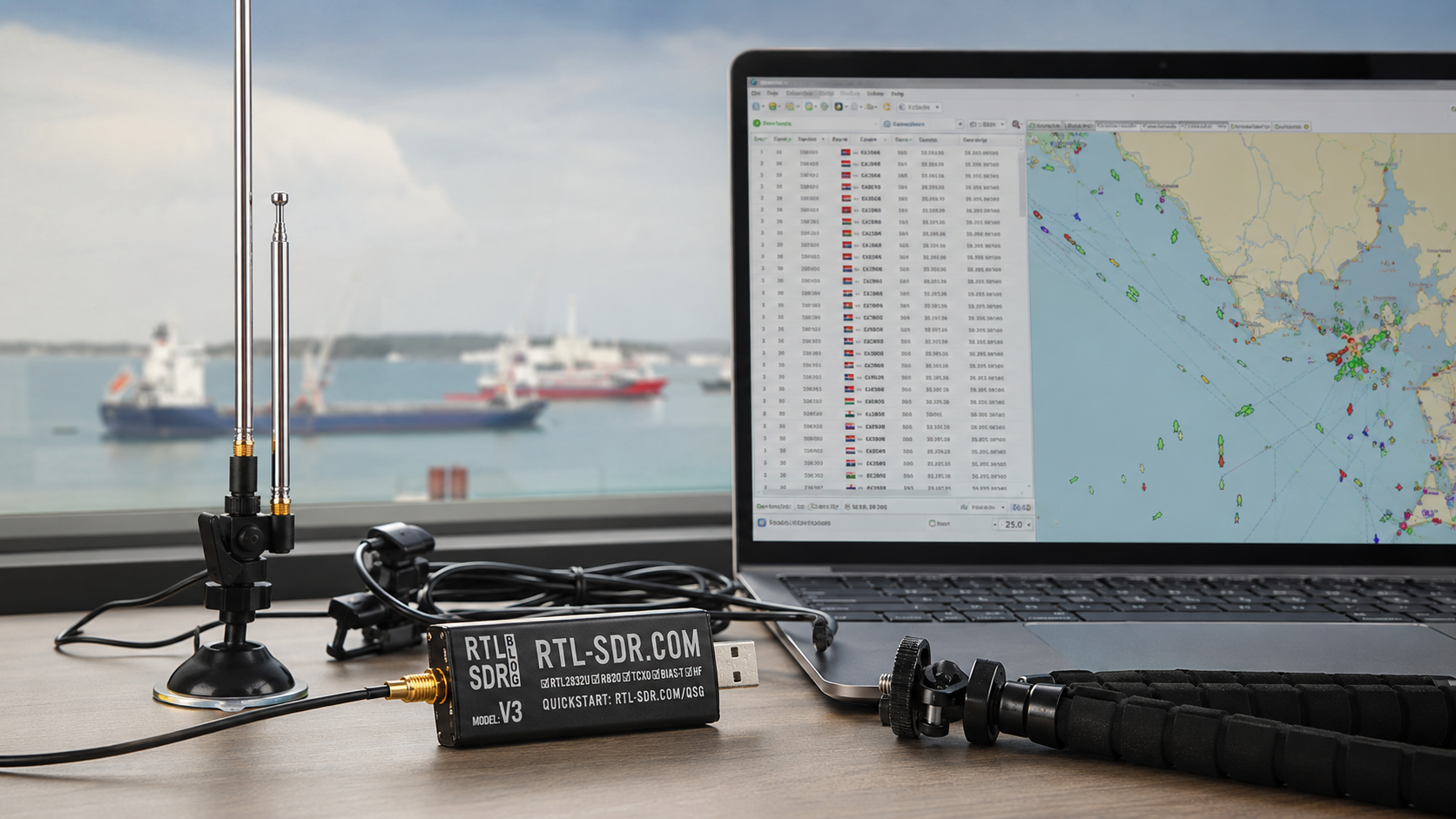
AIS ship tracking is one of the best RTL-SDR projects after ADS-B aircraft tracking. With a low-cost receive-only SDR, a suitable VHF marine antenna, and free decoder software, you can receive Automatic Identification System broadcasts from nearby ships and display vessel positions, MMSI numbers, course, speed, and related maritime data.
AIS is used by ships and shore stations for vessel awareness and maritime safety. It operates in the VHF marine band on two main channels: AIS 1 at 161.975 MHz and AIS 2 at 162.025 MHz. These frequencies are close enough that a single RTL-SDR can normally receive both channels at the same time using software such as AIS-catcher or rtl_ais.
This guide explains how to build an AIS ship-tracking receiver with RTL-SDR, what antenna to use, which software to install, how to send AIS NMEA data to OpenCPN, and how to fix the most common reception problems.
Browse current hardware in the RTL-SDR receivers, kits, antennas, and accessories category. For broader Raspberry Pi SDR projects, read Best SDR for Raspberry Pi: RTL-SDR, ADS-B, AIS, Satellites, and Remote Monitoring.
Quick Answer: Can RTL-SDR Track Ships with AIS?
Yes. RTL-SDR can receive AIS ship-tracking signals on 161.975 MHz and 162.025 MHz when paired with a suitable VHF marine antenna and AIS decoder software. For most beginners, the easiest modern software choice is AIS-catcher. The classic lightweight option is rtl_ais.
| Setup part | Recommended choice | Why it matters |
|---|---|---|
| Receiver | RTL-SDR Blog V3 USB-C or RTL-SDR Blog V3 Kit | Affordable receive-only SDR with stable TCXO and support for Windows, Linux, Raspberry Pi, and Android |
| Antenna | VHF marine antenna or adjustable dipole tuned around 162 MHz | AIS is in the VHF maritime band, not at 1090 MHz like ADS-B |
| Beginner decoder | AIS-catcher | Modern dual-channel AIS receiver with NMEA, web, UDP, HTTP, and TCP output options |
| Classic decoder | rtl_ais | Lightweight dual-frequency AIS decoder that outputs AIVDM/AIVDO NMEA sentences |
| Map display | OpenCPN or AIS-catcher web viewer | Displays decoded vessel information visually |
| Permanent station | Raspberry Pi | Low-power always-on AIS receiver for home, marina, coastal, or educational use |
What Is AIS?
AIS stands for Automatic Identification System. It is a VHF maritime data system used by ships, base stations, aids to navigation, and related maritime equipment to broadcast identification and navigation information.
Depending on the vessel and message type, AIS data can include:
- MMSI number
- Vessel name
- Call sign
- Ship type
- Position
- Course over ground
- Speed over ground
- Heading
- Navigation status
- Destination and ETA where transmitted
- Aids-to-navigation and safety-related information
For an RTL-SDR user, AIS is a receive-only learning project. It can show nearby maritime traffic, but it should not be treated as a certified navigation or safety system.
AIS Frequencies: AIS 1 and AIS 2
The two main AIS frequencies are:
| AIS channel | Marine channel | Frequency | Common name |
|---|---|---|---|
| AIS 1 | Channel 87B | 161.975 MHz | Channel A |
| AIS 2 | Channel 88B | 162.025 MHz | Channel B |
Because the two channels are only 50 kHz apart, a single RTL-SDR has enough bandwidth to receive both at once. This is different from some multi-frequency projects where the signals are too far apart for one RTL-SDR.
AIS vs ADS-B: Ship Tracking vs Aircraft Tracking
AIS and ADS-B are conceptually similar because both broadcast position and identity information, but they use different frequencies, antennas, software, and applications.
| Feature | AIS | ADS-B |
|---|---|---|
| Main use | Ship and maritime traffic tracking | Aircraft tracking |
| Main frequency | 161.975 MHz and 162.025 MHz | 1090 MHz |
| Antenna type | VHF marine antenna around 162 MHz | 1090 MHz ADS-B antenna |
| Beginner software | AIS-catcher or rtl_ais | dump1090, readsb, tar1090, PiAware |
| Output | AIS NMEA messages and ship positions | Aircraft positions and flight data |
| Best location | Near coast, river, port, marina, canal, or lake traffic | With clear sky view toward aircraft |
Do not use a dedicated 1090 MHz ADS-B antenna for AIS if you want best results. AIS needs a VHF antenna closer to 162 MHz.
Recommended RTL-SDR Hardware for AIS
RTL-SDR Blog V3 USB-C
The RTL-SDR Blog V3 USB-C dongle is a strong current choice if you already have or plan to buy a suitable AIS antenna. It includes a 1PPM TCXO for frequency stability, SMA connector, aluminum case, USB-C interface, and support for Windows, Linux, Raspberry Pi, and Android.
RTL-SDR Blog V3 Kit
The RTL-SDR Blog V3 Kit is better for beginners who want everything needed for first tests in one box. The included multipurpose dipole can be adjusted for VHF reception and is useful for learning antenna placement before buying a dedicated outdoor marine antenna.
Do you need RTL-SDR V4 for AIS?
No. AIS is around 162 MHz, where the RTL-SDR Blog V3 already works well. If you already own an RTL-SDR Blog V4, it can also be used, but V3 or V3 USB-C is normally a safe and practical buying direction for AIS.
Best Antenna for AIS with RTL-SDR
AIS reception depends heavily on antenna placement. A better antenna location can improve results more than changing the SDR dongle.
Best antenna choices
- Dedicated VHF marine antenna tuned around 156–162 MHz
- Outdoor vertical antenna for a permanent coastal or marina station
- Adjustable RTL-SDR dipole tuned around 162 MHz for beginner testing
- VHF discone or wideband receiving antenna for general marine-band monitoring
Beginner dipole length
A quarter-wave element for 162 MHz is approximately 46 cm. For a simple vertical dipole-style test, extend each element to around 46 cm as a starting point, then adjust placement and orientation for best reception.
The exact result depends on the antenna design, cable, mount, nearby objects, and indoor or outdoor placement. If you use the RTL-SDR Blog multipurpose dipole, treat this as a practical starting length rather than a laboratory-calibrated antenna.
Antenna placement tips
- Place the antenna as high as possible.
- Use a window or outdoor location facing the water.
- Avoid placing the antenna next to laptops, monitors, routers, LED lights, and power supplies.
- Use a shorter cable when possible.
- If outdoors, protect connectors from moisture.
- If you are far inland, do not expect much AIS traffic unless there are rivers, canals, ports, or lakes nearby.
How Far Can RTL-SDR Receive AIS?
AIS range is mainly limited by VHF line-of-sight. A low indoor antenna may only receive nearby vessels. A high outdoor antenna near the coast can receive much farther.
| Setup | Typical result |
|---|---|
| Indoor antenna far from water | Very limited or no AIS messages |
| Indoor window antenna near a river or marina | Nearby vessels may decode |
| Outdoor antenna near coast or port | Good local ship tracking |
| High outdoor antenna with clear sea view | Best range for a low-cost RTL-SDR station |
AIS is not a satellite-tracking project for normal RTL-SDR stations. You are mostly receiving local terrestrial VHF signals from ships and shore stations within radio range.
Best AIS Decoder Software for RTL-SDR
| Software | Best for | Output | Beginner recommendation |
|---|---|---|---|
| AIS-catcher | Modern dual-channel AIS reception, web viewing, and network output | NMEA, UDP, TCP, HTTP, web interface, and other options | Best first choice for most users |
| rtl_ais | Lightweight classic command-line decoding | AIVDM and AIVDO NMEA sentences | Good for simple Linux or Raspberry Pi setups |
| OpenCPN | Chart display and AIS target visualization | NMEA input from AIS decoder | Best when you want a chart-plotter-style display |
| SDR++ or SDR# | Visual signal checking | Waterfall and spectrum view | Useful before debugging decoder commands |
Windows Setup with AIS-catcher
On Windows, AIS-catcher is usually the easiest decoder to start with because pre-built binaries are available and the software can output decoded data without requiring a full Linux build environment.
Step 1: Install RTL-SDR drivers
Install the RTL-SDR driver with Zadig, then test the dongle in SDR# or SDR++ first. If the receiver is not visible in normal SDR software, AIS-catcher will not fix the driver issue.
Read the full Windows driver guide: RTL-SDR Setup Guide for Windows: SDR#, SDR++, Zadig, Drivers, and First Signal.
Step 2: Download and unpack AIS-catcher
Download the current AIS-catcher Windows release from the official project page, unpack the ZIP file into a folder, and open Command Prompt in that folder.
Step 3: Run a first test
AIS-catcherIf your RTL-SDR is detected and the antenna can hear AIS traffic, messages should begin appearing. If nothing appears, keep the software simple and improve antenna placement first.
Step 4: Set RTL-SDR gain manually
AIS-catcher -gr tuner 33.3 rtlagc ONThis sets the tuner gain and enables RTL AGC as a starting test. The best gain depends on your signal environment. Too much gain can overload the receiver, while too little gain can miss weak vessels.
Linux and Raspberry Pi Setup with AIS-catcher
Linux and Raspberry Pi are good choices for permanent AIS stations. Start manually before creating services or automatic startup scripts.
Step 1: Install RTL-SDR tools
sudo apt update
sudo apt install rtl-sdr
rtl_test
If rtl_test cannot see the receiver, fix RTL-SDR drivers or permissions before installing AIS software.
Step 2: Install AIS-catcher
Use the official AIS-catcher installation instructions for your distribution. Package availability and build steps can change, so follow the current project documentation when building a production station.
Step 3: Run a basic AIS-catcher test
AIS-catcherStep 4: Adjust gain
AIS-catcher -gr tuner 33.3 rtlagc ONStep 5: Add frequency correction if needed
Genuine RTL-SDR Blog receivers include a stable TCXO, so correction is usually small. If needed, AIS-catcher supports frequency correction through its RTL-SDR settings.
AIS-catcher -gr freqoffset 1 tuner 33.3Use a measured correction value rather than guessing.
Classic Setup with rtl_ais
rtl_ais is a lightweight command-line AIS decoder. It defaults to the two normal AIS frequencies and outputs AIVDM/AIVDO NMEA sentences.
Build rtl_ais on Linux
sudo apt update
sudo apt install git build-essential librtlsdr-dev libusb-1.0-0-dev

git clone https://github.com/dgiardini/rtl-ais.git
cd rtl-ais
make
sudo make install
Run rtl_ais with console logging
rtl_ais -nBy default, rtl_ais uses 161.975 MHz and 162.025 MHz. These are the two normal AIS channels, so most users do not need to set frequencies manually.
Set gain and PPM correction
rtl_ais -g 38.6 -p 1 -nAdjust gain and PPM correction for your receiver and local signal conditions. If messages are noisy or rare, check the antenna and gain before changing many software options at once.
Send NMEA to OpenCPN over UDP
rtl_ais -h 127.0.0.1 -P 10110 -nThis sends AIS NMEA sentences to UDP port 10110 on the same computer. You can then configure OpenCPN to listen for incoming NMEA data.
View AIS Targets in OpenCPN
OpenCPN is a free and open-source chart-plotter application. It can receive AIS NMEA data from software such as AIS-catcher or rtl_ais and display vessel targets on a chart.
Basic OpenCPN workflow
- Install OpenCPN.
- Start AIS-catcher or rtl_ais and confirm that NMEA messages are being produced.
- Open OpenCPN settings.
- Add a network connection for NMEA input.
- Use UDP or TCP according to the decoder output.
- Set the port, commonly 10110 for local AIS NMEA testing.
- Confirm AIS targets appear on the chart.
Important navigation warning
An RTL-SDR plus AIS-catcher or rtl_ais is a hobby and learning setup. It is not a certified AIS receiver, AIS transponder, collision-avoidance system, or primary navigation tool. Do not rely on it for safety of life, navigation, or vessel-operation decisions.
Using the AIS-catcher Web Viewer
AIS-catcher can provide a convenient built-in viewer for local station monitoring. This is useful if you want a quick browser-based display without configuring a full chart plotter immediately.
For a beginner station, the workflow is:
- Run AIS-catcher.
- Confirm messages are decoding.
- Open the local web interface if enabled in your configuration.
- Check vessel list and map-style output.
- Only then add OpenCPN, remote sharing, or automatic startup.
Keep any web viewer limited to your trusted local network unless you understand the security implications of exposing it externally.
Should You Feed AIS Data Online?
Some communities allow users to share AIS receiver data. Before feeding or forwarding decoded data, check your local laws and the terms of the receiving platform.
Responsible sharing checklist:
- Confirm AIS reception and data sharing is legal in your country.
- Do not rely on a hobby receiver for navigation.
- Do not publish misleading station data.
- Secure any web dashboards or network outputs.
- Use the latest stable software release when sharing data continuously.
- Keep logs only when needed and handle data responsibly.
Gain, AGC, and Frequency Correction
AIS decoding is sensitive to signal quality. The goal is not maximum gain. The goal is clean decoding.
Gain tips
- Start with a moderate gain value, such as around 30–40 dB.
- Reduce gain if strong local signals overload the receiver.
- Increase gain only if AIS bursts are weak and the noise floor remains controlled.
- Try manual gain and automatic gain options to see which works best in your location.
Frequency correction tips
RTL-SDR Blog receivers use a 1PPM TCXO, so correction is usually small. If decoding is unreliable, check PPM correction with RTL-SDR tools and apply a measured value.
rtl_test -pLet the test run long enough to estimate correction, then apply the result in AIS-catcher or rtl_ais if needed.
Filters and LNAs for AIS
AIS is close to the marine VHF band, so strong local transmitters, pagers, FM broadcast stations, or other nearby RF sources can affect reception.
When a filter helps
- The waterfall looks overloaded.
- Strong nearby signals raise the noise floor.
- AIS bursts are visible but decoding is poor.
- The receiver is near strong broadcast or marine transmitters.
A broadcast FM block filter can help in some overloaded VHF environments. View the Broadcast FM Block Filter.
When an LNA helps
An LNA may help if the antenna is outdoors, the signal is weak, and the coax cable run is long. It can also make reception worse if the receiver is already overloaded.
Read Do You Need an LNA for SDR?
Permanent AIS Station on Raspberry Pi
A Raspberry Pi is ideal for a permanent AIS station because it can run continuously with low power consumption. Build the station only after manual decoding works.
Recommended process
- Install Raspberry Pi OS.
- Connect the RTL-SDR directly or through a reliable powered USB hub.
- Run
rtl_test. - Install AIS-catcher or rtl_ais.
- Run the decoder manually.
- Adjust antenna placement and gain.
- Confirm stable messages for several hours.
- Create a systemd service only after the manual command works.
- Log output and monitor service restarts.
What to document
- Raspberry Pi model
- RTL-SDR serial number
- Decoder software and version
- Antenna type and height
- Gain setting
- Frequency correction
- Output port for OpenCPN or local web display
- Known-good command line
Common AIS with RTL-SDR Problems
| Problem | Likely cause | Fix |
|---|---|---|
| No vessels appear | No nearby AIS traffic, poor antenna location, or wrong setup | Move closer to water, raise the antenna, and test with a known active area. |
| RTL-SDR not found | Driver or permissions issue | Run rtl_test, fix Zadig on Windows, or fix Linux udev permissions. |
| Messages appear rarely | Weak signal or low vessel traffic | Improve antenna height, placement, and view toward the water. |
| Decoder shows errors | Overload, poor SNR, wrong gain, or frequency offset | Adjust gain, check PPM correction, and inspect the signal in SDR++. |
| OpenCPN shows no targets | NMEA output is not connected correctly | Confirm AIS NMEA messages first, then check UDP/TCP address and port. |
| Good reception indoors, poor reception after moving outdoors | Cable loss, bad connector, or water ingress | Check cable, adapters, connector sealing, and antenna mount. |
| Strong signals but bad decoding | Receiver overload | Reduce gain, remove unnecessary LNA, or add filtering. |
Recommended AIS Starter Setup
| Item | Recommended choice | Reason |
|---|---|---|
| Receiver | RTL-SDR Blog V3 USB-C or RTL-SDR Blog V3 Kit | Stable, affordable, receive-only, and suitable for 162 MHz AIS reception |
| Antenna | VHF marine antenna or adjustable dipole | AIS needs a VHF antenna, not a 1090 MHz ADS-B antenna |
| Software | AIS-catcher | Modern dual-channel decoder with flexible output options |
| Alternative software | rtl_ais | Simple classic decoder for AIVDM/AIVDO NMEA output |
| Display | AIS-catcher web viewer or OpenCPN | Shows decoded vessel data visually |
| Permanent receiver | Raspberry Pi | Low-power always-on station |
Legal and Safety Notes
Radio-monitoring laws vary by country. Check your local rules before receiving, decoding, logging, forwarding, or publishing AIS data.
- Receive only. RTL-SDR is receive-only and cannot transmit.
- Do not interfere with marine radio services.
- Do not use an RTL-SDR AIS setup as a certified navigation system.
- Do not rely on hobby receiver data for safety-of-life decisions.
- Do not transmit on AIS or marine VHF channels without authorization.
- Handle logged vessel data responsibly.
- Use official certified marine equipment for real vessel navigation and safety needs.
Related SDRstore.eu Guides
- Best SDR for Raspberry Pi: RTL-SDR, ADS-B, AIS, Satellites, and Remote Monitoring
- RTL-SDR Blog V3 Kit Review: Is It Still Worth Buying in 2026?
- RTL-SDR Setup Guide for Windows: SDR#, SDR++, Zadig, Drivers, and First Signal
- Best SDR for ADS-B: RTL-SDR Kits, Antennas, Filters, and LNAs Compared
- RTL-SDR V3 vs V4 vs V4 Lite: Which Budget SDR Should You Buy?
- Do You Need an LNA for SDR?
Official and Technical Resources
- ITU-R M.1371 AIS technical recommendation
- U.S. Coast Guard AIS overview
- AIS-catcher official GitHub repository
- AIS-catcher documentation
- rtl_ais official GitHub repository
- OpenCPN official website
- OpenCPN AIS devices documentation
- RTL-SDR Blog quick-start guide
Final Recommendation
For most beginners, the best AIS ship-tracking setup is an RTL-SDR Blog V3 USB-C or RTL-SDR Blog V3 Kit, a VHF marine antenna or adjustable dipole, and AIS-catcher. Start by confirming that the RTL-SDR works, place the antenna near a window or outdoors with a clear view toward the water, then run AIS-catcher and verify decoded messages.
If you prefer a simple classic command-line decoder, use rtl_ais. If you want a chart-style display, forward NMEA output to OpenCPN. If you want an always-on receiver, move the working command to a Raspberry Pi only after manual testing is stable.
The biggest performance upgrade for AIS is usually not a more expensive receiver. It is a better antenna, higher placement, cleaner VHF signal environment, and correct gain setting.
FAQ
Can RTL-SDR receive AIS ship signals?
Yes. RTL-SDR can receive AIS signals on 161.975 MHz and 162.025 MHz when paired with a suitable VHF marine antenna and AIS decoder software such as AIS-catcher or rtl_ais.
What are the AIS frequencies?
The two main AIS frequencies are 161.975 MHz for AIS 1, channel 87B, and 162.025 MHz for AIS 2, channel 88B.
What is the best AIS software for RTL-SDR?
AIS-catcher is the best modern beginner recommendation because it supports dual-channel AIS reception, RTL-SDR devices, NMEA output, network forwarding, and a web viewer. rtl_ais is a lightweight classic alternative.
Can one RTL-SDR receive both AIS channels?
Yes. AIS 1 and AIS 2 are only 50 kHz apart, so one RTL-SDR can normally receive both channels at the same time using software such as AIS-catcher or rtl_ais.
Can I use an ADS-B antenna for AIS?
A dedicated 1090 MHz ADS-B antenna is not ideal for AIS. Use a VHF marine antenna, VHF discone, or adjustable dipole tuned around 162 MHz.
How far can RTL-SDR receive AIS?
AIS range depends on VHF line-of-sight, antenna height, location, and nearby vessel traffic. A high outdoor antenna near the coast or a port will perform much better than a small indoor antenna far from water.
Can I run AIS decoding on Raspberry Pi?
Yes. Raspberry Pi is a good platform for a permanent AIS receiver. First test manually with rtl_test and AIS-catcher or rtl_ais, then create an automatic service only after decoding is stable.
Can I display RTL-SDR AIS data in OpenCPN?
Yes. AIS-catcher or rtl_ais can output AIS NMEA sentences, which can be sent to OpenCPN over UDP or TCP for chart-style vessel display.
Why am I not seeing any AIS ships?
The most common reasons are no nearby vessel traffic, poor antenna placement, wrong antenna type, RTL-SDR driver problems, excessive gain, receiver overload, or being too far inland.
Is RTL-SDR AIS safe for navigation?
No. An RTL-SDR AIS setup is for learning, monitoring, and experimentation. Do not use it as a certified navigation, collision-avoidance, or safety-of-life system.
No posts found
Write a review






We support all major card and digital payment options. More local methods are available and shown during checkout.
You enter into a binding sales contract once you have received an 'order confirmation and sales receipt' email from us, in line with our Sales & Delivery conditions. Therefore, sdrstore.eu has the right to cancel your order in the event of technical problems, delivery failure, Fair use policy and other similar situations.






Your payments are protected by advanced encryption and 3-D Secure authentication for safe online shopping.