








bladeRF vs LimeSDR: Which SDR Is Better for MIMO, GNU Radio, and FPGA Development?
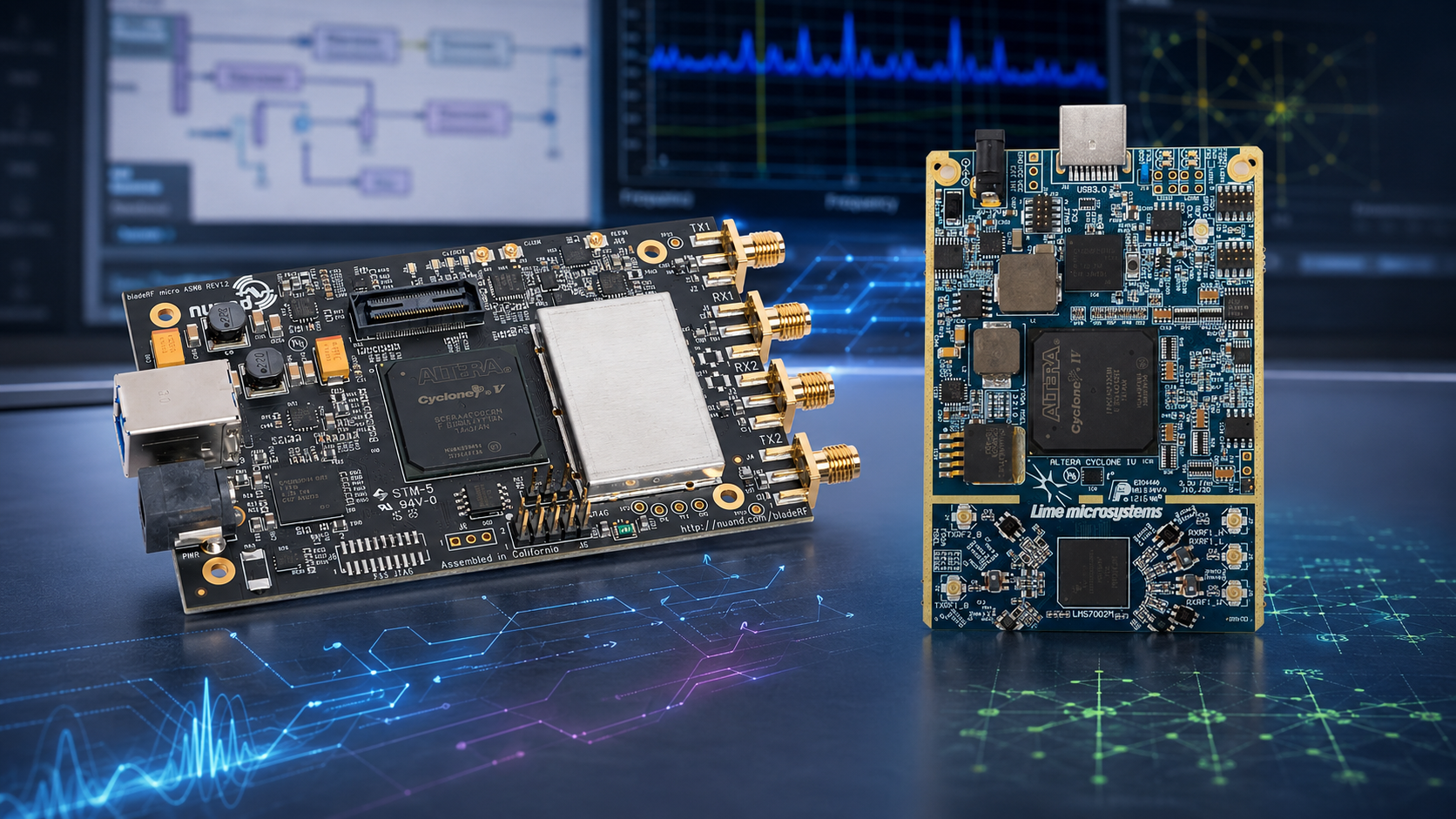
bladeRF and LimeSDR are two well-known software-defined radio families for wireless research, GNU Radio projects, MIMO experimentation, and FPGA-oriented development. Both can be excellent choices, but they are not aimed at exactly the same buyer.
bladeRF 2.0 micro is usually the better fit when you want a compact USB 3.0 2×2 MIMO SDR with strong libbladeRF support, a wide upper frequency range, and the option to choose a larger xA9 FPGA for custom HDL acceleration.
LimeSDR is usually the better fit when you want the LimeSuite and LMS7002M ecosystem, very low-frequency coverage on the full-size LimeSDR USB, open hardware modification potential, and broad wireless prototyping in the Lime Microsystems and MyriadRF ecosystem.
This buyer guide compares bladeRF vs LimeSDR for MIMO, GNU Radio, FPGA development, university labs, wireless research, and advanced RF prototyping.
Browse the bladeRF SDR devices and accessories category, the LimeSDR category, the bladeRF 2.0 micro xA4, the bladeRF 2.0 micro xA9, and the LimeSDR Mini V2.2.
Quick Answer: bladeRF or LimeSDR?
| Research need | Better choice | Why |
|---|---|---|
| Compact 2×2 MIMO USB SDR | bladeRF 2.0 micro | Both xA4 and xA9 are 2×2 MIMO platforms in a compact USB 3.0 form factor. |
| Full-size 2×2 MIMO Lime ecosystem | LimeSDR USB | Full-size LimeSDR USB is a genuine 2TX/2RX LMS7002M platform. |
| Lower-frequency coverage below 10 MHz or 47 MHz | LimeSDR USB | Official LimeSDR USB specifications list 100 kHz–3.8 GHz coverage. |
| Higher-frequency work above 3.8 GHz | bladeRF 2.0 micro | Nuand lists bladeRF 2.0 micro with 47 MHz–6 GHz top-line frequency direction. |
| FPGA-heavy HDL acceleration | bladeRF 2.0 micro xA9 | The xA9 variant provides much more FPGA headroom than xA4 and more than full-size LimeSDR USB. |
| LimeSuite and LMS7002M development | LimeSDR | LimeSDR is built around LimeSuite, LMS7002M, and the MyriadRF ecosystem. |
| GNU Radio host-side experimentation | Either | Both can be used for GNU Radio workflows when the correct drivers and blocks are installed. |
| Small full-duplex SDR, not 2×2 MIMO | LimeSDR Mini | LimeSDR Mini is compact and full-duplex, but it is officially 1TX/1RX, not a 2×2 MIMO replacement. |
The simple rule: choose bladeRF when you want compact 2×2 MIMO and FPGA flexibility. Choose full-size LimeSDR USB when you want the LimeSuite ecosystem, 100 kHz low-frequency coverage, and genuine 2×2 MIMO in the Lime family. Do not confuse LimeSDR Mini with full-size LimeSDR USB for MIMO work.
bladeRF vs LimeSDR Specification Comparison
| Feature | bladeRF 2.0 micro | LimeSDR USB | LimeSDR Mini 2.0 / V2.2 direction |
|---|---|---|---|
| RF transceiver | Analog Devices AD9361 direction | Lime Microsystems LMS7002M | Lime Microsystems LMS7002M |
| Official frequency direction | 47 MHz–6 GHz top-line; detailed table lists RX from 70 MHz and TX from 47 MHz | 100 kHz–3.8 GHz | 10 MHz–3.5 GHz direction |
| Channel configuration | 2×2 MIMO | 2TX / 2RX MIMO | 1TX / 1RX |
| Sample-rate direction | 61.44 MSPS standard | 61.44 MSPS | 30.72 MSPS |
| Bandwidth direction | 56 MHz filtered bandwidth | 61.44 MHz bandwidth | 40 MHz RF bandwidth direction |
| ADC/DAC sample depth | 12-bit | 12-bit | 12-bit |
| Host interface | USB 3.0 SuperSpeed | USB 3.0 | USB 3.0 |
| FPGA | Cyclone V xA4 or xA9 | Altera Cyclone IV EP4CE40F23C8N | Lattice ECP5 LFE5U-45F direction |
| Main software ecosystem | libbladeRF, GNU Radio integrations, SoapySDR direction | LimeSuite, SoapySDR, GNU Radio integrations | LimeSuite, SoapySDR, GNU Radio integrations |
| Best fit | Compact MIMO, FPGA headroom, custom modem work, portable RF research | Lime ecosystem, low-frequency coverage, 2×2 MIMO, open hardware prototyping | Compact Lime development where 1TX/1RX is enough |
Important Naming Note: LimeSDR USB Is Not LimeSDR Mini
Many buyers search for “LimeSDR” and find several related products. They are not interchangeable.
The full-size LimeSDR USB is the model to compare against bladeRF 2.0 micro for 2×2 MIMO. It is officially listed as a 2TX/2RX platform with 100 kHz–3.8 GHz coverage and 61.44 MHz bandwidth.
LimeSDR Mini is smaller and convenient, but it is officially a 1TX/1RX platform. It can be a good compact full-duplex SDR for single-channel development, but it is not a direct 2×2 MIMO competitor to bladeRF 2.0 micro.
For current SDRstore.eu availability, browse the LimeSDR category.
What bladeRF Does Better
1. Wider upper frequency range
bladeRF 2.0 micro is a stronger fit when the project needs frequency coverage above the LimeSDR USB upper range. Nuand presents bladeRF 2.0 micro as a 47 MHz–6 GHz platform, with its detailed table listing RX tuning from 70 MHz to 6 GHz and TX tuning from 47 MHz to 6 GHz.
This makes bladeRF attractive for many L-band, S-band, and higher-frequency research projects where a 3.8 GHz upper limit is too restrictive.
2. Compact 2×2 MIMO form factor
bladeRF 2.0 micro gives you 2×2 MIMO in a compact USB 3.0 board. That is useful for university benches, portable RF research, GNU Radio projects, authorized wireless-security research, and MIMO learning.
View the bladeRF 2.0 micro xA4 for the best-value entry into the platform.
3. xA9 FPGA headroom
The biggest bladeRF advantage over LimeSDR for FPGA development is the xA9 option. Nuand lists the bladeRF 2.0 micro xA9 with a 301 kLE Cyclone V FPGA, substantially more than the xA4 and more than the full-size LimeSDR USB FPGA logic capacity.
Choose bladeRF 2.0 micro xA9 when the research plan includes:
- Custom HDL signal-processing chains
- FPGA filters
- FFT pipelines
- Correlators
- Custom modem logic
- Low-latency DSP experiments
- Transmit modulators
- Receive acquisition blocks
- Advanced postgraduate or commercial FPGA research
Read the dedicated guide: bladeRF 2.0 micro xA4 vs xA9: Which SDR Should You Buy?
What LimeSDR Does Better
1. Very low-frequency coverage on LimeSDR USB
Full-size LimeSDR USB is officially listed with 100 kHz–3.8 GHz frequency coverage. This is one of the strongest reasons to choose LimeSDR USB over bladeRF when the project needs coverage below the normal bladeRF receive range.
This can matter for selected HF, LF-adjacent experimentation, NMR-related projects, test-equipment research, and broad educational work where low-frequency tuning is important.
2. LimeSuite and LMS7002M ecosystem
LimeSDR is built around the LMS7002M RF transceiver and LimeSuite driver tools. LimeSuite supports LMS7002M-based boards and provides the configuration, calibration, and software workflow for Lime devices.
Choose LimeSDR when the team specifically wants:
- LimeSuite workflows
- LMS7002M experimentation
- MyriadRF ecosystem resources
- Open hardware design files
- Lime family compatibility
- Wireless prototyping in the Lime ecosystem
3. Open hardware modification potential
Lime Microsystems emphasizes open-source PCB design, FPGA gateware, microcontroller firmware, and host driver sources for LimeSDR USB. This can be attractive for universities, hardware developers, and engineering teams that want to study or modify the design.
MIMO Research: Which SDR Is Better?
For true 2×2 MIMO, compare bladeRF 2.0 micro against full-size LimeSDR USB, not LimeSDR Mini.
| MIMO requirement | Better choice | Reason |
|---|---|---|
| Compact 2×2 MIMO with higher upper frequency range | bladeRF 2.0 micro | Strong portable MIMO platform with 6 GHz upper direction. |
| 2×2 MIMO with 100 kHz lower tuning direction | LimeSDR USB | Better for projects needing very low-frequency coverage. |
| FPGA-heavy MIMO processing | bladeRF 2.0 micro xA9 | xA9 gives substantially more FPGA headroom for custom HDL. |
| LimeSuite-based MIMO experiments | LimeSDR USB | Best fit when the lab is already built around LimeSuite and LMS7002M. |
| Small 1TX/1RX full-duplex projects | LimeSDR Mini | Useful compact Lime board, but not a 2×2 MIMO substitute. |
For a broader buyer guide, read 2×2 MIMO SDR Explained: USRP B210, PLUTO+, bladeRF, LimeSDR, and Research Use Cases.
GNU Radio: bladeRF or LimeSDR?
Both bladeRF and LimeSDR can be used with GNU Radio, but their normal software paths are different.
| GNU Radio workflow | Recommended SDR | Why |
|---|---|---|
| libbladeRF-based workflow | bladeRF | Best match for Nuand’s bladeRF software ecosystem. |
| SoapySDR experimentation | Either | Both can be used in SoapySDR-based environments when correctly installed. |
| LimeSuite and LMS7002M workflow | LimeSDR | Best match for LimeSDR hardware and driver tools. |
| Host-based flowgraphs | Either | Both can stream IQ samples to the host computer for software DSP. |
| Future FPGA acceleration | bladeRF xA9 | Better FPGA headroom for custom hardware processing. |
For most GNU Radio users, the best SDR is the one with the cleanest installation path for the operating system, driver version, and GNU Radio version they plan to use. Do not choose only by headline RF specifications.
Read more: Best SDR for GNU Radio Projects: RTL-SDR, HackRF, PlutoSDR, bladeRF, and USRP.
FPGA Development: bladeRF xA9 Has the Strongest Case
If FPGA development is a central requirement, bladeRF 2.0 micro xA9 is usually the strongest choice in this comparison. Its larger FPGA provides more room for custom logic than bladeRF xA4 or full-size LimeSDR USB.
Choose bladeRF xA9 when the project requires:
- Hardware accelerators
- Custom physical-layer blocks
- DSP chains implemented in HDL
- FPGA-based filtering
- FPGA-based acquisition or synchronization
- Research into host-versus-FPGA processing trade-offs
- Long-term expansion room for postgraduate or commercial projects
Choose LimeSDR when the project is specifically about LMS7002M, LimeSuite, open hardware modification, or Lime family development rather than maximum FPGA headroom.
Frequency Coverage: Choose by the Real Band, Not the Bigger Number
bladeRF and LimeSDR have different strengths at the edges of their tuning ranges.
- Choose bladeRF when the project needs coverage up toward 6 GHz.
- Choose full-size LimeSDR USB when the project needs coverage down toward 100 kHz.
- Choose LimeSDR Mini only when its 1TX/1RX channel count and frequency range are enough.
Do not buy an SDR only because it has a wider-looking range. Check whether you need transmit or receive operation in that band, the required instantaneous bandwidth, the antenna setup, RF power level, filters, local regulations, and software support.
Which SDR Should a University Lab Buy?
For universities, the best choice depends on the course design.
| Course or lab objective | Best choice |
|---|---|
| General GNU Radio and 2×2 MIMO learning | bladeRF xA4 or LimeSDR USB |
| FPGA and HDL-focused research | bladeRF xA9 |
| LimeSuite and LMS7002M training | LimeSDR USB or LimeSDR Mini |
| Compact student stations without 2×2 MIMO requirement | LimeSDR Mini or another lower-cost SDR |
| Portable 2×2 MIMO research stations | bladeRF xA4 |
| Low-frequency experimentation | LimeSDR USB |
For broader planning, read How to Build a University SDR Lab and SDR Hardware for Universities.
Which SDR Should a Cybersecurity or RF Research Team Buy?
For authorized wireless-security research, both platforms can be useful. Choose based on the radio bands, software tools, and development depth required by the project.
Choose bladeRF when you need:
- Compact 2×2 MIMO
- Higher-frequency coverage than LimeSDR USB
- libbladeRF development
- Custom waveforms
- xA9 FPGA headroom
- Portable research benches
Choose LimeSDR when you need:
- LimeSuite workflows
- LMS7002M-specific research
- 100 kHz low-frequency coverage on LimeSDR USB
- Open hardware modification potential
- Compact 1TX/1RX LimeSDR Mini stations where MIMO is not required
Read more: SDR for Cybersecurity Research.
Common Buying Mistakes
Comparing bladeRF against LimeSDR Mini as if both are 2×2 MIMO
bladeRF 2.0 micro is a 2×2 MIMO platform. LimeSDR Mini is officially 1TX/1RX. Compare bladeRF against full-size LimeSDR USB for true 2×2 MIMO decisions.
Buying bladeRF xA9 only because it is the top bladeRF model
xA9 is valuable when you need FPGA capacity. It does not automatically improve RF reception compared with xA4.
Buying LimeSDR only for low-frequency coverage without checking the software workflow
Frequency coverage is only one part of the decision. Confirm LimeSuite support, GNU Radio workflow, host performance, antennas, and measurement requirements.
Forgetting RF accessories
Budget for antennas, cables, adapters, attenuators, dummy loads, DC blocks, filters, and measurement tools. The SDR board alone is not a complete research bench.
Accessories to Buy with bladeRF or LimeSDR
- Suitable antennas for the intended frequency bands
- Short high-quality RF cables
- SMA or U.FL adapters depending on the board
- Fixed attenuators
- 50-ohm dummy loads
- DC blocks where required
- Band-specific filters
- USB 3.0 cable suitable for stable streaming
- External clocking accessories where required
- Spectrum analyzer or NanoVNA for lab validation
For measurement planning, read NanoVNA vs TinySA and RF Cybersecurity Lab Equipment Checklist.
Legal and RF-Safety Notes
bladeRF and LimeSDR are transmit-capable SDR platforms. Use them only on frequencies, devices, systems, and power levels where you are legally permitted and authorized to transmit.
- Start with cabled tests where possible.
- Use suitable attenuation before connecting receiver inputs.
- Use dummy loads when radiation is unnecessary.
- Do not connect transmitter output directly to a sensitive receiver input.
- Verify signal levels before connecting test equipment.
- Use shielding where appropriate.
- Follow local spectrum regulations.
- Obtain written authorization before wireless-security testing.
Request a Formal Quote for SDR Research Hardware
Universities, laboratories, cybersecurity firms, telecom teams, product-development groups, engineering departments, and businesses can request a formal quote directly from SDRstore.eu.
Use the Add to Quote button on product pages or the document icon on product cards. Add the required bladeRF boards, LimeSDR devices, antennas, attenuators, cables, adapters, test instruments, and quantities to one quote request.
A quote request is useful when you need:
- A bladeRF vs LimeSDR comparison for internal approval
- Multiple SDR devices for a lab rollout
- Formal pricing for university procurement
- Accessories included in the same offer
- A phased RF laboratory equipment plan
- Custom pricing for business or institutional orders
Read the SDRstore.eu quote-request guide.
Related SDRstore.eu Guides
- bladeRF 2.0 micro xA4 vs xA9: Which SDR Should You Buy?
- bladeRF 2.0 micro vs USRP B210: Which 2×2 MIMO SDR Is Better for Research?
- 2×2 MIMO SDR Explained: USRP B210, PLUTO+, bladeRF, LimeSDR, and Research Use Cases
- Best SDR for GNU Radio Projects: RTL-SDR, HackRF, PlutoSDR, bladeRF, and USRP
- USRP B210 Alternatives: Lower-Cost SDR Boards for Universities and RF Labs
- SDR for Cybersecurity Research: Hardware for Authorized Wireless Security Testing
Official Resources
- Nuand bladeRF 2.0 micro official overview
- Nuand bladeRF 2.0 micro xA4 official product page
- Nuand bladeRF 2.0 micro xA9 official product page
- Nuand bladeRF open-source repository
- Lime Microsystems LimeSDR USB official product page
- MyriadRF LimeSDR USB documentation
- Lime Microsystems LimeSDR Mini 2.0 official product page
- MyriadRF Lime Suite documentation
Final Verdict: Which SDR Should You Buy?
Choose bladeRF 2.0 micro xA4 if you want a compact, good-value 2×2 MIMO SDR for GNU Radio, SoapySDR, portable RF research, host-based DSP, and university lab work.
Choose bladeRF 2.0 micro xA9 if your project needs serious FPGA headroom for custom HDL accelerators, modem development, filters, correlators, FFT pipelines, or low-latency DSP research.
Choose full-size LimeSDR USB if you want the LimeSuite and LMS7002M ecosystem, 100 kHz–3.8 GHz coverage, genuine 2TX/2RX MIMO, and open hardware modification potential.
Choose LimeSDR Mini if you want a compact Lime-family SDR for 1TX/1RX full-duplex projects and do not need true 2×2 MIMO.
The best choice is not the board with the most impressive headline specification. It is the SDR that matches your frequency range, channel count, FPGA requirements, software ecosystem, accessories, and long-term research roadmap.
FAQ
Is bladeRF better than LimeSDR?
bladeRF is usually better when you need compact 2×2 MIMO, higher upper-frequency coverage, libbladeRF workflows, or xA9 FPGA headroom. LimeSDR USB is usually better when you need the LimeSuite ecosystem, LMS7002M development, 100 kHz low-frequency coverage, and open hardware modification potential.
Is LimeSDR USB a 2×2 MIMO SDR?
Yes. Full-size LimeSDR USB is officially listed as a MIMO platform with 2TX and 2RX channels. It should not be confused with LimeSDR Mini, which is officially 1TX and 1RX.
Is LimeSDR Mini a replacement for bladeRF 2.0 micro?
No. LimeSDR Mini is a compact full-duplex Lime-family SDR, but it is not a 2×2 MIMO replacement for bladeRF 2.0 micro. Choose it when 1TX/1RX is enough.
Which is better for GNU Radio: bladeRF or LimeSDR?
Both can be good GNU Radio platforms. Choose bladeRF for libbladeRF and bladeRF-specific workflows. Choose LimeSDR for LimeSuite and LMS7002M workflows. The best option depends on your operating system, driver setup, GNU Radio version, and project examples.
Which is better for FPGA development?
bladeRF 2.0 micro xA9 is the strongest option in this comparison for FPGA-heavy development because it provides substantially more FPGA capacity than bladeRF xA4 and full-size LimeSDR USB.
Which SDR has better frequency coverage?
It depends on the band. bladeRF 2.0 micro has the stronger upper-frequency direction, reaching 6 GHz. LimeSDR USB has the stronger low-frequency direction, officially covering down to 100 kHz.
Which SDR should a university lab buy?
Choose bladeRF xA4 for compact 2×2 MIMO and good value, bladeRF xA9 for FPGA-focused research, LimeSDR USB for LimeSuite and low-frequency 2×2 work, and LimeSDR Mini for compact 1TX/1RX teaching stations.
Which SDR is better for wireless-security research?
Choose bladeRF when custom waveforms, higher-frequency coverage, FPGA work, and compact 2×2 MIMO matter. Choose LimeSDR when LimeSuite, LMS7002M behavior, low-frequency coverage, or Lime-family development matters.
Does bladeRF xA9 receive better than bladeRF xA4 or LimeSDR?
Not automatically. bladeRF xA9 should be chosen for FPGA capacity, not because it automatically has better RF reception. RF performance depends on the full setup, including antennas, gain, filters, clocking, cables, and software configuration.
How can a business request a bladeRF or LimeSDR quote?
Use the Add to Quote button on SDRstore.eu product pages or the document icon on product cards. Add the SDR boards, accessories, quantities, and project notes so the complete setup can be reviewed as one quotation request.
No posts found
Write a review






We support all major card and digital payment options. More local methods are available and shown during checkout.
You enter into a binding sales contract once you have received an 'order confirmation and sales receipt' email from us, in line with our Sales & Delivery conditions. Therefore, sdrstore.eu has the right to cancel your order in the event of technical problems, delivery failure, Fair use policy and other similar situations.






Your payments are protected by advanced encryption and 3-D Secure authentication for safe online shopping.