








PlutoSDR vs HackRF One: Which SDR Is Better for Transmit, Receive, and Research?
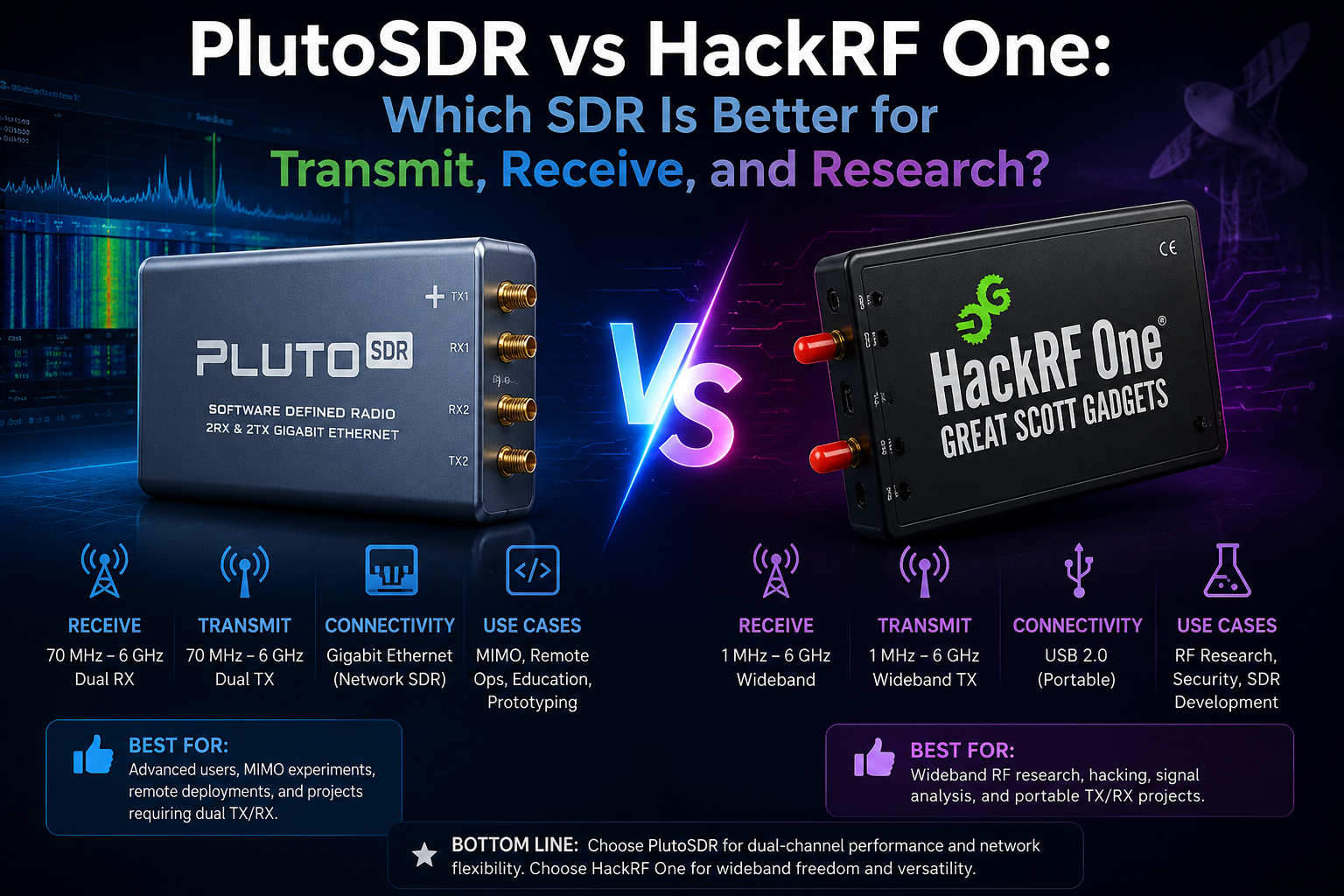
Updated: June 2026. This guide compares PlutoSDR and HackRF One for receiving, transmitting, full-duplex experiments, GNU Radio, digital communications, wireless research, education, portable use, and advanced SDR development.
PlutoSDR and HackRF One are two of the most popular transmit-capable software-defined radio platforms. Both are useful for learning, wireless research, signal analysis, GNU Radio development, authorized laboratory testing, and custom RF projects.
However, they are not interchangeable.
HackRF One is a wideband half-duplex SDR transceiver covering 1 MHz–6 GHz. It is flexible, open source, widely supported, and especially attractive when you want broad frequency coverage or portable use with a PortaPack H4M.
Standard ADALM-PLUTO, often called PlutoSDR, is a 12-bit RF learning platform based on the AD9363 transceiver and Zynq-7010 FPGA. Its official RF range is 325 MHz–3.8 GHz, it supports up to 20 MHz instantaneous bandwidth, and it includes one transmit channel plus one receive channel with half-duplex or full-duplex operation.
This PlutoSDR vs HackRF One guide explains which SDR is better for transmit, receive, digital communications, GNU Radio, portable use, university labs, wireless research, and long-term development.
It also explains where the PLUTO+ SDR AD9363 2T2R Transceiver fits. PLUTO+ is not identical to a standard PlutoSDR. It is an expanded PlutoSDR-style platform with 2TX, 2RX, Gigabit Ethernet, MicroSD boot support, and listed 70 MHz–6 GHz coverage.
Quick Answer: Should You Buy PlutoSDR or HackRF One?
| Choose | Best For | Main Reason |
|---|---|---|
| HackRF One | Wideband RF exploration, portable PortaPack use, frequencies above 3.8 GHz, and general half-duplex experimentation | Broad 1 MHz–6 GHz operating range and strong software ecosystem |
| Standard PlutoSDR | Digital communications, full-duplex learning, GNU Radio, MATLAB, Simulink, and AD936x development | 12-bit ADC and DAC with one transmit channel and one receive channel operating half duplex or full duplex |
| PLUTO+ SDR | More advanced PlutoSDR-style projects, 2TX/2RX experiments, Ethernet, remote placement, and MicroSD workflows | Expanded hardware with Gigabit Ethernet and listed 70 MHz–6 GHz coverage |
The easiest rule is:
- Choose HackRF One if frequency coverage and flexibility matter most.
- Choose standard PlutoSDR if full-duplex learning, 12-bit conversion, and digital-communications experiments matter most.
- Choose PLUTO+ SDR if you like the PlutoSDR software ecosystem but want 2TX/2RX, Ethernet, MicroSD boot support, and a more development-focused board.
PlutoSDR vs HackRF One Comparison Table
| Feature | Standard ADALM-PLUTO | HackRF One |
|---|---|---|
| Main purpose | RF learning, digital communications, and SDR development | Wideband wireless exploration and SDR development |
| Official RF operating range | 325 MHz–3.8 GHz | 1 MHz–6 GHz |
| Instantaneous bandwidth or sample rate | Up to 20 MHz instantaneous bandwidth | Up to 20 million samples per second |
| ADC and DAC resolution | 12-bit ADC and DAC | 8-bit I and 8-bit Q samples |
| Transmit channels | 1 | 1 |
| Receive channels | 1 | 1 |
| Full-duplex operation | Yes, one transmit channel and one receive channel | No |
| Half-duplex operation | Yes | Yes |
| FPGA or SoC | Xilinx Zynq Z-7010 FPGA | No equivalent integrated Zynq processing platform |
| RF transceiver architecture | Analog Devices AD9363 | HackRF One wideband RF architecture |
| USB interface | USB 2.0 Micro-USB powered interface | Hi-Speed USB 2.0 |
| GNU Radio support | Yes | Yes |
| MATLAB and Simulink support | Officially supported | Not the main official workflow |
| libiio API | Yes | Uses a different software ecosystem |
| Standalone portable screen option | Requires an external host or custom solution | Available through PortaPack H4M |
| Best beginner use | Digital-communications learning | Wideband exploration and GNU Radio experimentation |
What Is PlutoSDR?
ADALM-PLUTO is a portable RF learning module created by Analog Devices. It is commonly called PlutoSDR or Pluto.
The standard platform is based on:
- Analog Devices AD9363 RF transceiver
- Xilinx Zynq Z-7010 FPGA
- One transmit channel
- One receive channel
- 12-bit ADC and DAC
- USB-powered operation
- GNU Radio source and sink blocks
- MATLAB and Simulink support
- libiio APIs for C, C++, C#, and Python
SDRstore.eu offers a Pluto SDR Radio AD9363 ZYNQ7010 compatible with ADALM-PLUTO for users interested in this ecosystem.
Standard PlutoSDR official key specifications
- 325 MHz–3.8 GHz RF coverage
- Up to 20 MHz instantaneous bandwidth
- Flexible-rate 12-bit ADC and DAC
- One transmitter and one receiver
- Half-duplex or full-duplex operation
- USB 2.0 powered interface
- Zynq Z-7010 FPGA
- AD9363 RF transceiver
PlutoSDR is commonly used for:
- Digital-communications education
- GNU Radio development
- MATLAB and Simulink experiments
- Wireless-protocol research
- Modulation and demodulation learning
- Full-duplex experiments
- RF laboratory exercises
- Signal-processing development
- University projects
- IoT and wireless-system prototyping
What Is HackRF One?
HackRF One is an open-source software-defined radio platform created by Great Scott Gadgets.
It can receive or transmit signals from 1 MHz to 6 GHz. It is half duplex, which means it can transmit or receive at one moment, but it cannot transmit and receive simultaneously.
SDRstore.eu offers the HackRF One 1 MHz–6 GHz SDR Development Board.
HackRF One official key specifications
- 1 MHz–6 GHz operating-frequency range
- Half-duplex transceiver
- Up to 20 million samples per second
- 8-bit I and 8-bit Q quadrature samples
- GNU Radio, SDR#, and additional software compatibility
- Software-configurable RX gain
- Software-configurable TX gain
- Software-configurable baseband filter
- Software-controlled antenna-port power
- SMA female antenna connector
- Clock input and output for synchronization
- Hi-Speed USB 2.0
- USB-powered operation
- Open-source hardware
HackRF One is commonly used for:
- Wideband RF exploration
- GNU Radio development
- Authorized wireless testing
- RF education
- Spectrum investigation
- Custom modulation experiments
- Signal-generation projects in controlled environments
- Clock-synchronized experiments
- Portable PortaPack H4M workflows
- Wireless-system prototyping
The Biggest Difference: Full Duplex vs Half Duplex
The most important PlutoSDR vs HackRF One difference is not frequency range. It is duplex capability.
Standard PlutoSDR supports one transmit channel and one receive channel with half-duplex or full-duplex operation.
HackRF One is half duplex. It can transmit or receive, but it cannot transmit and receive simultaneously.
| Operation | Standard PlutoSDR | HackRF One |
|---|---|---|
| Receive signals | Yes | Yes |
| Transmit signals | Yes | Yes |
| Transmit and receive simultaneously | Yes, in suitable configurations | No |
| Best for learning full-duplex systems | Yes | No |
| Best for simple transmit-or-receive experiments | Yes | Yes |
Choose PlutoSDR when full duplex matters
PlutoSDR is more suitable when your project needs to transmit and receive at the same time.
Examples include:
- Digital-communications experiments
- Loopback tests
- Custom modem development
- Full-duplex radio learning
- Bidirectional wireless-system prototyping
- Laboratory waveform testing
Choose HackRF One when half duplex is enough
Half-duplex operation is enough for many RF projects:
- Receiving a signal for analysis
- Generating a test waveform in a shielded or permitted environment
- Switching between transmit and receive during development
- Portable RF exploration
- Learning basic GNU Radio workflows
- Investigating a wide range of frequencies
Frequency Coverage: HackRF One Reaches Much Wider
HackRF One has a major frequency-coverage advantage.
| Frequency Range | Standard PlutoSDR | HackRF One |
|---|---|---|
| Below 1 MHz | Outside official standard RF range | Outside official operating range |
| 1 MHz–325 MHz | Outside official standard RF range | Supported |
| 325 MHz–3.8 GHz | Supported | Supported |
| 3.8 GHz–6 GHz | Outside official standard RF range | Supported |
| 2.4 GHz ISM-band projects | Supported | Supported |
| 5 GHz projects | Outside official standard RF range | Supported |
Choose HackRF One when you need to explore lower VHF frequencies, many sub-GHz systems, or signals above 3.8 GHz.
Choose standard PlutoSDR when your project fits within 325 MHz–3.8 GHz and benefits from its AD9363 architecture, 12-bit conversion, full-duplex operation, or Zynq development environment.
Bandwidth and Sample Rate: Understand the Difference
Standard PlutoSDR provides up to 20 MHz instantaneous bandwidth.
HackRF One provides up to 20 million samples per second.
These specifications are related but should not be treated as perfectly identical measurements. Real-world usable spectrum depends on the selected sample rate, filters, host system, RF environment, software, and project requirements.
| Feature | Standard PlutoSDR | HackRF One |
|---|---|---|
| Published bandwidth or sample-rate specification | Up to 20 MHz instantaneous bandwidth | Up to 20 million samples per second |
| Suitable for wide spectrum captures | Yes | Yes |
| Host-system load | Can increase significantly at wider settings | Can increase significantly at wider settings |
| IQ recording size | Can become large quickly | Can become large quickly |
| Best practice | Use only the bandwidth required by the project | Use only the sample rate required by the project |
Wider is not always better. A narrower configuration can reduce CPU use, storage requirements, and processing complexity.
12-Bit PlutoSDR vs 8-Bit HackRF One
Standard PlutoSDR uses 12-bit ADC and DAC conversion.
HackRF One uses 8-bit I and 8-bit Q quadrature samples.
| Feature | Standard PlutoSDR | HackRF One |
|---|---|---|
| Converter resolution | 12-bit ADC and DAC | 8-bit I and 8-bit Q samples |
| Main advantage | More amplitude-resolution headroom for suitable research and communications workflows | Flexible wideband exploration with a simpler open-source development platform |
| Should bit depth decide the purchase alone? | No | No |
Bit depth matters, but it is not the only specification that determines real-world performance.
Also consider:
- Target frequency
- Required duplex mode
- RF filtering
- Gain settings
- Noise environment
- Antenna quality
- Clock stability
- Software support
- Host-computer performance
- Whether portable use matters
Which SDR Is Better for Receiving?
The best receiver depends on the signal you want to analyze.
| Receiving Goal | Better Starting Choice | Reason |
|---|---|---|
| General exploration from 1 MHz to 6 GHz | HackRF One | Wider official frequency coverage |
| Receive experiments within 325 MHz–3.8 GHz | PlutoSDR | 12-bit AD9363-based platform with full-duplex capability |
| Listen to FM, ADS-B, AIS, satellites, or radio scanners affordably | RTL-SDR instead | A low-cost receive-only SDR is often enough |
| Receive above 3.8 GHz | HackRF One | HackRF One covers up to 6 GHz |
| Receive while transmitting in the same experiment | PlutoSDR | Standard PlutoSDR supports half-duplex or full-duplex operation |
| Portable screen-based field exploration | HackRF PortaPack H4M | PortaPack adds a screen, controls, and Mayhem firmware workflows |
Neither PlutoSDR nor HackRF One is automatically the best choice for simple listening. If your only goal is receiving common radio signals, consider starting with an RTL-SDR receiver.
Read our comparison: HackRF One vs RTL-SDR: Which SDR Should You Buy?
Which SDR Is Better for Transmitting?
PlutoSDR and HackRF One can both generate and transmit RF signals in suitable authorized environments.
The correct choice depends on the project.
| Transmit Goal | Better Starting Choice | Reason |
|---|---|---|
| Generate test signals across a very wide frequency range | HackRF One | 1 MHz–6 GHz operating coverage |
| Learn transmit and receive signal chains | PlutoSDR | One TX and one RX with half-duplex or full-duplex operation |
| Build digital-communications experiments | PlutoSDR | AD9363, 12-bit ADC and DAC, and integrated Zynq development environment |
| Build portable transmit-or-receive field experiments | HackRF PortaPack H4M | Screen-based portable workflows |
| Use two transmit and two receive channels | PLUTO+ SDR | Expanded 2TX and 2RX platform |
Important transmit warning
Neither device should be treated as a finished plug-and-play radio transmitter.
A proper transmit setup may require:
- Suitable RF filters
- Attenuators
- Dummy loads
- Directional couplers
- Shielded test environments
- Appropriate antennas
- Power amplifiers only when legally permitted and technically appropriate
- Spectrum analysis to verify signal quality
- Compliance with local frequency, power, bandwidth, and licensing rules
For early experiments, use a dummy load, attenuation, shielding, or a cabled test setup whenever possible.
Which SDR Is Better for GNU Radio?
Both PlutoSDR and HackRF One work with GNU Radio.
HackRF One is a strong general-purpose GNU Radio platform when you need wide frequency coverage and half-duplex transmit-or-receive experiments.
PlutoSDR is especially attractive for GNU Radio users who want to learn digital communications, build full-duplex workflows, experiment with AD936x devices, and use the same radio through GNU Radio, libiio, MATLAB, Simulink, or Python.
| GNU Radio Goal | Recommended SDR |
|---|---|
| Explore many frequencies from 1 MHz–6 GHz | HackRF One |
| Learn basic SDR receive and transmit flows | Either device |
| Build full-duplex source-and-sink experiments | PlutoSDR |
| Experiment with AD936x RF transceivers | PlutoSDR |
| Use 2TX and 2RX Pluto-style hardware with Ethernet | PLUTO+ SDR |
| Use a screen-based portable HackRF workflow | HackRF PortaPack H4M |
Which SDR Is Better for MATLAB and Simulink?
PlutoSDR is the clearer choice for MATLAB and Simulink workflows.
Analog Devices officially highlights MATLAB and Simulink support for ADALM-PLUTO. This makes PlutoSDR attractive for students, engineers, and universities already using MathWorks software.
Choose PlutoSDR for:
- MATLAB-based signal analysis
- Simulink RF experiments
- University laboratory exercises
- Digital-communications courses
- Algorithm prototyping
- Custom waveform generation
- Source-and-sink demonstrations
HackRF One remains useful for development, but MATLAB and Simulink are not its primary official advantage.
Which SDR Is Better for Python and Custom Software?
PlutoSDR is attractive for custom software because the official platform supports libiio and APIs for several programming languages, including Python.
HackRF One also has a mature developer ecosystem and can be integrated into custom software through HackRF tools, libraries, GNU Radio, and compatible applications.
| Development Goal | Recommended SDR |
|---|---|
| Use libiio and AD936x workflows | PlutoSDR |
| Use Python with the Analog Devices software ecosystem | PlutoSDR |
| Build wide-frequency open-source RF tools | HackRF One |
| Create custom portable applications | HackRF with PortaPack development |
| Build network-connected custom Pluto-style systems | PLUTO+ SDR |
Which SDR Is Better for Wireless Research?
PlutoSDR and HackRF One are both useful for research, but their strengths are different.
Choose HackRF One for research when:
- You need broad 1 MHz–6 GHz coverage.
- You want a flexible general-purpose RF tool.
- You want open-source hardware.
- You need clock input and output for synchronized experiments.
- You want portable workflows through PortaPack H4M.
- Your experiments are half duplex.
Choose PlutoSDR for research when:
- You need full-duplex operation.
- You are studying digital communications.
- You want AD9363 and Zynq development.
- You use GNU Radio, MATLAB, Simulink, libiio, or Python.
- Your experiments fit within the official 325 MHz–3.8 GHz range.
- You want a portable RF learning module.
Choose PLUTO+ SDR for research when:
- You want 2TX and 2RX.
- You need Gigabit Ethernet.
- You want MicroSD boot support.
- You want an external reference-clock option.
- You need a network-connected lab radio.
- You want a more flexible PlutoSDR-style board.
Which SDR Is Better for Universities?
| Teaching Goal | Recommended SDR |
|---|---|
| Introduce students to RF reception affordably | RTL-SDR first |
| Teach wideband wireless exploration | HackRF One |
| Teach modulation and demodulation | PlutoSDR |
| Teach full-duplex radio concepts | PlutoSDR |
| Teach MATLAB and Simulink SDR workflows | PlutoSDR |
| Teach GNU Radio across a very wide frequency range | HackRF One |
| Build network-connected advanced labs | PLUTO+ SDR |
| Build more demanding 2×2 MIMO research labs | Compare PLUTO+ SDR, USRP B210, bladeRF, and other suitable advanced platforms |
Universities may benefit from a mixed lab:
- RTL-SDR for affordable receive-only exercises
- HackRF One for wideband exploration
- PlutoSDR for full-duplex digital communications
- PLUTO+ SDR for Ethernet and 2TX/2RX experimentation
- USRP or bladeRF for advanced MIMO and research workloads
Which SDR Is Better for Portable Use?
HackRF One has the stronger portable ecosystem because it can be paired with PortaPack hardware.
A standard PlutoSDR is compact and USB-powered, but it normally depends on a computer or another host device for control.
| Portable Goal | Better Choice |
|---|---|
| Portable laptop-based GNU Radio development | Either device |
| Compact USB-powered digital-communications lab | PlutoSDR |
| Screen-based portable RF exploration | HackRF PortaPack H4M |
| Wideband field investigation from 1 MHz–6 GHz | HackRF One or HackRF PortaPack H4M |
| Portable full-duplex learning setup | PlutoSDR with a suitable host device |
HackRF PortaPack H4M: A Major Portable Advantage
A normal HackRF One is controlled from a computer. PortaPack adds a screen, controls, and portable workflows.
SDRstore.eu offers the HackRF PortaPack H4M Mayhem Signature Edition.
Choose HackRF PortaPack H4M if you want:
- Portable spectrum exploration
- A screen and physical controls
- Mayhem firmware workflows
- Field signal investigation
- Portable antenna comparisons
- A HackRF device that can still connect to a computer
PortaPack H4M does not replace calibrated professional test equipment. It also does not replace a complete amateur-radio transceiver.
Which SDR Is Better for Amateur Radio?
The best choice depends on whether you want to listen, experiment, or make normal contacts.
| Ham-Radio Goal | Recommended SDR |
|---|---|
| Listen to HF, VHF, and UHF affordably | RTL-SDR or another receive-only SDR |
| Explore frequencies from 1 MHz–6 GHz | HackRF One |
| Learn digital-communications waveforms | PlutoSDR |
| Build full-duplex experiments | PlutoSDR |
| Use a portable screen-based RF platform | HackRF PortaPack H4M |
| Make normal voice, CW, or digital-mode contacts | Use a dedicated licensed amateur-radio transceiver |
PlutoSDR and HackRF One are development platforms. They are not complete plug-and-play HF or VHF amateur-radio transceivers.
Read our detailed guide: Best SDR for Ham Radio in 2026: HF, VHF, UHF, Digital Modes, and Portable Use
Which SDR Is Better for Satellites?
Both devices can be useful for satellite projects.
| Satellite Goal | Recommended SDR |
|---|---|
| Receive beginner weather satellites affordably | RTL-SDR instead |
| Receive signals within 325 MHz–3.8 GHz | PlutoSDR or HackRF One |
| Build full-duplex satellite experiments | PlutoSDR |
| Explore satellite-related signals across a wider 1 MHz–6 GHz range | HackRF One |
| Build 2TX/2RX satellite research setups | PLUTO+ SDR, USRP, bladeRF, or another suitable platform |
For a beginner weather-satellite receiver, start with RTL-SDR and SatDump.
Read our guide: SatDump V2 with RTL-SDR: Complete Beginner Setup Guide
Which SDR Is Better for Wi-Fi, Bluetooth, and ISM-Band Research?
Both PlutoSDR and HackRF One cover the 2.4 GHz ISM band.
HackRF One also covers frequencies up to 6 GHz, making it more flexible when your research extends beyond the standard PlutoSDR range.
PlutoSDR remains attractive when the project benefits from full-duplex operation, 12-bit conversion, AD9363 development, Zynq processing, or MATLAB and Simulink integration.
| Research Goal | Recommended SDR |
|---|---|
| Explore a wide range of ISM-band signals | HackRF One |
| Study 2.4 GHz digital communications | Either device |
| Develop full-duplex experiments | PlutoSDR |
| Explore frequencies above 3.8 GHz | HackRF One |
| Use Ethernet and 2TX/2RX | PLUTO+ SDR |
Perform wireless research only on devices, networks, frequencies, and systems that you own or have explicit authorization to test.
Which SDR Is Better for Raspberry Pi and Embedded Projects?
HackRF One and PlutoSDR can both work in Linux-based projects, but the best option depends on the workload.
Choose HackRF One when:
- You need 1 MHz–6 GHz frequency coverage.
- You want half-duplex wideband experiments.
- You are building custom open-source RF tools.
- You want clock synchronization options.
- You may add PortaPack later.
Choose PlutoSDR when:
- You want libiio support.
- You want full-duplex experiments.
- You use Python, GNU Radio, MATLAB, or Simulink.
- You want AD9363 and Zynq development.
- Your frequency range fits the official specification.
Choose PLUTO+ SDR when:
- You want native Gigabit Ethernet.
- You want to position the SDR near antennas while the computer remains elsewhere.
- You want MicroSD boot support.
- You need 2TX and 2RX.
- You want a more advanced PlutoSDR-style layout.
For simple Raspberry Pi services such as ADS-B, AIS, OpenWebRX, and SatDump receiving, start with RTL-SDR instead.
Read our Raspberry Pi guide: Best SDR for Raspberry Pi: RTL-SDR, ADS-B, AIS, Satellites, and Remote Monitoring
Important: PlutoSDR Extended Range Is Not the Same as the Official Range
Standard ADALM-PLUTO is officially specified for 325 MHz–3.8 GHz.
Some PlutoSDR-style platforms and firmware configurations are used with wider tuning ranges. Buyers should not automatically assume that extended tuning provides identical performance across every frequency.
When evaluating an extended Pluto-style range:
- Check the exact board version.
- Check the RF transceiver chip.
- Check the firmware configuration.
- Use suitable antennas and filters.
- Verify signal quality at the intended frequencies.
- Do not assume edge-of-range performance matches the native operating range.
- Use calibrated RF equipment for serious measurements.
This distinction matters when comparing standard PlutoSDR with HackRF One.
HackRF One officially covers 1 MHz–6 GHz. Standard ADALM-PLUTO officially covers 325 MHz–3.8 GHz. The PLUTO+ SDR is listed separately as a PlutoSDR-style platform with 70 MHz–6 GHz coverage.
What Is PLUTO+ SDR?
PLUTO+ SDR is an expanded PlutoSDR-style transceiver for users who want more hardware flexibility than the standard ADALM-PLUTO design.
SDRstore.eu offers the PLUTO+ SDR AD9363 2T2R Radio SDR Transceiver.
PLUTO+ SDR listed features
- AD9363 RF transceiver
- 2 transmit channels
- 2 receive channels
- Listed 70 MHz–6 GHz RF range
- 40 MHz 0.5 ppm VCTCXO reference clock
- Zynq7010 FPGA
- 512 MB RAM
- 32 MB flash memory
- USB 2.0 OTG support
- Gigabit Ethernet
- MicroSD boot support
- External reference-clock option
Choose PLUTO+ SDR instead of standard PlutoSDR when:
- You need two transmit and two receive channels.
- You want Gigabit Ethernet.
- You want MicroSD booting.
- You want a more flexible lab platform.
- You want remote SDR placement over Ethernet.
- You want to experiment with MIMO-style workflows.
- You understand that extended range should be verified for your application.
Read the full review: PLUTO+ SDR Review: AD9363 2T2R SDR Transceiver with Ethernet and 70 MHz–6 GHz Coverage
Follow the setup guide: PLUTO+ SDR Setup Guide: First Signal with SDRangel, GNU Radio, and Ethernet
Standard PlutoSDR vs PLUTO+ SDR vs HackRF One
| Feature | Standard PlutoSDR | PLUTO+ SDR | HackRF One |
|---|---|---|---|
| Main goal | Portable RF learning module | Expanded PlutoSDR-style development board | Wideband open-source RF exploration platform |
| RF transceiver | AD9363 | AD9363 | HackRF One RF architecture |
| Official or listed frequency range | Officially 325 MHz–3.8 GHz | Listed as 70 MHz–6 GHz | Officially 1 MHz–6 GHz |
| Transmit channels | 1 | 2 | 1 |
| Receive channels | 1 | 2 | 1 |
| Full-duplex support | Yes | Transmit-and-receive workflows supported; real-world project performance depends on configuration and RF isolation | No |
| Ethernet | No native Gigabit Ethernet | Gigabit Ethernet | No native Ethernet |
| MicroSD boot support | Not the standard workflow | Yes | Not the standard workflow |
| Portable screen ecosystem | Not the main workflow | Not the main workflow | PortaPack H4M available |
| Best buyer | Student or developer learning SDR communications | Intermediate or advanced user wanting Ethernet and 2TX/2RX | User prioritizing wideband exploration and portable flexibility |
What About HackRF Pro?
HackRF Pro is the newer official Great Scott Gadgets development board.
SDRstore.eu offers the HackRF Pro 100 kHz–6 GHz USB-C SDR Transceiver.
HackRF Pro official highlights
- 100 kHz–6 GHz operating-frequency range
- Tunable from 0 Hz to 7.1 GHz
- Half-duplex transceiver
- Up to 20 million samples per second
- 8-bit I and 8-bit Q quadrature samples
- GNU Radio, SDR#, and additional software compatibility
- USB-C connectivity
- Updated hardware design
Choose HackRF Pro when you want the newer official HackRF platform. Choose HackRF One when you want the classic widely supported option or a proven PortaPack ecosystem. Choose PlutoSDR or PLUTO+ when full-duplex and AD936x development matter more.
Read the comparison: HackRF Pro vs PortaPack H4M: Which One Should You Buy?
Do You Need External Filters?
PlutoSDR and HackRF One are flexible development platforms. Flexibility does not remove the need for RF filtering.
Use filters when:
- You are transmitting a test waveform.
- You need to reduce unwanted harmonics.
- Strong nearby signals overload the receiver.
- You are working near sensitive services.
- You are adding an external power amplifier.
- You need a cleaner band-limited signal.
- You are comparing RF chains.
Use a spectrum analyzer or suitable RF measurement equipment to verify transmitted signal quality.
Read our guide: NanoVNA vs TinySA: Which RF Tool Do You Actually Need?
Do You Need an External Power Amplifier?
Not for initial learning.
Start with low-power cabled experiments, dummy loads, attenuation, and shielded setups. Add amplification only when the project requires it and you understand the legal and technical implications.
An external RF amplifier may also require:
- Input-power verification
- Output filtering
- Heat management
- Stable power supply
- Appropriate connectors and cables
- Dummy-load testing
- Spectrum analysis
- Legal authorization
Do You Need a NanoVNA or TinySA?
A NanoVNA and tinySA answer different RF questions.
| Goal | Best Tool |
|---|---|
| Test antenna SWR | NanoVNA |
| Measure antenna impedance | NanoVNA |
| Test filters and cables | NanoVNA |
| Inspect the RF spectrum | tinySA or another suitable spectrum analyzer |
| Check harmonics with proper attenuation | tinySA or another suitable spectrum analyzer |
| Verify a complete RF development setup | Both may be useful |
Read our antenna guide: How to Test Antenna SWR with a NanoVNA
Common PlutoSDR and HackRF One Buying Mistakes
Buying HackRF One only because it covers more frequencies
Wider coverage is useful only when your project needs it. PlutoSDR may be the better choice for full-duplex communications research within its official range.
Buying PlutoSDR without understanding its official RF range
Standard ADALM-PLUTO is officially specified for 325 MHz–3.8 GHz. Treat extended Pluto-style ranges separately and verify performance for your project.
Assuming HackRF One is full duplex
HackRF One is half duplex. It cannot transmit and receive simultaneously.
Assuming PlutoSDR is automatically a finished radio station
PlutoSDR is a learning and development platform. It may require software, filters, antennas, external hardware, and careful RF engineering.
Ignoring antennas
Use antennas suited to the selected frequency. One antenna is not suitable for every signal between 1 MHz and 6 GHz.
Ignoring transmitted-signal quality
A software-defined waveform still needs suitable filtering and verification. Do not assume that a waveform is clean only because it appears correct in software.
Using transmit functions without authorization
Follow local frequency allocations, licensing rules, bandwidth limits, power limits, and equipment requirements.
Which SDR Should You Buy?
| Your Main Goal | Buy |
|---|---|
| Explore signals from 1 MHz–6 GHz | HackRF One |
| Learn half-duplex GNU Radio workflows | Either HackRF One or PlutoSDR |
| Learn full-duplex SDR concepts | PlutoSDR |
| Use MATLAB and Simulink | PlutoSDR |
| Use libiio and Python workflows | PlutoSDR |
| Study AD936x RF systems | PlutoSDR |
| Explore frequencies above 3.8 GHz | HackRF One |
| Use a portable screen-based platform | HackRF PortaPack H4M |
| Buy the newer official HackRF platform | HackRF Pro |
| Use 2TX, 2RX, Ethernet, and MicroSD booting | PLUTO+ SDR |
| Build simple ADS-B, AIS, satellite, or radio-listening projects affordably | RTL-SDR instead |
| Build advanced MIMO and high-bandwidth research systems | Compare PLUTO+ SDR, USRP B210, bladeRF, and other suitable advanced radios |
Where to Browse PlutoSDR and HackRF Products
- PlutoSDR and PLUTO+ SDR radios
- Pluto SDR Radio AD9363 ZYNQ7010 compatible with ADALM-PLUTO
- PLUTO+ SDR AD9363 2T2R Transceiver with Gigabit Ethernet
- HackRF One, PortaPack H4M, HackRF Pro, and accessories
- HackRF One 1 MHz–6 GHz SDR Development Board
- HackRF PortaPack H4M Mayhem Signature Edition
- HackRF Pro 100 kHz–6 GHz USB-C SDR Transceiver
- Software-defined radio equipment
- Antennas and RF accessories
- RF test and measurement equipment
Related SDRstore.eu Guides
- PLUTO+ SDR Review: AD9363 2T2R SDR Transceiver with Ethernet and 70 MHz–6 GHz Coverage
- PLUTO+ SDR Setup Guide: First Signal with SDRangel, GNU Radio, and Ethernet
- HackRF One vs RTL-SDR: Which SDR Should You Buy?
- HackRF Pro vs PortaPack H4M: Which One Should You Buy?
- Best SDR Receivers in 2026: RTL-SDR, SDRplay, Airspy, HackRF, PlutoSDR, and More
- Best SDR for Ham Radio in 2026: HF, VHF, UHF, Digital Modes, and Portable Use
- Best SDR for Raspberry Pi: RTL-SDR, ADS-B, AIS, Satellites, and Remote Monitoring
- NanoVNA vs TinySA: Which RF Tool Do You Actually Need?
Official Resources
- Analog Devices ADALM-PLUTO official product page
- Analog Devices PlutoSDR documentation
- Great Scott Gadgets HackRF One official product page
- Great Scott Gadgets HackRF Pro official product page
Final Verdict: PlutoSDR vs HackRF One
PlutoSDR and HackRF One are both capable SDR transceivers, but they serve different priorities.
Choose HackRF One if you want the widest official frequency coverage, from 1 MHz to 6 GHz, an open-source hardware platform, flexible GNU Radio workflows, clock-synchronization options, and a strong portable ecosystem through PortaPack H4M.
Choose standard PlutoSDR if you want a 12-bit AD9363-based RF learning platform, one transmit channel, one receive channel, full-duplex operation, GNU Radio blocks, MATLAB, Simulink, libiio, Python workflows, and digital-communications research within the official 325 MHz–3.8 GHz range.
Choose PLUTO+ SDR if you want a more advanced PlutoSDR-style board with 2TX, 2RX, Gigabit Ethernet, MicroSD boot support, external clock options, and listed 70 MHz–6 GHz coverage.
Do not choose based on the longest specification list. Choose based on the first real project you plan to complete.
FAQ
What is the difference between PlutoSDR and HackRF One?
Standard PlutoSDR is a 12-bit AD9363-based RF learning platform with one transmit channel, one receive channel, and half-duplex or full-duplex operation from 325 MHz–3.8 GHz. HackRF One is an 8-bit half-duplex transceiver covering 1 MHz–6 GHz.
Is PlutoSDR better than HackRF One?
PlutoSDR is better for full-duplex experiments, digital communications, MATLAB, Simulink, libiio, Python, and AD936x development. HackRF One is better when wider 1 MHz–6 GHz coverage and portable PortaPack use matter more.
Is HackRF One better than PlutoSDR?
HackRF One is better for general wideband exploration because its official operating range is 1 MHz–6 GHz. PlutoSDR is better for projects requiring full-duplex operation and a 12-bit AD9363-based platform.
Can PlutoSDR transmit and receive at the same time?
Yes. Standard ADALM-PLUTO supports one transmit channel and one receive channel with half-duplex or full-duplex operation.
Can HackRF One transmit and receive at the same time?
No. HackRF One is half duplex. It can transmit or receive, but it cannot perform both actions simultaneously.
What frequency range does PlutoSDR cover?
Standard ADALM-PLUTO is officially specified for 325 MHz–3.8 GHz RF coverage. Some PlutoSDR-style platforms and configurations use extended ranges, but edge-band performance should be verified for the specific device and project.
What frequency range does HackRF One cover?
HackRF One officially covers 1 MHz–6 GHz.
Which has better bit depth: PlutoSDR or HackRF One?
Standard PlutoSDR uses a flexible-rate 12-bit ADC and DAC. HackRF One uses 8-bit I and 8-bit Q quadrature samples.
Which has more bandwidth: PlutoSDR or HackRF One?
Standard PlutoSDR provides up to 20 MHz instantaneous bandwidth. HackRF One supports up to 20 million samples per second. These specifications are related but should not be treated as perfectly identical measurements.
Which is better for GNU Radio: PlutoSDR or HackRF One?
Both work with GNU Radio. Choose HackRF One for broad 1 MHz–6 GHz exploration and half-duplex experiments. Choose PlutoSDR for full-duplex source-and-sink flows and AD936x-based digital-communications projects.
Which is better for MATLAB and Simulink?
PlutoSDR is the clearer choice because Analog Devices officially supports MATLAB and Simulink workflows for ADALM-PLUTO.
Which is better for Python development?
PlutoSDR is attractive for Python projects because it supports the Analog Devices libiio ecosystem. HackRF One also supports custom development through its own tools, libraries, and compatible software.
Which is better for university labs?
PlutoSDR is strong for digital communications, full-duplex concepts, MATLAB, Simulink, and GNU Radio. HackRF One is strong for wideband exploration and open-source RF development. Many labs benefit from using both.
Which is better for portable use?
HackRF One has the stronger portable ecosystem because it can be paired with PortaPack H4M for screen-based field workflows. PlutoSDR remains compact and USB powered but normally depends on an external host device.
What is PLUTO+ SDR?
PLUTO+ SDR is an expanded PlutoSDR-style platform with an AD9363 transceiver, 2TX, 2RX, Gigabit Ethernet, MicroSD boot support, USB OTG, an external reference-clock option, and listed 70 MHz–6 GHz coverage.
Is PLUTO+ SDR the same as standard PlutoSDR?
No. PLUTO+ SDR is based on the PlutoSDR concept but adds hardware features such as 2TX, 2RX, Gigabit Ethernet, and MicroSD boot support. Standard ADALM-PLUTO has one transmit and one receive channel.
Is 70 MHz–6 GHz the official standard PlutoSDR range?
No. Standard ADALM-PLUTO is officially specified for 325 MHz–3.8 GHz. Extended Pluto-style tuning ranges depend on the board, firmware configuration, calibration, and required performance level.
Should I buy PLUTO+ SDR or HackRF One?
Choose PLUTO+ SDR for 2TX/2RX experiments, Ethernet, MicroSD booting, and Pluto-style digital-communications development. Choose HackRF One for broad 1 MHz–6 GHz exploration and portable PortaPack compatibility.
Should I buy HackRF One or HackRF Pro?
HackRF One remains the classic widely supported platform. HackRF Pro is the newer official development board with 100 kHz–6 GHz operating coverage, USB-C, and updated hardware.
Can PlutoSDR or HackRF One replace RTL-SDR?
Both can receive many signals, but RTL-SDR remains the easier and more affordable choice for simple listening, ADS-B, AIS, weather satellites, and Raspberry Pi receiver projects.
Do I need a license to use PlutoSDR or HackRF One?
Reception rules vary by country. Any transmission must comply with local regulations, permitted frequencies, license privileges, bandwidth limits, power limits, and equipment requirements.
Can I connect an amplifier directly to PlutoSDR or HackRF One?
Do not add an amplifier without checking signal levels, filtering, power requirements, heat management, connectors, and local regulations. Start with low-power cabled tests, dummy loads, and suitable attenuation.
No posts found
Write a review






We support all major card and digital payment options. More local methods are available and shown during checkout.
You enter into a binding sales contract once you have received an 'order confirmation and sales receipt' email from us, in line with our Sales & Delivery conditions. Therefore, sdrstore.eu has the right to cancel your order in the event of technical problems, delivery failure, Fair use policy and other similar situations.






Your payments are protected by advanced encryption and 3-D Secure authentication for safe online shopping.